15
Select mode
MODES
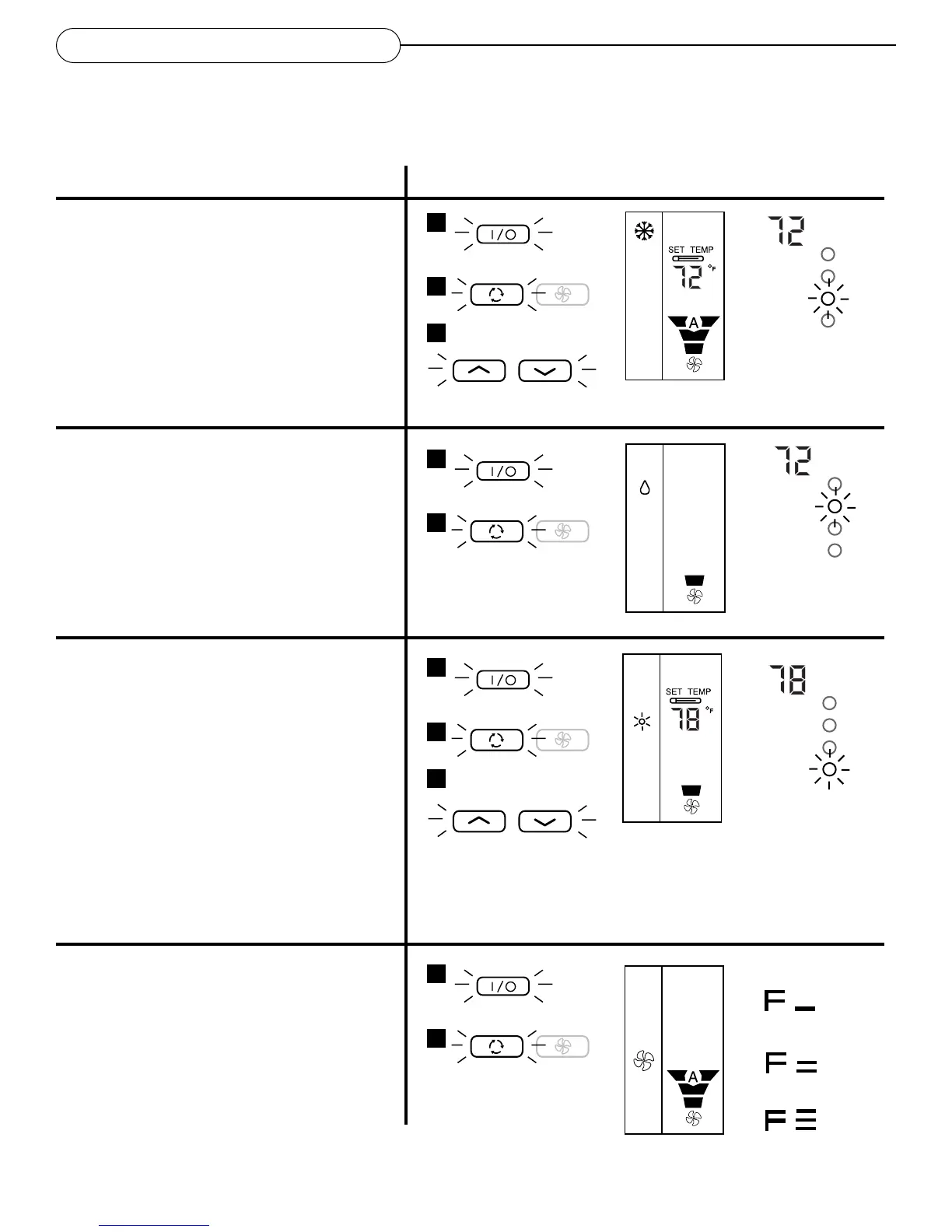
Cool Mode
• Turn on your air conditioner by pressing the
On/Off button on the remote control
• Press the Mode button until cool mode is
selected on the remote control display. The
onboard display’s blue indicator will come on.
• Set the temperature by pressing the
temperature buttons to lower or raise the set
temperature
Dehumidify Mode
• Turn on your air conditioner by pressing the
On/Off button on the remote control
• Press the Mode button until dehumidify mode
is selected on the remote control display. The
onboard display’s green indicator will come
on.
NOTE:
Fan speed is always on low in dehumidify mode.
Heat Mode (heat pump models only)
• Turn on your air conditioner by pressing the
On/Off button on the remote control
• Press the Mode Selector button until heat
mode is selected on the remote control
display. The onboard display’s red indicator
will come on.
• Set the temperature by pressing the
temperature buttons to raise or lower the set
temperature
• Defrost Mode: If ice forms on the outdoor
coil, the unit will automatically go into
Defrost mode. When the unit is in defrost
mode the red LED will flash on and off. Heat
will not be available until Defrost is complete.
Fan Mode
• Turn on your air conditioner by pressing the
On/Off button on the remote control
• Press the Mode button until the Fan mode is
selected on the remote control display
When in Cool
mode, the blue
LED will shine.
When in Dry mode,
the green LED will
shine.
When in Heat mode,
the red LED will
shine.
When in Defrost
mode, the red LED
will blink.
Remote keypad
Remote display
Onboard display
Mode
1
2
3
1
2
1
2
3
1
2
Low
Fan
Med
Fan
High
Fan



 To Next Page