Cleaning the cabinet
• Clean the air conditioner cabinet with a damp cloth
and wipe it dry
• Do not use harsh solvents or cleaners
• Do not use water above 104° F for cleaning, as this will cause
discoloration and deformation
• Do not splash or spray water onto the unit as this may cause a
short circuit
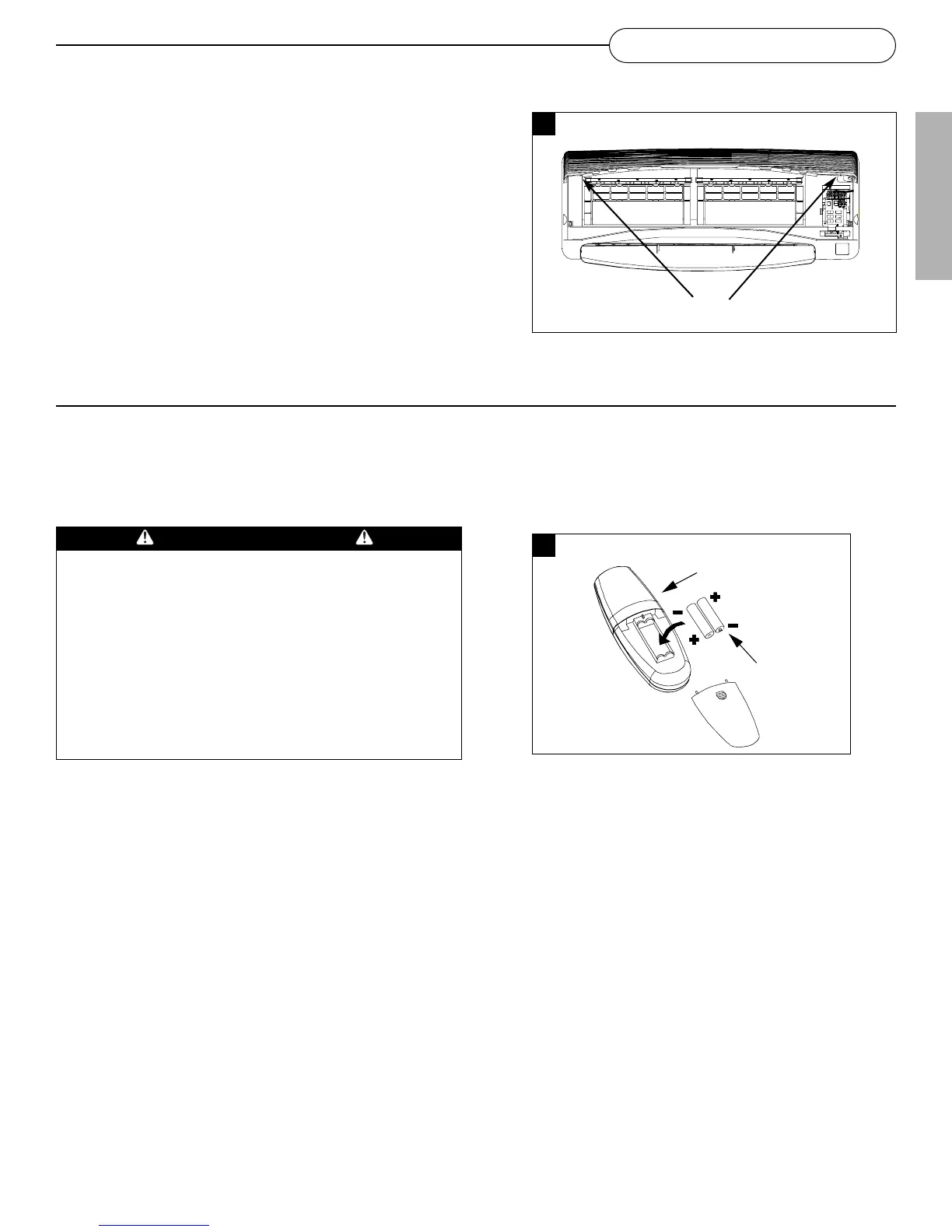
Removing the Grille
•Open the grille and remove two Grille Locks beside the
grille hinges
• Lift the grille out of the indoor unit
18
MAINTENANCE
Changing remote control batteries
• With the back of the remote control facing you, slide and lift out the battery cover
• Place two new “AAA” size batteries into the battery compartment
• Slide the battery cover back into position
Grille Locks
WARNING
• Use only AAA or IEC R03 1.5V batteries
• Remove the batteries if the remote controller is not used for a
month or longer
• Do not attempt to recharge the supplied batteries
• Both batteries should be replaced at the same time
• Do not dispose of the batteries in a fire as they may explode.
• Do not mix old and new batteries
• Do not mix alkaline, standard (carbon - zinc), or rechargeable
(nickel-cadmium) batteries
• Do not install the batteries with the polarity (+/–) reversed
• Keep batteries and other items that could be swallowed away
from young children. Contact a doctor immediately if an
object is swallowed.
1130
1131
ENGLISH



 To Next Page