-15-
Adjusting the speaker volume
Adjusting images
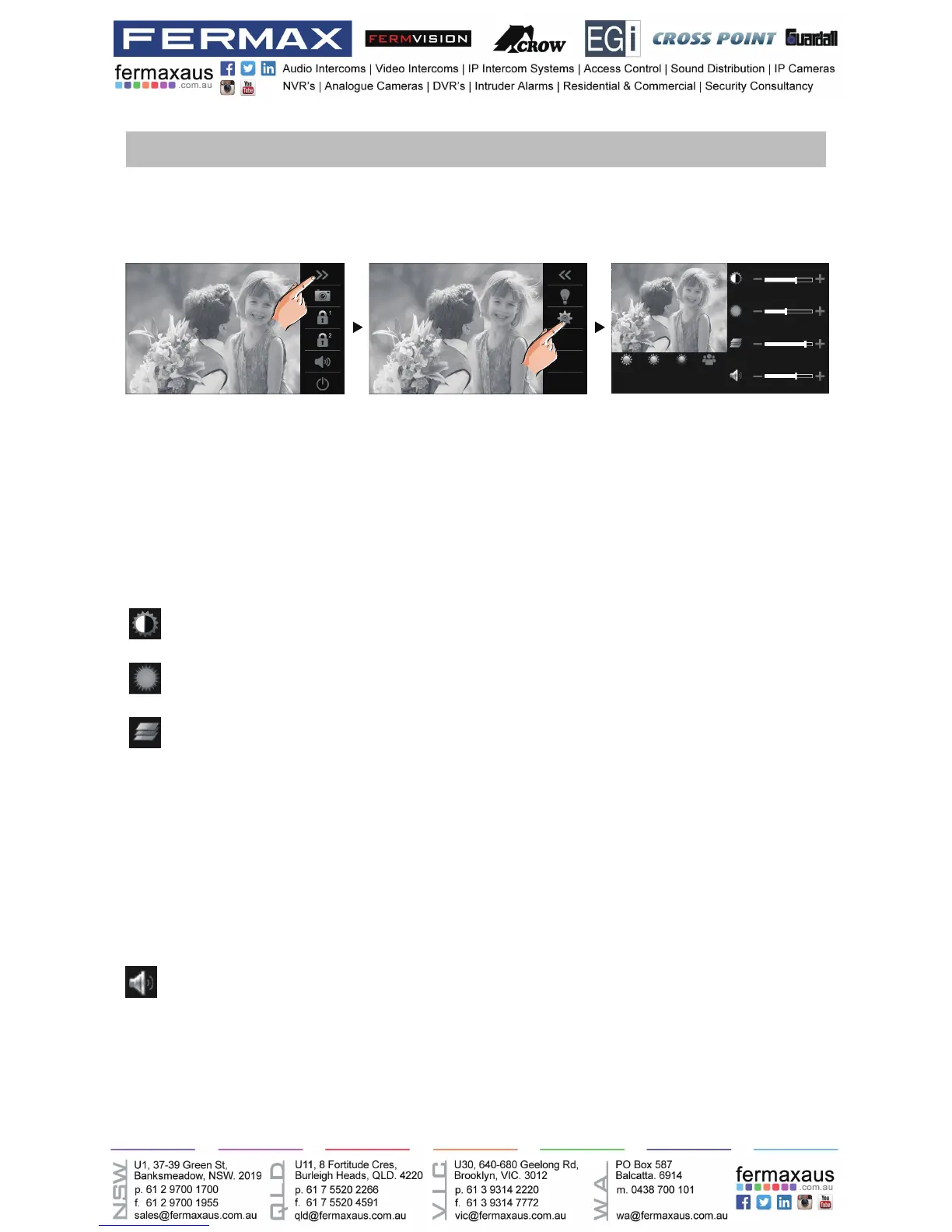
Adjusting screen&volume
While receiving a call from door station, or monitoring /communicating with the visitor,you can
adjust the screen and speaker volume. Follow the steps:
Total 4 scene modes can be selected in sequence:Normal, Brightly, Soft and User.Whichever
mode you choose, there will be a corresponding value for contrast,brightness and color.
Youshould knowthatthecontrast,brightnessandcolorcanbemodiedfreely,butthisaction
should be at the User scene mode.
Volume can be adjusted at any time.
Adjusting range: 0 (mute), 1 - 9.
Adjust the contrast of the screen,the range is 0~9. Touch - or + to change the level.
Adjust the brightness of the screen ,the range is 0~9. Touch - or + to change the level.
Adjust the color of the screen,the range is 0~9. Touch - or + to change the level.
Touch - or + to reach desired level.
00:10 DS-1 00:10 DS-1
Normal Brightly Soft User
Note: The adjustments have no effect on the recorded images.











 To Next Page