4. Activating and configuring DeviceNet
Festo P.BE-CMMS-FHPP-DN-SW-EN en 1103a 15
4. Activating and configuring DeviceNet
4.1 Activation of DeviceNet
The inserted DeviceNet module will be recognized automatically when the motor controller
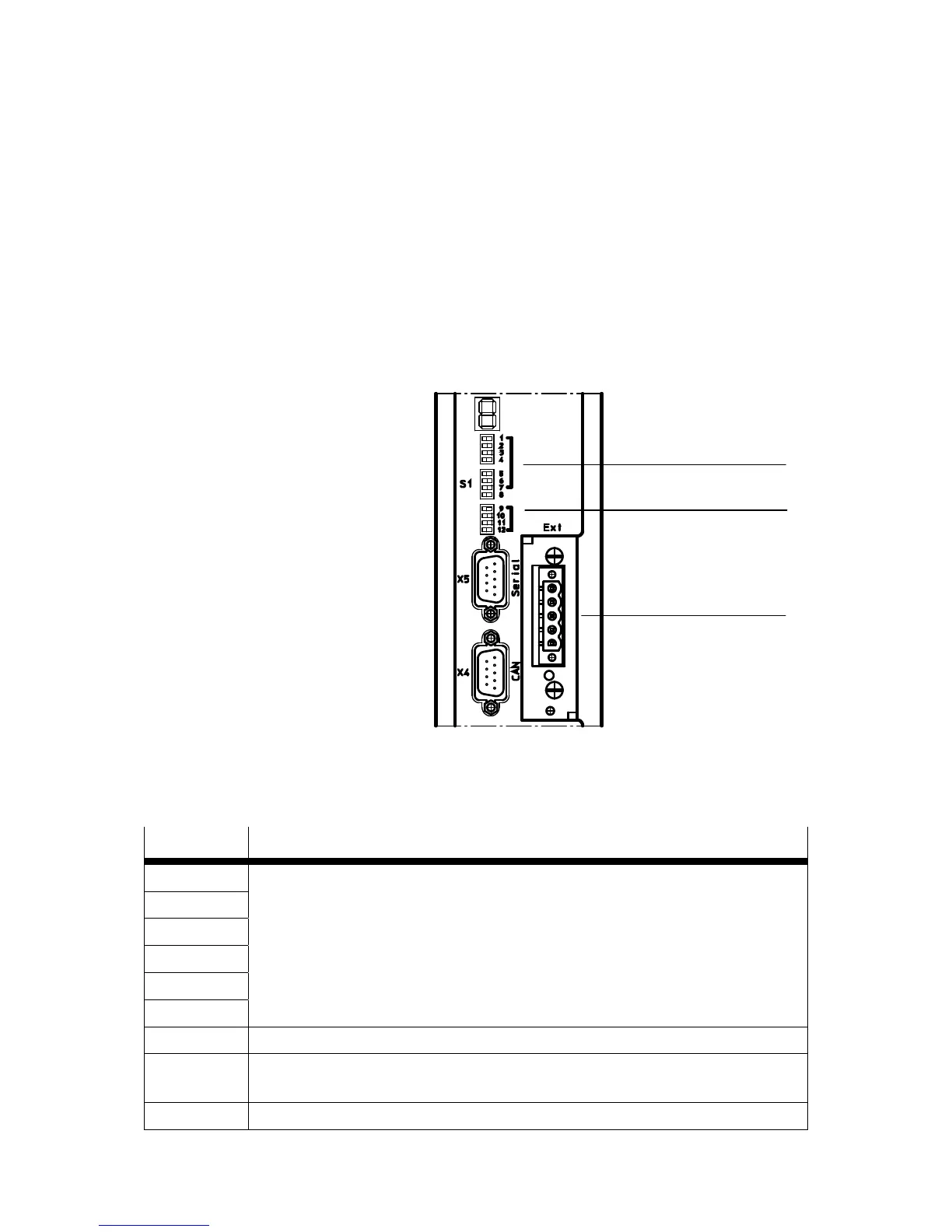
is switched on. n order to activate, you must deactivate the CAN interface with DIP switch
11 at the CMMS/CMMD motor controller.
A unique MAC ID must be assigned to each device in the network. The MAC ID must be set
with DIP switches 1 … 6 on the motor controller.
The baud rate must be set with DIP switches 9 and 10.
1 DIP switch 1 ... 6 (MAC-ID)
2 DIP switch 11
3 CAMC-DN slot
Fig. 4.1 DIP switch
DIP switch Meaning
1
2
3
4
5
6
MAC ID.
See example
7 Reserved
8 Bootloader (If the switch is set to ON, the system searches for new firmware on the SD
card)
9 Transmission rate







 To Next Page