2. Commissioning
2−36
Festo P.BE−CPX−FB11−EN en 0503b
Configure CPX modules (modular EDS)
1. Double−click the CPX terminal in the network
(seeFig.2/11). A dialogue box will open.
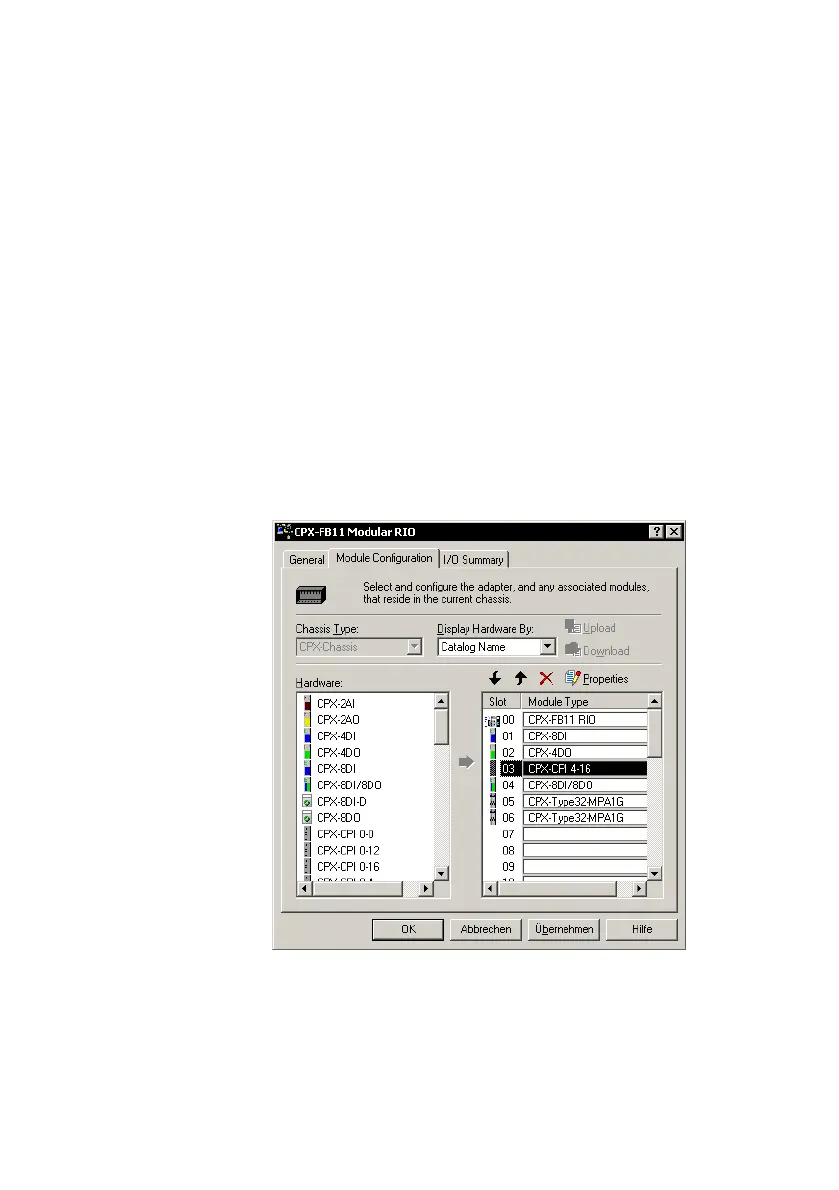
2. Select the Module Configuration" register.
To use modular EDS, the field bus node must be installed
on place 0. In the dialogue box, the
field bus node is
already entered in place 0.
3. Pull the CPX module in accordance with your CPX ter
minal’s equipment into the configuration table on the
right−hand side. The illustration shows the configuration
for the example terminal 2 from Fig.2/2:
Fig.2/13: Module configuration with modular EDS
(example terminal 2)


 To Next Page