© 2008 Festo Corporation 28 U
Getting Started with Festo MecLab
Stack Magazine Station
Sample exercise using the stack magazine
The purpose of this section is to explain the interaction of the FluidSIM® software and the
hardware components of the stack magazine station using a sample exercise.
Task
1. Build a stack magazine that pushes out one work piece when a button is momentarily
pressed.
2. When a second button is pressed, the stack magazine returns to its normal position.
Analysis of the task
1. The signal to advance must be “remembered” since the pushbutton is to be briefly or mo-
mentarily pressed.
2. The double-acting cylinder is actuated using a 4/2-way solenoid valve.
3. The 4/2-way double solenoid valve is used to store or remember the pushbutton signal.
Solution
If not already done, the second valve as well as the magnetic proximity sensor must first be
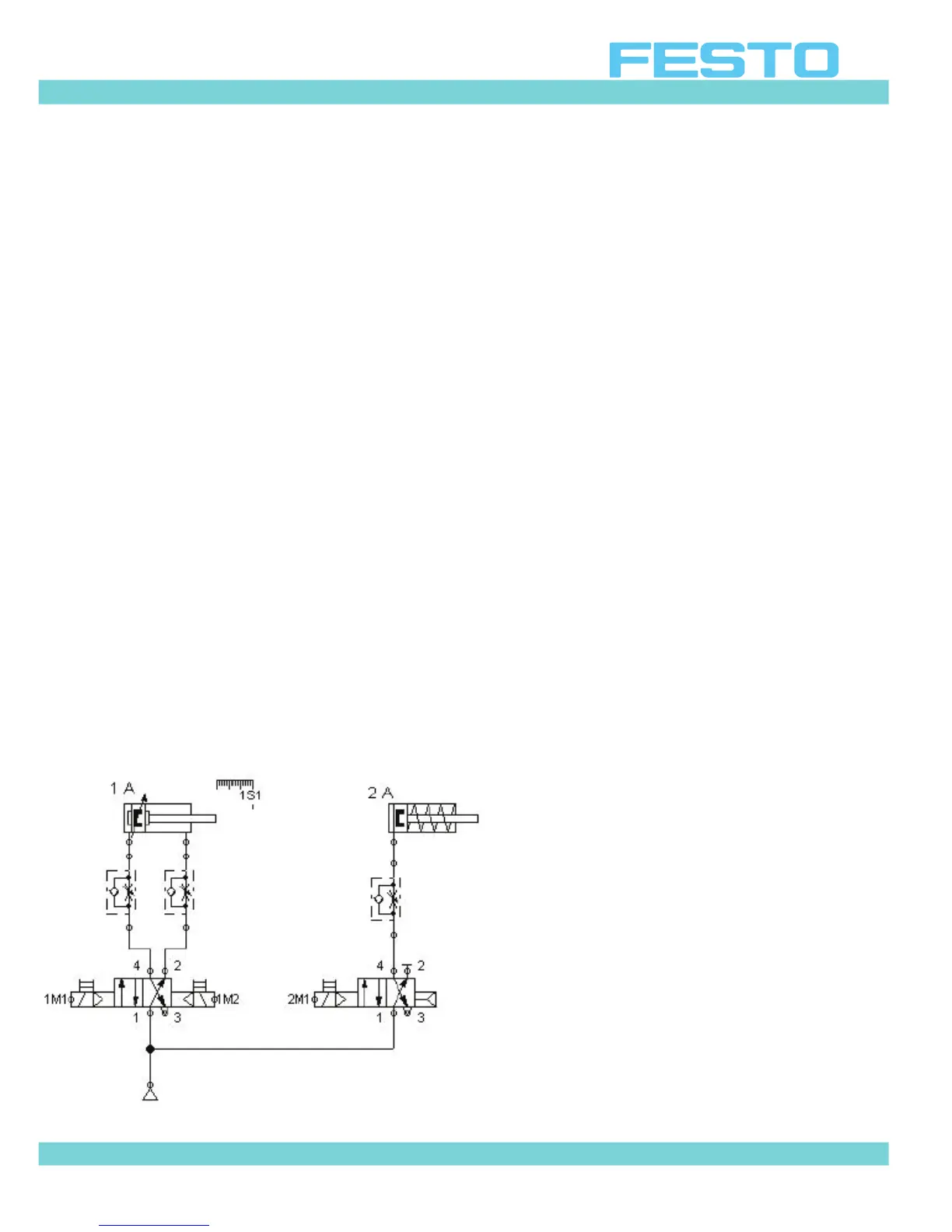
assembled and connected (cf. Section 4.3). The circuit diagram in Figure 4.8 shows an exam-
ple of how the components can be connected. Table 4.1 describes the connection of the sen-
sor and the valve solenoids to the multi-pin plug distributor.
Figure 4.8: Pneumatic circuit diagram of
the stack magazine station


 To Next Page