C2, Work in GPRS mode (Note: GPRS only can play the role as a “Client”.)
C2.1 Turn off the PIN code of the SIM card on other mobile phone before using it in LS-20EG/LS-20GV.
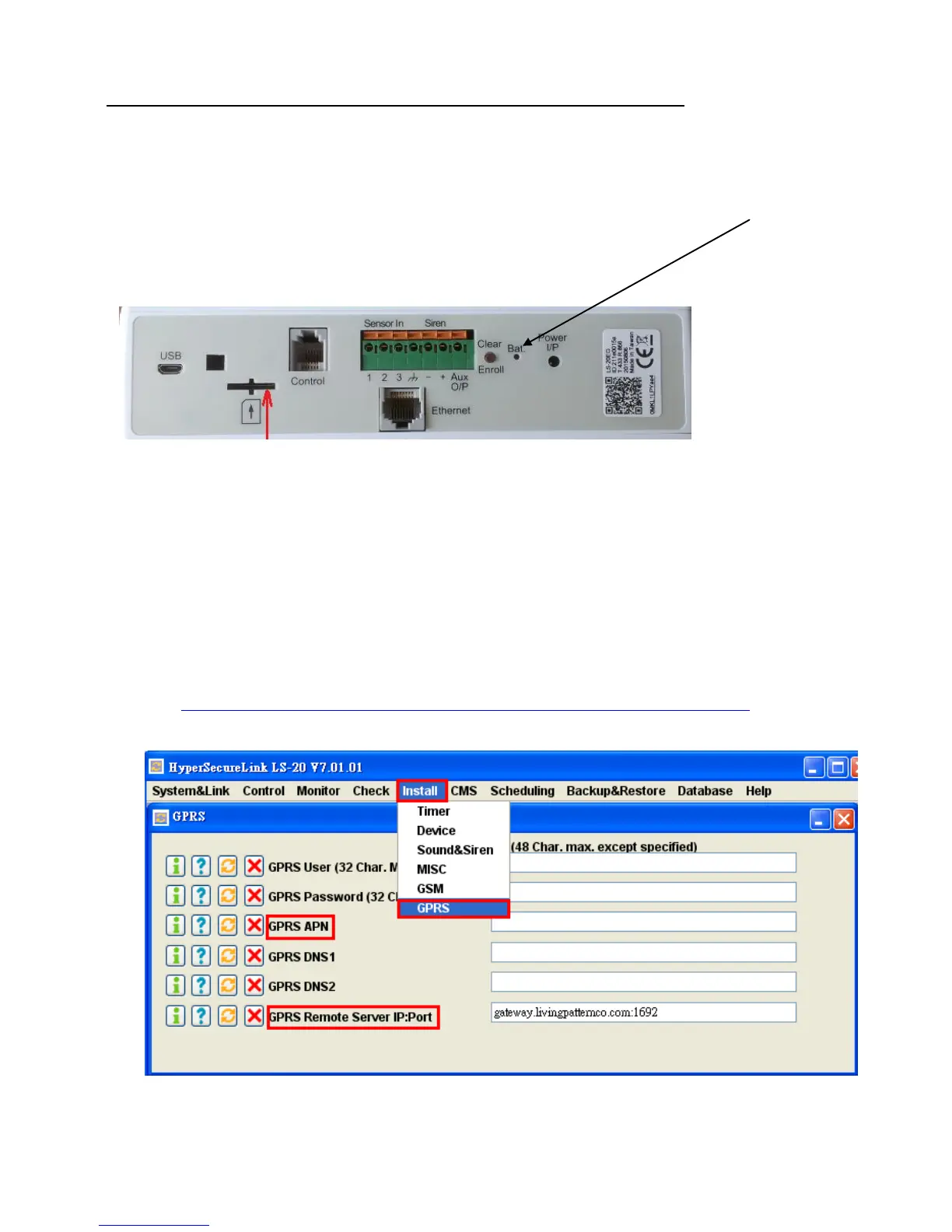
C2.2 Disconnect the power adaptor and use a straightened paper clip to stick in the hole of “Bat.” to turn
off the backup battery
C2.3 Insert the SIM card to the slot then reconnect the power.
SIM card slot
C2.4 Connect the LS-20EG/LS-20GV USB port with USB cable to your PC; use HyperSecureLink to set
GPRS APN, GPRS Remote Server IP: Port and CMS1&Server.
Note: after setting is completed, the USB cable has to be removed from the base unit; otherwise,
the LS-20EG/LS-20GV can’t connect to the cloud server.
C2.4.1 GPRS APN varies with the mobile operators, please consult your local mobile operators or
refer to the link below
http://www.hw-group.com/products/HWg-Ares/HWg-Ares_GSM_APN_en.html


 To Next Page