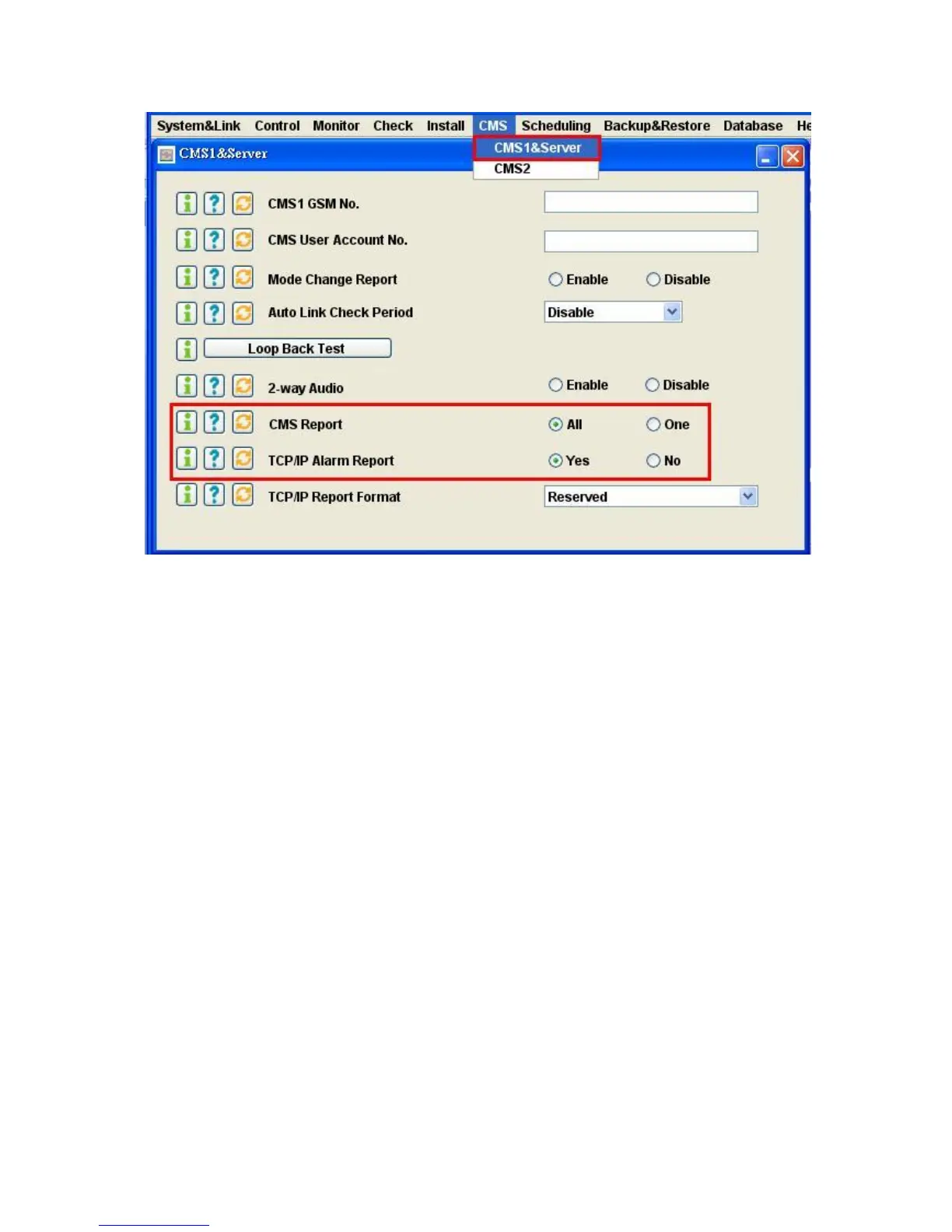
C2.4.2 Select the “CMS Report” and “TCP/IP Alarm Report” as below.
C2.5 Register the LS-20EG/ LS-20GV to the cloud server and connected the Ethernet cable. Please press
“Clear” button on the base unit and open the web page of the cloud server from your PC to check if
the connection to the server is successful.
C2.6 LS-20EG/LS-20GV will connect to the server through Ethernet first, if it finds the Ethernet is not
working then it will switch to the GPRS channel automatically.
Switching from Ethernet to GPRS takes about 3~5 minutes depends on the network service provider,
if the switching is successful then you will hear “OK” from the LS-20EG/LS-20GV.
Note: To test this switching action, just remove the Ethernet cable and wait for 3~5 minutes.
C2.7 When the LS-20EG/ LS-20GV is using GPRS to transmit data, by pressing the “Clear” button on the
rear panel, it will switch from GPRS back to Ethernet.
At 00:00:00 midnight every day, the LS-20EG/LS-20GV will check if it is using GPRS service and
then switch back to Ethernet to save the communication cost.


 To Next Page