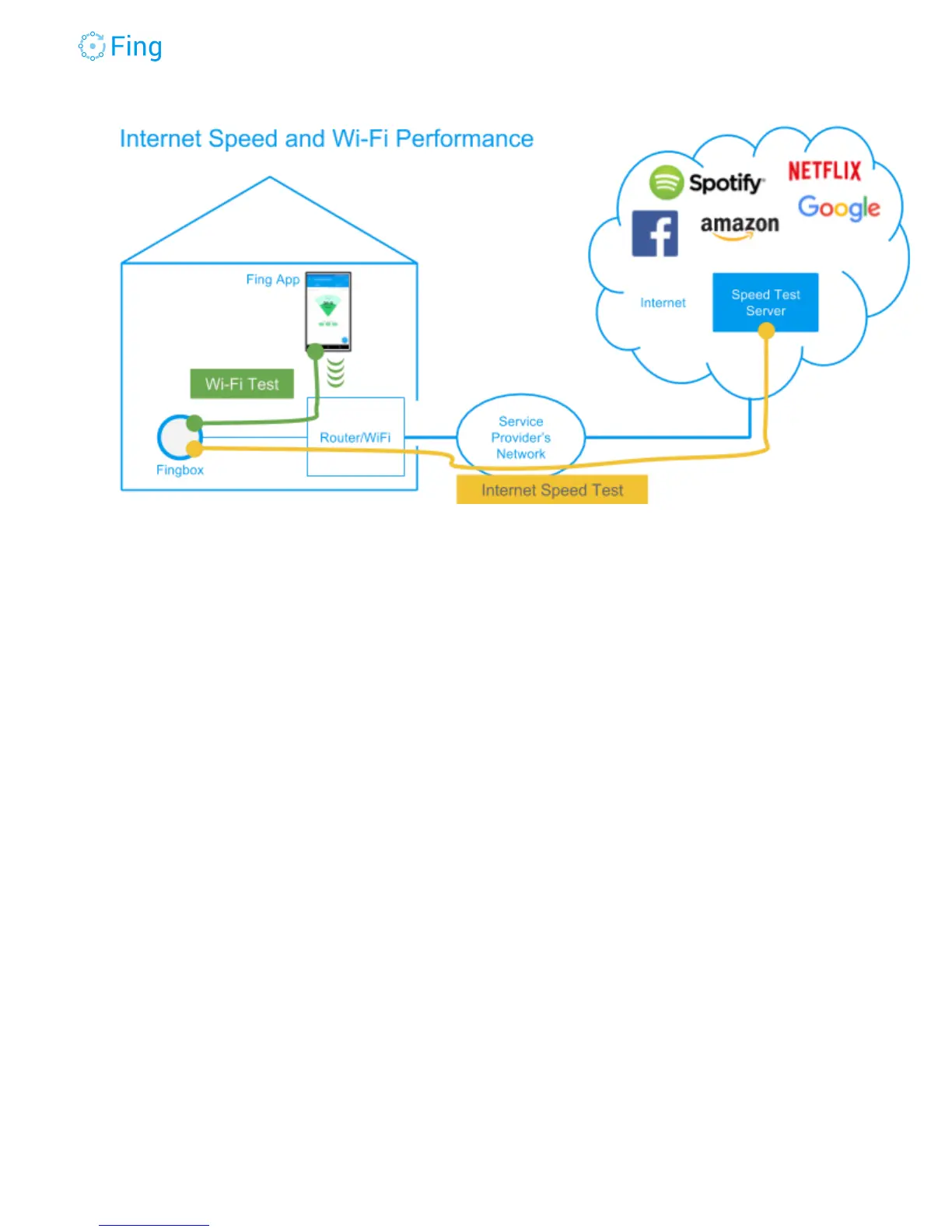
● The Wi-Fi test (green line) is all done within your home: it measures a data stream
flowing between the Fingbox and the phone you’re using to run the Fing app. Data flows
through your home wireless and wired infrastructure. It accurately measures the Wi-Fi
speed at the location of your phone. You can run the Wi-Fi test from different rooms and
see where sweet and dark spots are located. This WiFi test is not affected by the speed
of your service provider connection. Its results depend on the performance of your Wi-Fi
access point, the local intensity of the Wi-Fi signal and the level of interference from
other Wi-Fi systems nearby.
● The Internet speed test (yellow line) runs between the Fingbox and a test server
located in an Internet data center as close as possible to your home. Because Fingbox is
wired, this test is not affected by your home Wi-Fi. Of course, if someone is using a
significant portion of the Internet connection, the test results may be affected. So, to
have the most accurate measure, it’s better to run the Internet speed test when no
other devices are using Internet significantly (for example watching a video,
uploading pictures or sending a large email attachment).
Internet Speed Test
The Internet Speed Test measures how fast your service provider connects you to the big
“global” Internet. We selected M-Lab as the best partner to run this type of speed test because
M-Lab has test servers in most of the important Internet Exchange points around the planet. It’s
Fingbox User’s Guide - App v6.2.1 Page 35



 To Next Page