411 Communicator Document #50921 Rev. E 12/09/2008 P/N 50921:E 37
Default Mode
3.4 Default Mode
To return all program entries to their factory original settings, perform the following steps only when the system is
idle (i.e. the communicator is not active) and there are no active fire alarms or fire supervisories in the system:
Press the MODE key followed by the 4-digit code 3337 and press the [ENTER/STORE] key.
3337 spells DEFP (DEFault Programming) on a Touch-Tone
®
phone.
If an incorrect key is entered, reenter the proper 4-digit code before
pressing the [ENTER/STORE] key. Within
five seconds, repeat this entry by again pressing the MODE key followed by the 4-digit code 3337 and pressing
the [ENTER/STORE] key. The display will read 3337 while the E
2
nonvolatile memory (storage area for all pro-
gramming options) is being reprogrammed with the original default settings. When reprogramming is complete,
the display will be blank.
3.5 Troubleshoot Mode
To access the Troubleshoot Mode, press the MODE key followed by the digits 8768 and then the [ENTER/STORE]
key.
8768 spells TROU on a Touch-Tone
®
phone.
Once in this mode, the 411 will continue to communicate any events not yet acknowledged at a central station prior
to
entering Troubleshoot Mode. The UP arrow, DOWN arrow and 1st EVENT keys do not function in this mode.
Telephone Line Testing
Pressing C for touchtone dialing or D for rotary dialing, followed by [ENTER/STORE] causes seizure of the Pri-
mary phone line, which in turn, lights the red LED 1 on the circuit board near the PH1 connector, signifying that the
Primary phone line is active. After a delay of three seconds, the 411 goes off-hook to acquire a dial tone.
The Programmer keypad may be used as a telephone touchpad for number dialing. Once the first digit is pressed, the
display will move the C or D character one position to the left, while placing the digit to be dialed on the farthest right
display position. Continue to press the phone numbers to be dialed. Successive depressions of the [ENTER/
STORE] key hangs up and picks up the phone (places the phone on or off the hook).
The secondary phone line may be tested by pressing the E key for touchtone dialing or the F key for rotary dialing
and then following the same procedure used for the primary phone line. A handset may be temporarily connected
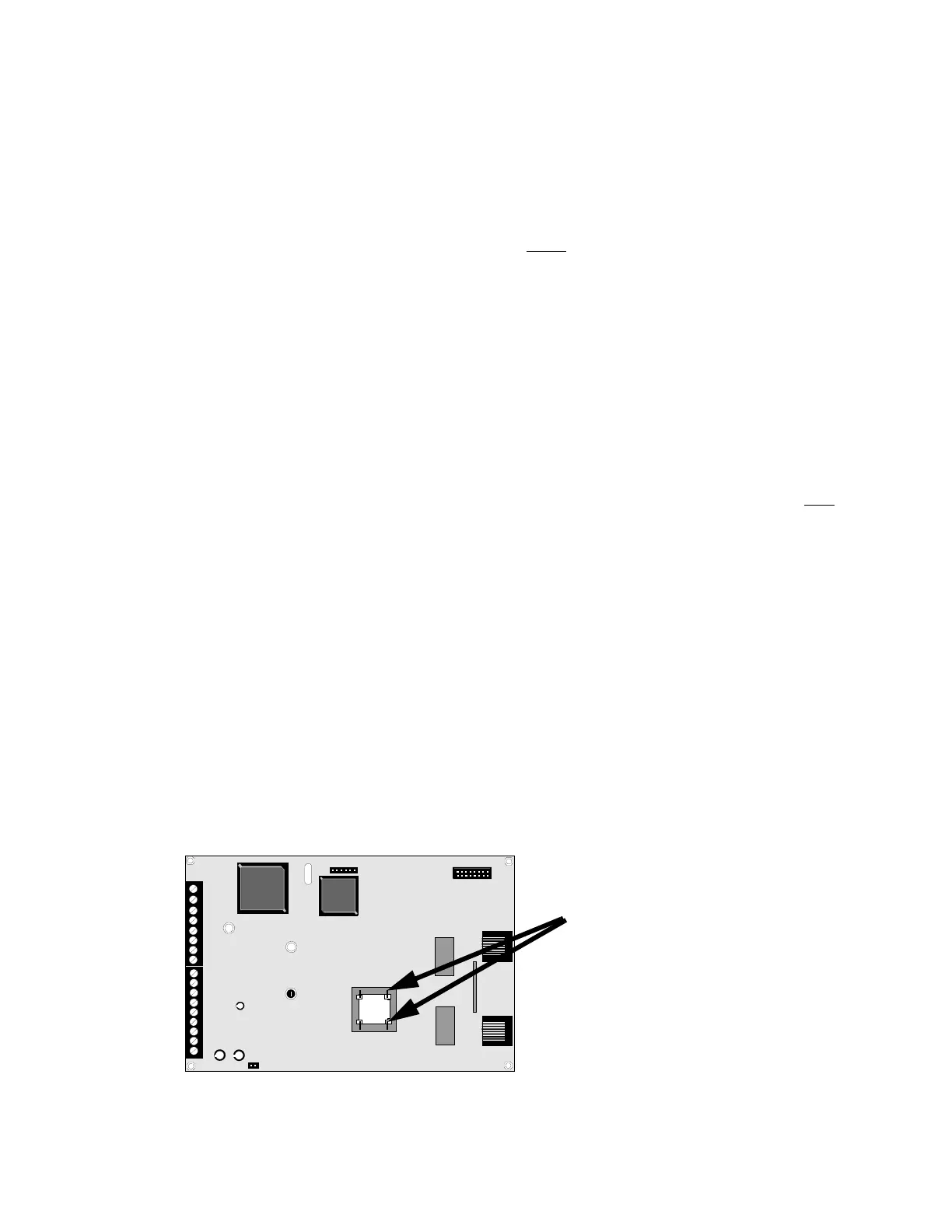
across transformer T1 of the 411 as indicated in Figure 3-2. The handset, when connected across T1, may be used
only as an amplifier/speaker or telephone with the keypad used for number dialing.
TB2
TB1
U8
U10
J1
J2
J4
PH1
R41
PH2
FIGURE 3-2:Handset/Speaker Connection
Both Primary and Secondary Lines
411BRD.CDR


 To Next Page