Hardware Installation Manual for FJD 3D Excavator Guidance System
6
Copyright © FJ Dynamics Technology Co., Ltd. All Rights Reserved.
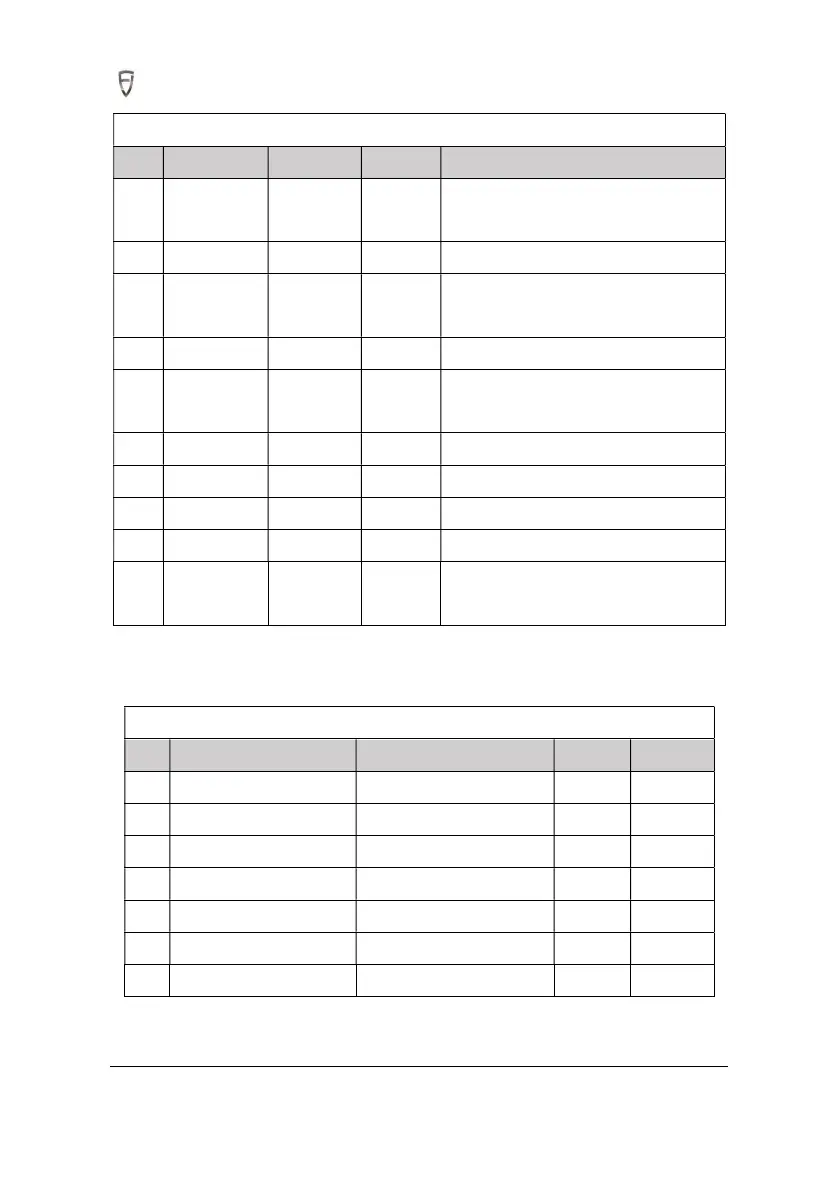
Assembly Tools for FJD 3D Excavator Guidance System
S/N Tool Model Qty Function
1
Cross
screwdriver
Mid-size 1
Install control terminal and bracket base
plate
2 Hex key set T3~T6 1 Install attitude sensor, bracket screws, etc.
3
Open-end
wrench
1
Choose different wrenches depending on
the actual screws of the excavator
4 Utility knife 1 Unpacking
5 Scissors 1
Cutting the straps and 3M double-sided
tape
6 Multimeter 1 Measure voltage and circuit on/off
7 Total station 1 Calibrate measurement parameters
8 Strap 1 Fix harnesses
9 3M tape 1 Fix the sensor
10
Carburetor
cleaner
1 Clean body oil stain
2.4 Open-package Inspection
After preparing the tools mentioned above, please check the following packing list.
Packaging Box of Excavator Guidance System
S/N Item Spec./model Quantity Remark
1 Control terminal 1
2 Attitude sensor 4
3 RTK antenna 2
4 4G sucker antenna 1
5 Beidou 1 feeder 1
6 Beidou 2 feeder 1
7 Attitude sensor mount 2



 To Next Page