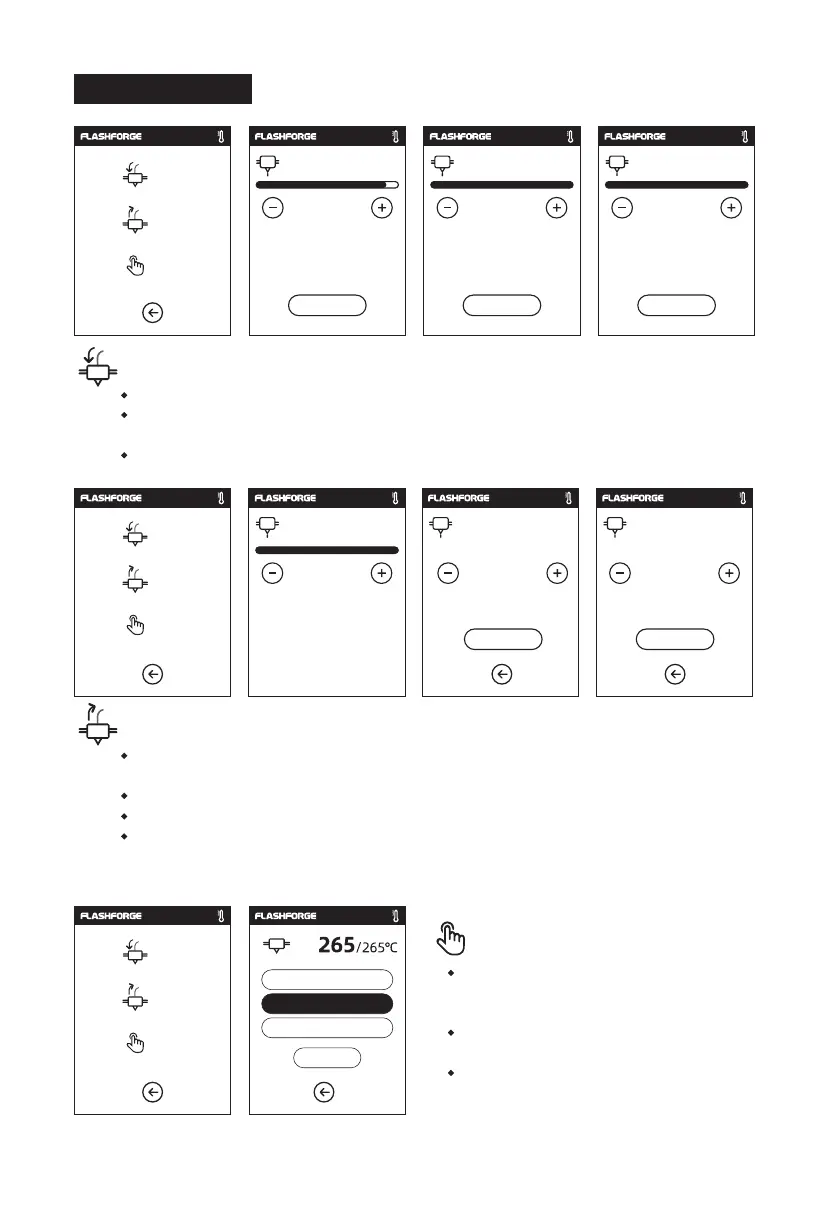
2.3.3 Filament
Load
Change
Heating extruder...
Cancel OK OK
Preheat completed.
Begin loading.
Press OK when new color appears
Manual
100 mm
300 mm
Load
200 mm
Load
Change
Manual
Load
Change
Manual
Load
Change
Manual operate
The extruder is heated up to the target temperature.
After heat completed, insert the filament into the extruder at an upright angle until
some resistance is sensed [as the filament is pushed through the feeding wheel].
Load will complete when you see filament come out of extruder.
The extruder is heated up to the target temperature, after heat completed, filament
will be unloaded from the extruder.
Pull out the filament according to the instruction.
Insert new filament into the filament intake, tap [OK] ;
New filament will be pushed into the extruder, replace will complete when you see
new filament come out of extruder.
Wait until the extruder is heated up to
the target temperature, choose the
loading length, click on [Loading];
Load the filaments, make a push until
the resistance is felt;
Gear set works. Filaments coming out
of the extruder in dicates a success.
22
240/265℃
Unloading the filament,
please wait...
265/265℃
Pull out filament,
feed new filament, press [OK]
OK
265/265℃
Please insert the filament
OK
265/265℃
265/265℃ 265/265℃















 To Next Page