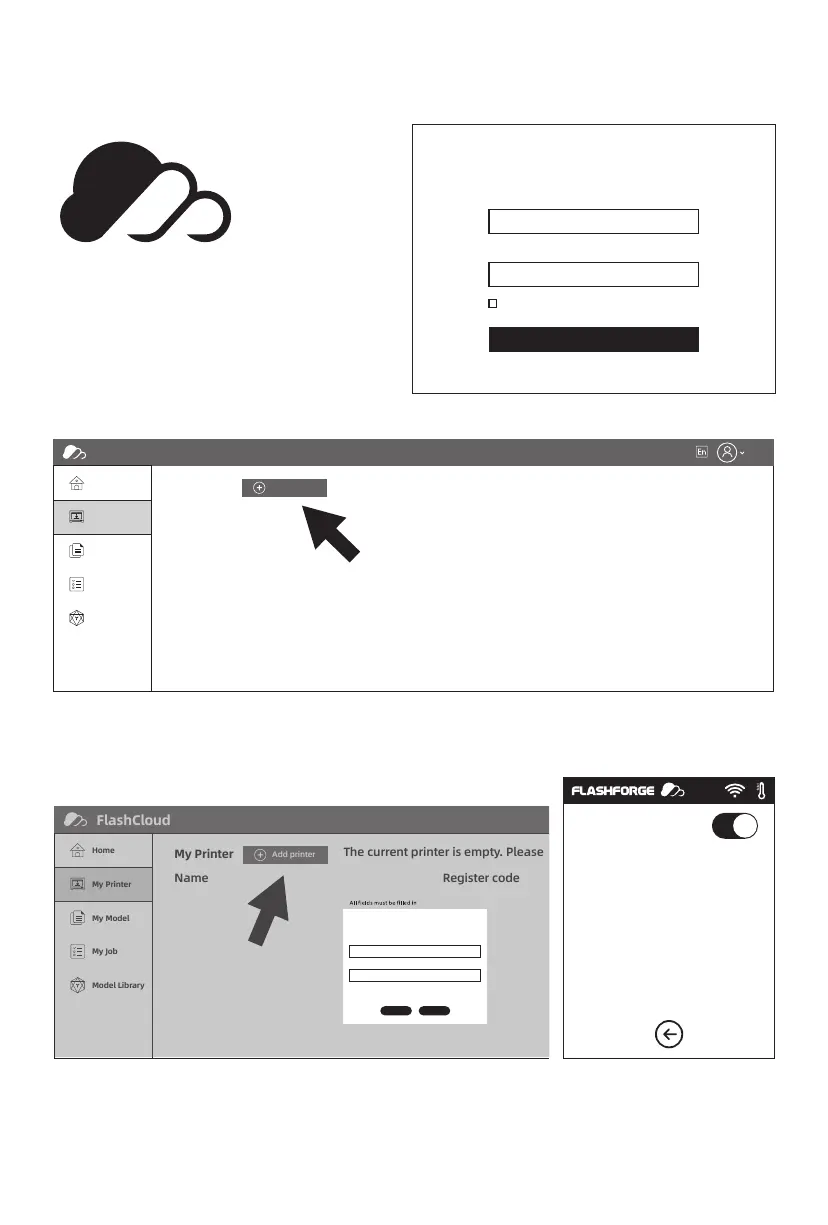
2. After login in cloud with your own account, click [My Printer] - click [Add Printer].
3. Input your printer’s name and Flashcloud registration code in [Add printer] interface. These
information are showed in your printer’s FlashCloud interface.
1. Register your account on Flashforge cloud:
After activate your account through your
email box, login in Flashforge cloud with
your account.
2.4.3.1 FlashCloud Print
FlashCloud: Cloud.sz3dp.com
My Printer
Name Register code
The current printer is empty. Please
Add printer
FlashCloud
Home
My Printer
My Model
My Job
Model Library
Login
FlashCloud
Printer Name:
Registration Code:
ABCDEF
E-mail
Password
Remember Password
Forgot password Register
Login
Add Printer
All fields must be filled in
Name
OK Cancel
Registration Code
FlashCloud
Home
My Printer
My Printer
My Model
Name Register code Type State
The current printer is empty. Please add a printer.
Add printer
My Job
Model Library
30















 To Next Page