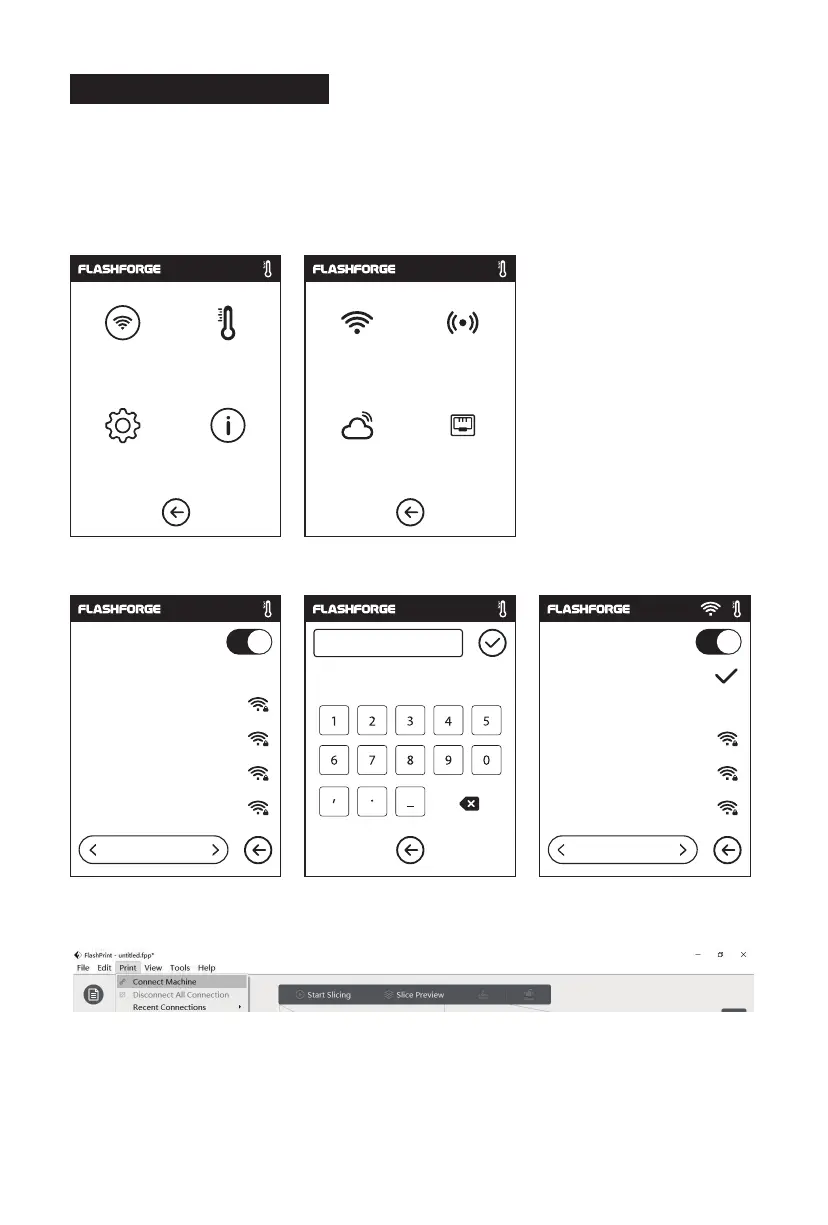
After generating the Gcode file, you can transfer it to your printer with different network
methods. If use USB stick to print, please insert your USB stick with target .g/.gx file to
your printer, there will be no need to set new network.
1. Tap [Tools] - Tap [Network] - Tap [Wi-Fi].
2. Choose a network and input the password.
3. Open the FlashPrint software, click the icon at the bottom left corner of the interface to
select the [Machine Type]., select [Flashforge Adventurer 3 series]. Then click [Print] -
[Connect Machine].
2.4.2 Model File Transfer
Method 1:
Wi-Fi Connection
Network Preheat Wi-Fi Hot spot
Setting
WiFi
123 abc %#
1/3
Flashforge
ChinaNet-AnCr
TP-LINK_EDC2
QS_1234
Choose a network
WiFi
1/3
Choose a network
ChinaNet-AnCr
TP-LINK_EDC2
QS_1234
Flashforge
About Cloud Ethernet
25















 To Next Page