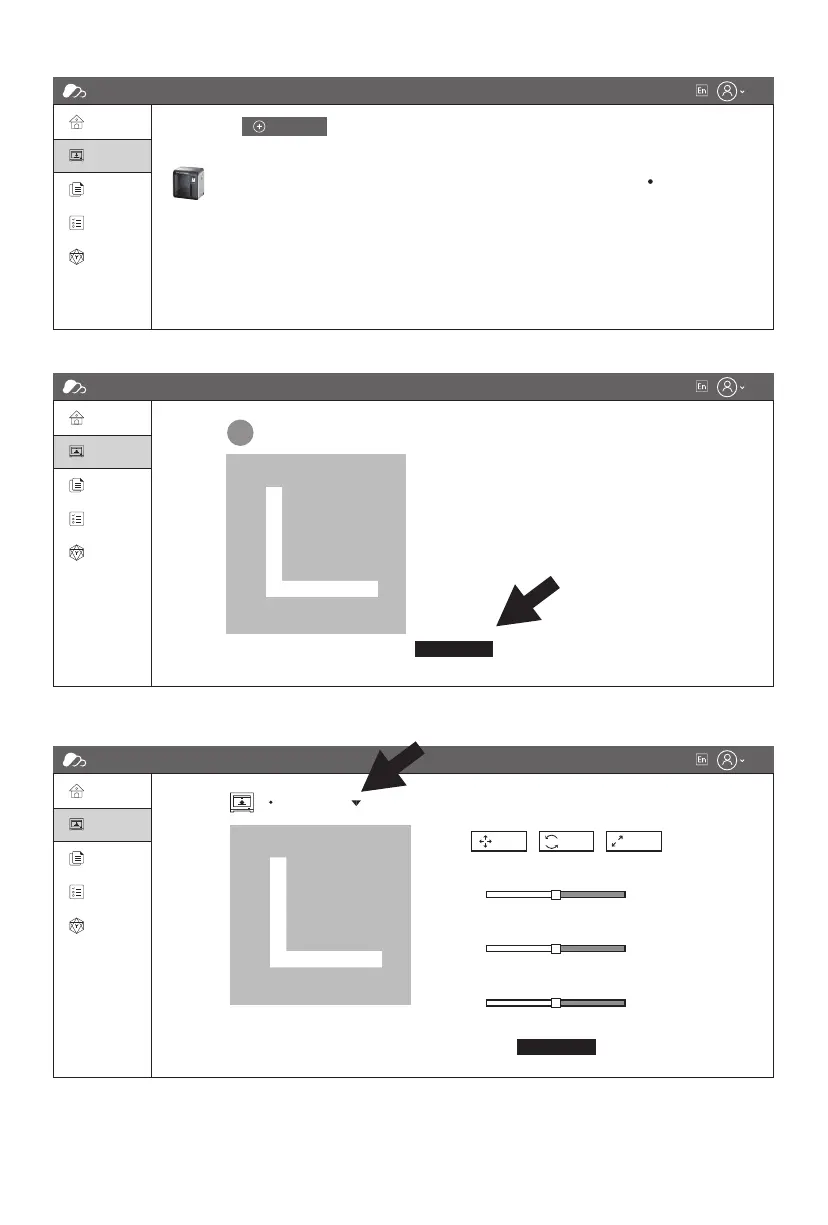
4. Add printer completed.
5. Choose a model from cloud model library or upload your own model [.stl file], click [Print], enter
the edit model interface to edit model.
6. In the drop down menu of the printer’s name, your can choose the printer which runs this
mission. [The printer must be added into ‘my printer’]
FlashCloud
Home
My Printer
My Printer
My Model
Name Register code
Flashforge ABCDEF Adventurer 3 Pro 2 Idle
Type State
The current printer is empty. Please add a printer.
Add printer
My Job
Model Library
FlashCloud
Home
3D Model
User
2023.3.2
Model Detail
My Printer
My Model
My Job
Model Library
Print
FlashCloud
Home
My Printer
My Model
My Job
Model Library
Edit model
Print
Flashforge
Print para
Move
-150
X: 0
150
-150
X: 0
150
-150
X: 0
150
Rotate Scale
31















 To Next Page