Finder2.0 User Guide |
www.flashforge.com
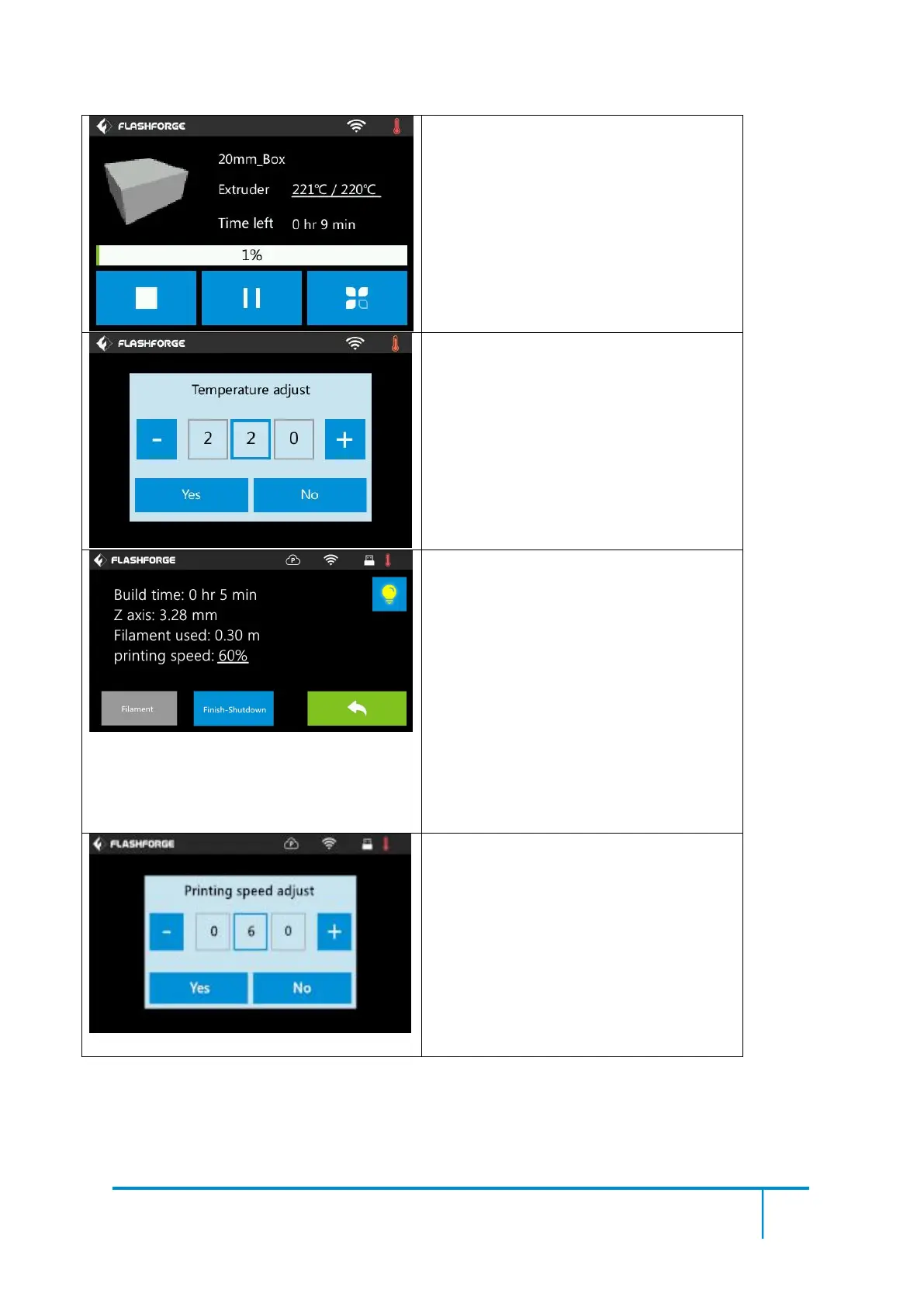
Print interface
Abort: To abort the print job.
Pause/Resume: To suspend or resume the
print job.
Tools:To check status or modify settings
during printing: build time, Z axis, filament
used, printing speed, light status, change
filament, finish-shutdown.
Extruder temperature: Can be changed
during printing.
To set extruder temperature during printing:
After extruder temperature has reached
target temperature, temperature figure will
be underlined in print interface,
Tap the temperature figure to adjust;
Tap [Yes] to save the setting while tap [No]
to cancel the setting.
Tools in print interface
Printing speed: To change printing speed
during printing by tapping the underlined
speed figure.
Light bulb: To turn on/off the light.
Filament: To change filament during
printing. (Note: You need to suspend the
printing operation first)
Finish-Shutdown: To start auto shutdown
after print job finished.
Cancel: To end the tool orders and return
to the print interface.
To set the printing speed during printing
Tap the speed figure to adjust;
Tap [Yes] to save the setting while tap [No]
to cancel the setting.















 To Next Page