For this operation, users can contact Flashforge after-sales
personnel for remote assistance with calibration.
Special Note
The cleaning method can be viewed by clicking the [How to deal with clogged
extruder?] on the maintenance screen. Please operate following the instructions
on the screen.
6.2.2 Clogged Nozzle Cleaning
Generally, users do not need to carry out this operation. When the flatness of the
equipment that has undergone a variety of calibration or automatic leveling
compensation is still improper, it may be that the previously installed platform
flatness has been damaged. At this time, the initial platform leveling is required.
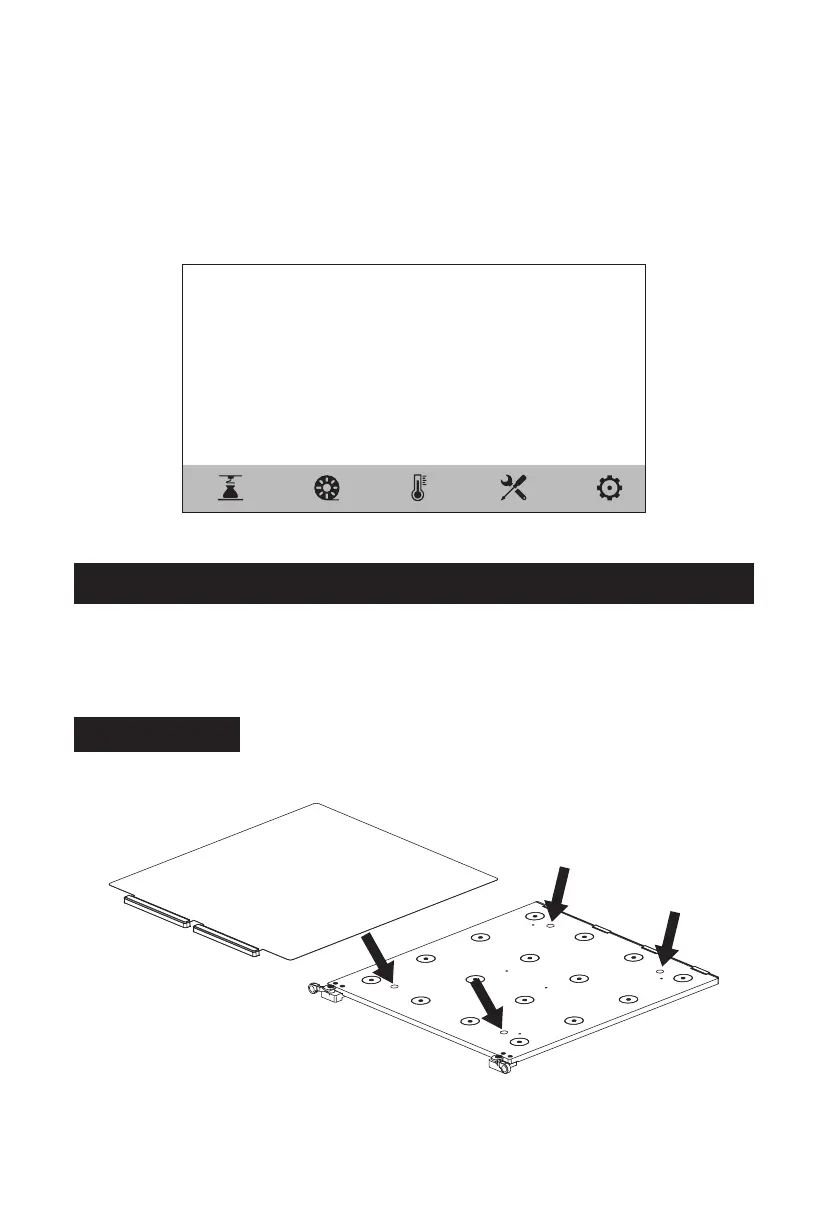
Please operate as follows: There are four leveling points in total.
1. Remove the flexible steel plate;
2. Loosen (note that the screws only
need to be loosened and do not need to
be removed) the four locking screws on the platform;
6.3 Platform Flatness Calibration
< How to deal with the clogged extruder?
Method 1: Preheat the extruder, and heat the extruder to the required temperature
of the material used. Pull out the filament guide tube, press the handle,
pull out the filament, and insert the unclogging pin tool into the nozzle
for unclogging.
Method 2: If Method 1 taken is invalid, replace the nozzle assembly according to
the disassembly and assembly method of the nozzle assembly.
20















 To Next Page