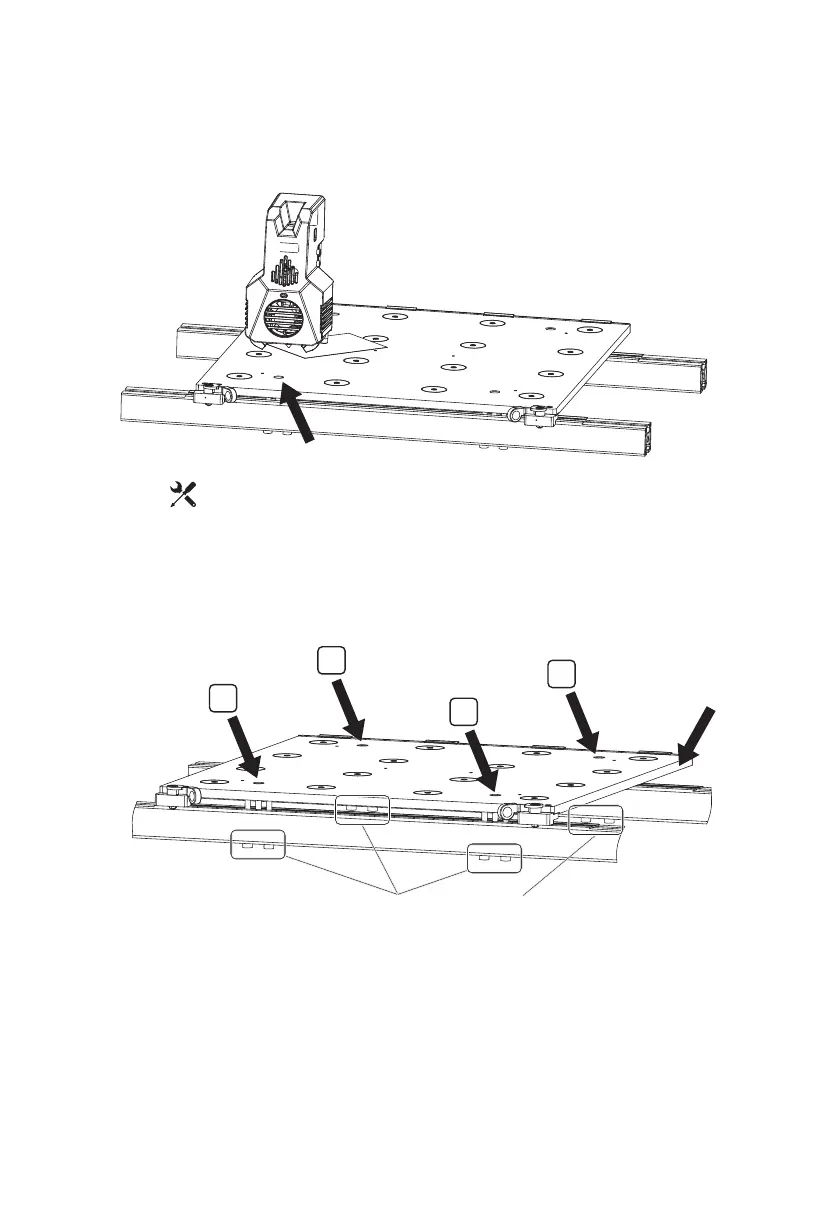
Position 1
Hexagon Socket Head Cap Screw M5*60
Platform
1
3. Click the [ ]- [Manual] on the screen and click the Z-axis up arrow to manually
move the extruder to Position 1 [above the leveling screw]; Stop when the Z-axis
rises to the position where it is about to touch the nozzle; Insert the leveling card
between the platform and nozzle and adjust the left M5*60 screw below the profile
at the same time; When feeling resistance during sliding the leveling card, it
indicates that it is the appropriate position. Then adjust the right screw below the
profile in the same way as the left screw;
4. Manually move the extruder to Position 2, and be sure to move it slowly. If the
extruder scratches the platform, it is necessary to adjust the left M5*60 screw
below the profile at Position 2, slide the leveling card to confirm that the distance
between the nozzle and the platform is appropriate, and then adjust the right screw;
5. Adjust the Position 3 and Position 4 in the same way in turn;
6. After finishing the adjustment of the four positions, please tighten the four screws
above the platform to lock the platform.
4
3
2
21















 To Next Page