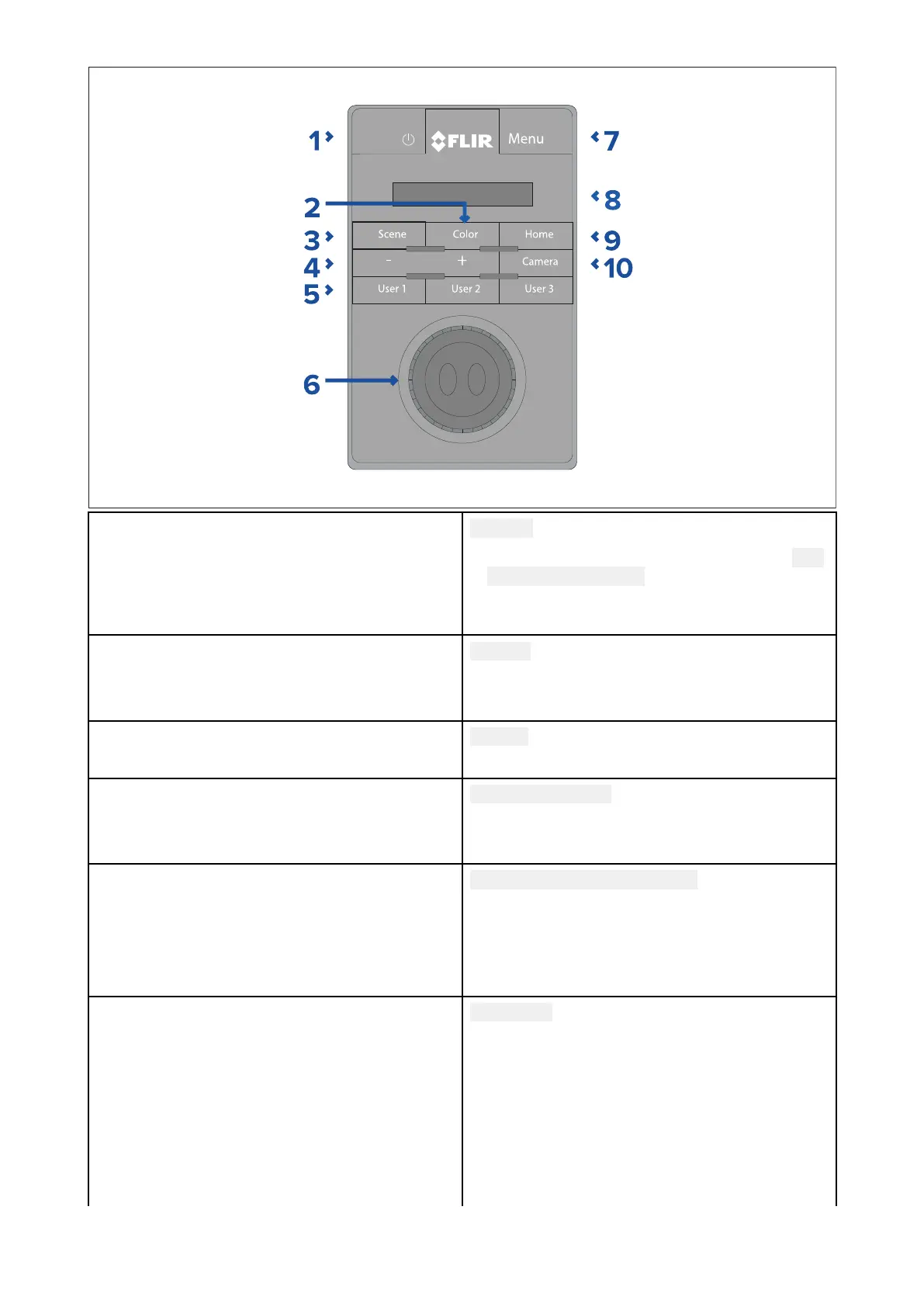
1
POWER
•PresscycleJCU-2displaybrightness Dim
>Normal>Bright.
•Pressandholdtowakecameraorenter
powermenu.
2
COLOR
•Presstochangepalette.
•Pressandholdtochangepolarity.
3
SCENE
•Presstochangescenesettings.
4
MANUALFOCUS
•+—PresstoadjustthermaleZoom.
•
5
USER1,USER2,USER3
•Userprogrammablebuttons(cong-
uredviacamerawebpage:see
p.84—ConguringJCU-2user-
programmablebuttons(UPBs)).Default
actionis“togglerear-viewmirrormode”.
6
JOYSTICK
T oManageCamera
•T wisttozoomcamera.
•Pushfore/afttotiltcamera.
•Pushleftorrighttoroatecamera.
T oNavigateOn-ScreenMenus
•Pushleft/right/up/downtohighlight
menuitem.
JCU-2operation
83



 To Next Page