Starting the Basic and Standard package
pumps
These are the steps to be performed at the initial startup
of a shift.
1. Check all connections for leaks.
2. Turn the manual air pressure regulator all the way
counter-clockwise.
3. Depress the red pressure relief buttons on both of
the inlet water filters to release any air.
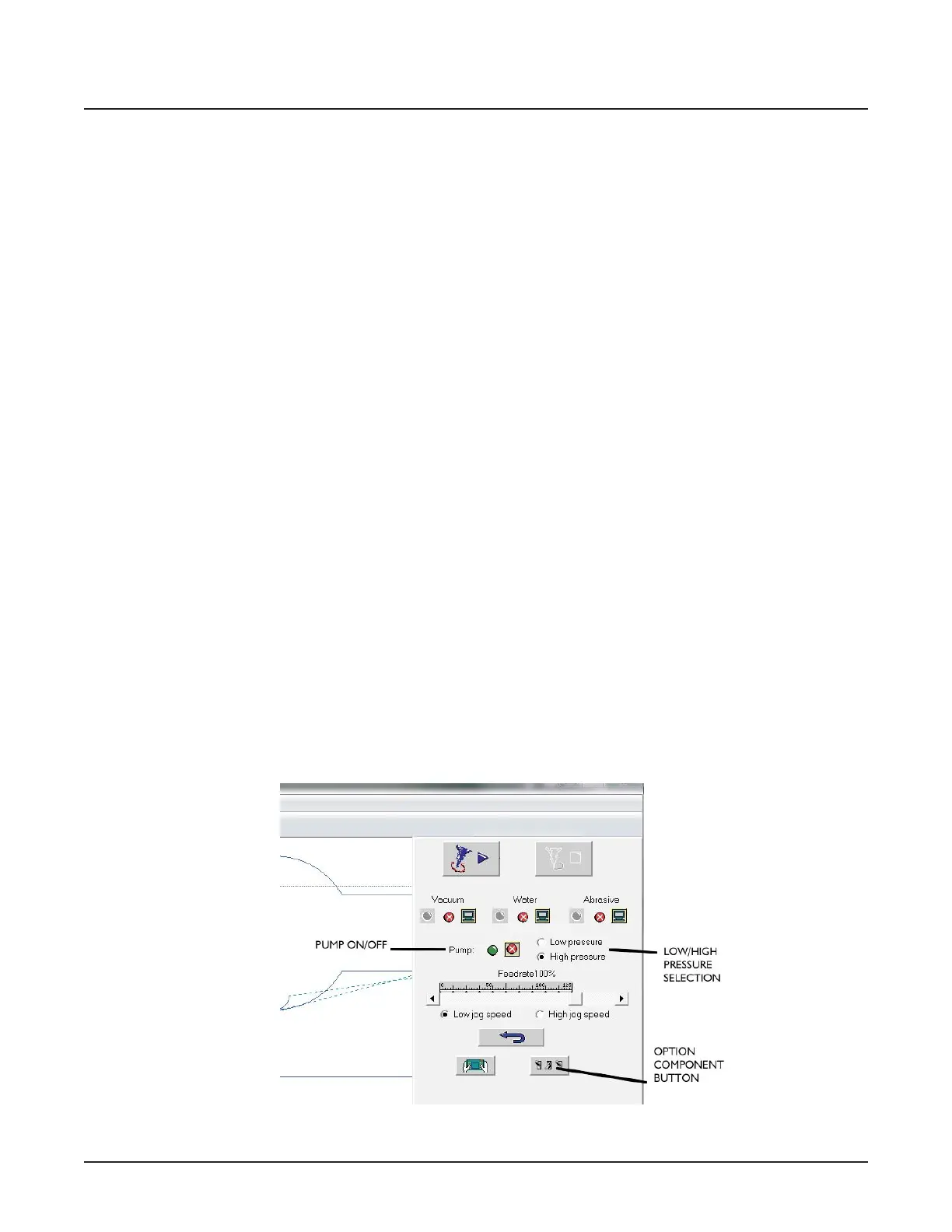
4. Start FlowCUT and open a part file. Click the Run
Machine button. The screen will display the pump
on/off control.
5. Reduce the air pressure to the PCV to zero.
6. Click on the high-pressure selection in the sidebar.
7. Turn the pump on by clicking the pump ON button.
When the pump is spinning at full rpm, turn the
manual air pressure regulator clockwise until the
pressure display reads 55,000 psi of pressure.
Pressure is indicated on either the analog gauge (Ba-
sic) or on the digital display in FlowMaster (Stan-
dard). Operate the pump at this pressure for 5-10
minutes while checking for leaks. Correct as re-
quired.
CAUTION
Do not tighten any loose or leaking connections while the
pump is operating or while the line is pressurized.
The pump is now ready for use.
Starting the Plus and Premium package
pumps
These are the steps to be performed at the initial startup
of a shift.
1. Check all connections for leaks.
2. Depress the red pressure relief buttons on both of
the inlet water filters to release any air.
3. Run the HyPlex Prime pump Temperature Input Off
-
set Adjustment routine on Page 16.
4. Run the Calibrating the pump control system routine
on Page 16.
5. Click on the low-pressure selection in the sidebar.
6. Turn the pump on for 5-10 minutes while checking
for leaks. Correct as required.
CAUTION
Do not tighten any loose or leaking connections while the
pump is operating or while the line is pressurized.
The pump is now ready for use.
© Flow International Corporation M-416 | 15
CHAPTER 1
Equipment Description



 To Next Page