7102
User’s Guide
36
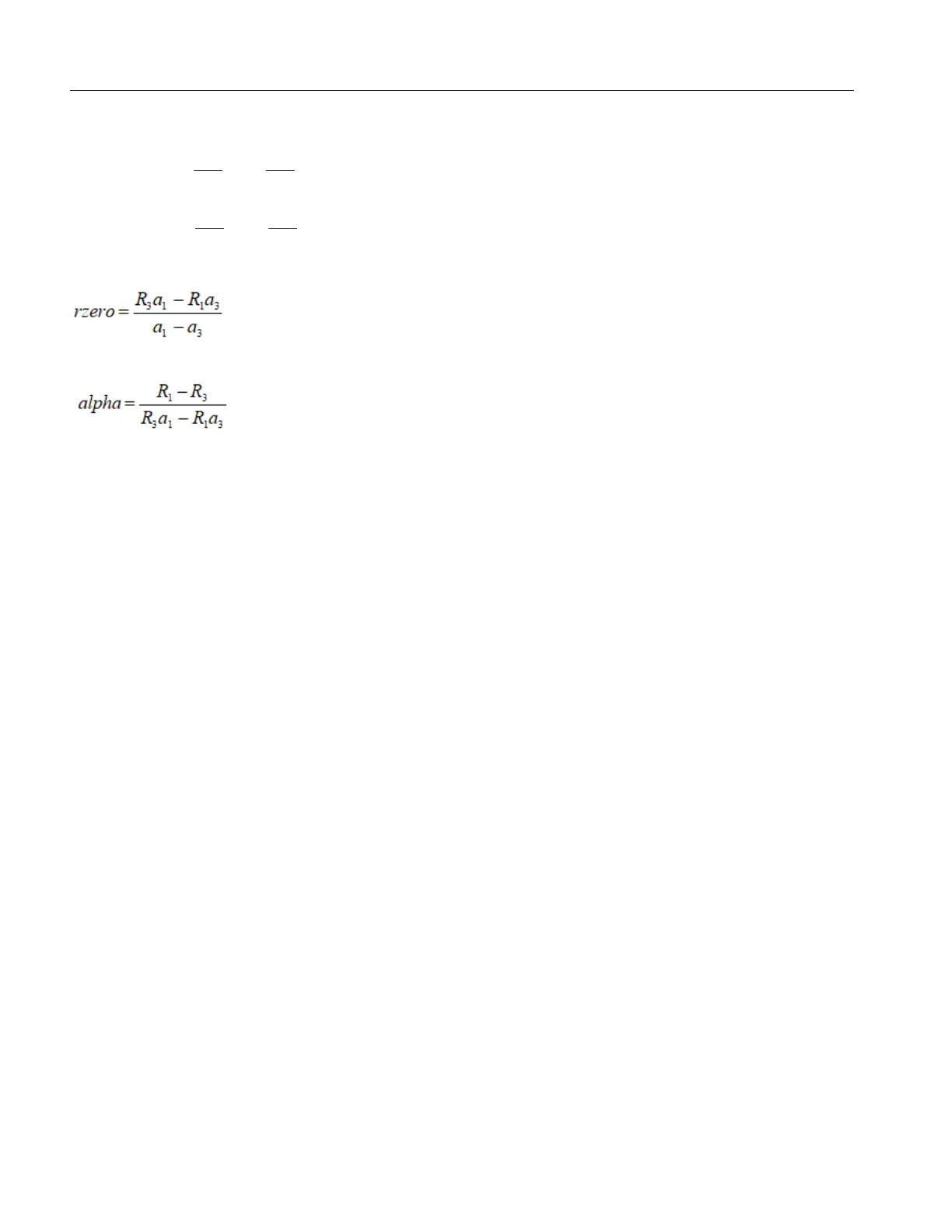
Compute R0 & ALPHA
Where:
delta is the new value of DELTA computed above
Program the new values for DELTA (delta), R0 (rzero), and ALPHA (alpha) into the Product with these
steps.
1. Push SET and EXIT simultaneously and then push UP until CAL shows.
2. Push SET five times until R0 is displays.
3. Push SET then use UP or DOWN until the correct numerical setting shows.
4. Push SET to accept the new value.
5. Repeat step 2 for ALPHA and DELTA.
Accuracy and Repeatability
Check the accuracy of the Product at various points over the calibrated range. If the Product does not
pass specification at all set-points, repeat the Calibration Procedure.
Maintenance
• With proper care, the Product requires very little maintenance. Refer to Safety Information.
• If the outside of the instrument becomes soiled, wipe it clean with a damp cloth and mild detergent.
Do not use harsh chemicals on the surface which can damage the paint.
• Keep the well of the calibrator clean and clear of any foreign matter. Do not use chemicals to clean
the well.
• Handle the Product with care. Avoid knocking or dropping the instrument.
• If a hazardous material is spilled on or inside the Product, take the appropriate decontamination
steps as outlined by the national safety council with respect to the material.
−
+=
100
1
100
11
11
TT
deltaTa
−
+=
100
1
100
33
33
TT
deltaTa



 To Next Page