Infusion Pump Analyzer
Operating Instructions
3
3-7
Utilities
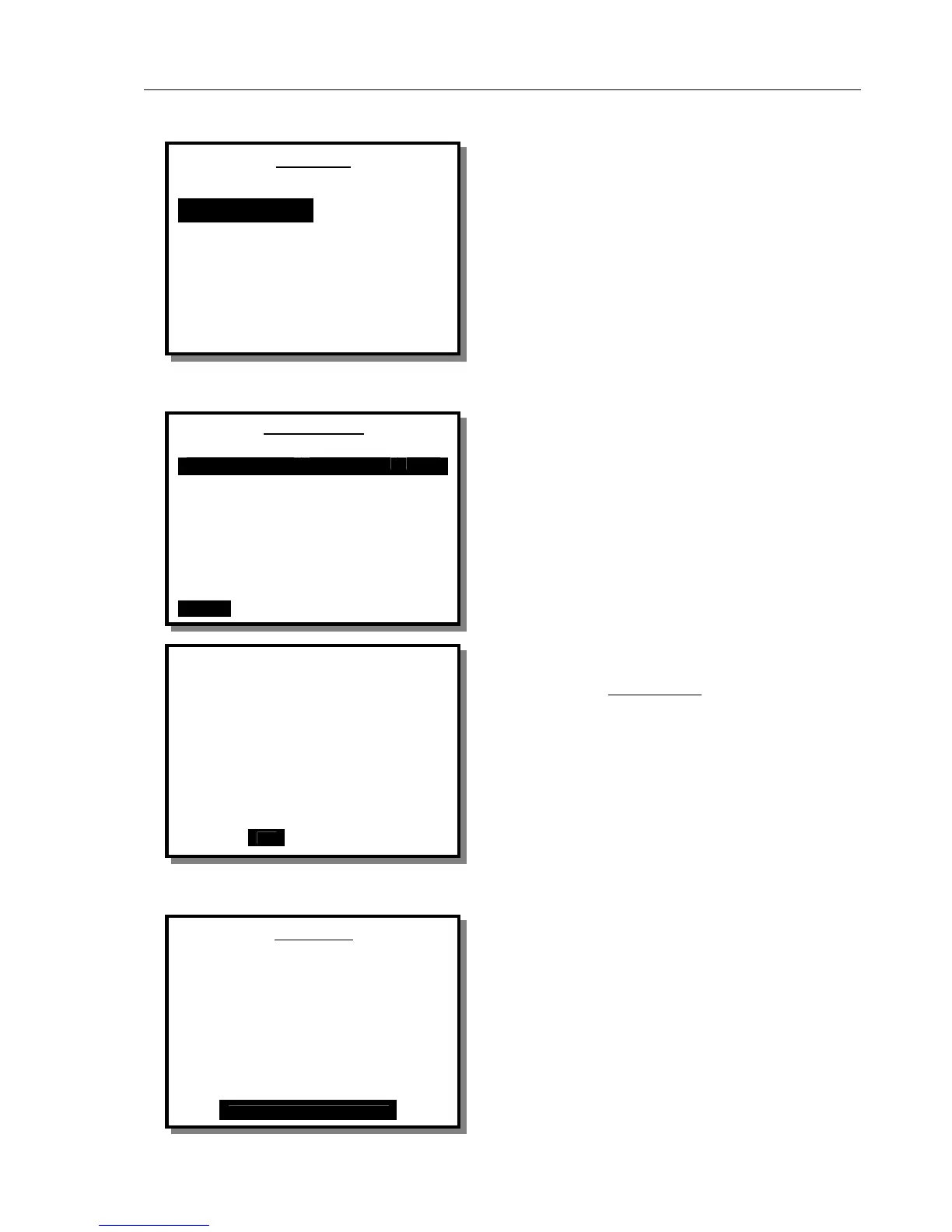
This screen is displayed whenever UTIL is selected.
Using the arrow keys to move the cursor to the required
utility, in this case RECALL TESTS is selected, press
ENTER and the set-up screen for the chosen utility is
displayed.
Choosing ESC and pressing ENTER will default to the
STATUS ALL CHANNELS screen.
Recall Tests
The cursor is moved by pressing the up and down
buttons. When the required stored test is selected,
pressing ENTER brings up the menu selections shown
at the bottom of the screen. User’s then have the options
to PRINT text data, DEL or ESC and return to
UTILITIES main screen.
Note: If you select DEL and press ENTER a warning
screen is displayed as shown. Selecting YES and
pressing ENTER will DELETE ALL
results. Make
sure you have printed or downloaded any records that
you need. Selecting NO returns to the UTILITIES
menu.
Set Clock
To Set the Clock use the left and right keys to select the
item to be changed then the up and down keys to
change to the required setting.
When correct settings are achieved press ENTER to
accept these settings.
These settings cannot be altered once a test is in
progress.
UTILITIES
RECALL TESTS REPORT HEADER
SET CLOCK RS232 PORT
LCD SETUP ENG TESTS
PRINTER TEST PARAMETERS
ESC
Recall Tests
Control No Date Time
Dual Flow 03-Sep-03 14:31
Dual Flow 04-Sep-03 12:05
PCA Test 12 06-Sep-03 10:45
PRINT DELETE ESC
Set Clock
Date 00–Jan–00 Time 09 : 57 : 25
Use the left and right arrow
keys to select.
Use the up and down arrow
keys to change.
Press ENTER to Accept
WARNING
This will delete ALL results!
Are you sure?
NO YES



 To Next Page