IDA-4 Plus
Operators Manual
3-28
PCA Activity with Basal Flow
This will follow the PCA Activity Only scenario
described above, but with a basal flow rate set. The
basal flow rate should also be entered on the
IDA-4 Plus.
Basal Flow Only
When a PCA pump is operated with the basal flow rate
only, it should be tested using the normal single flow
rate method.
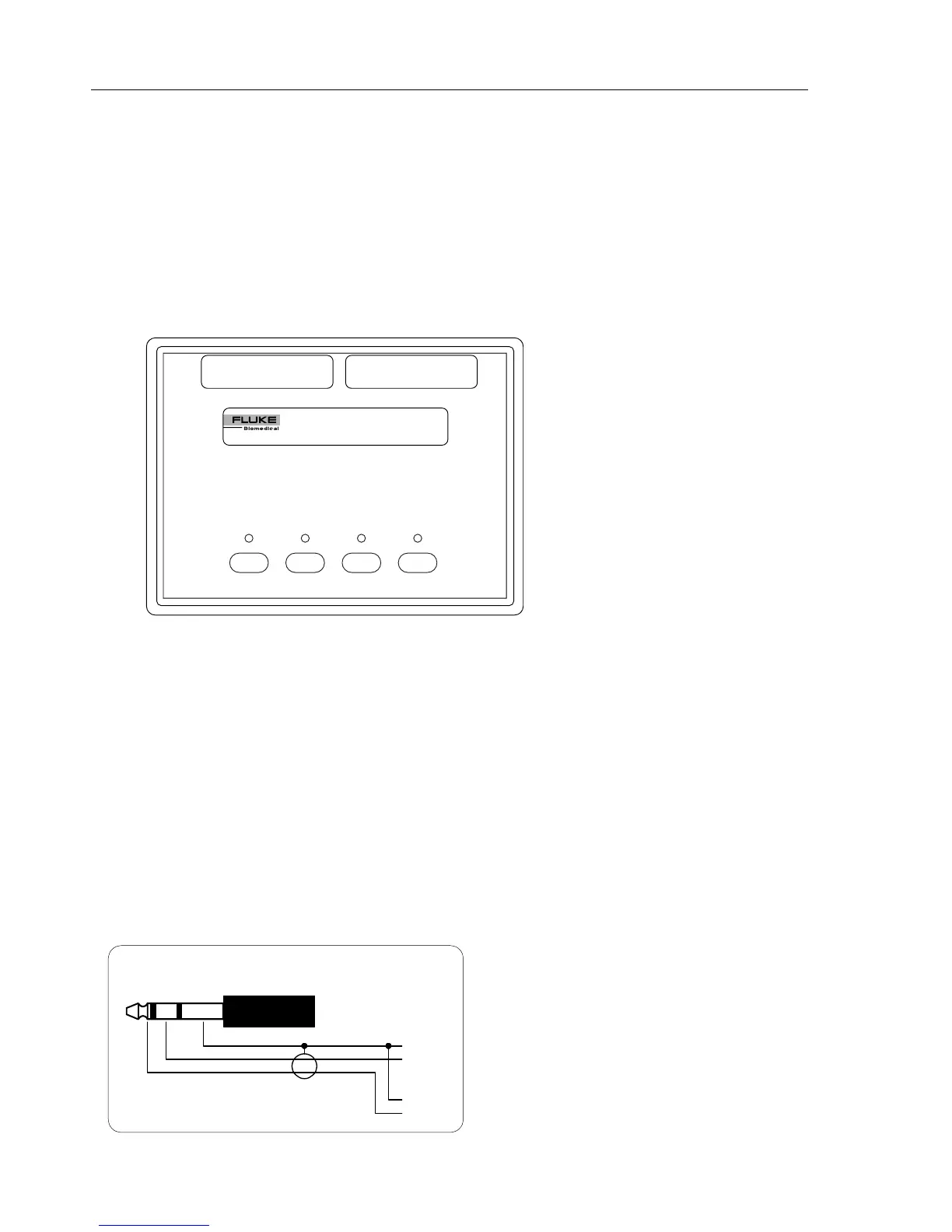
Optional PCA Trigger / Remote Call Interface
CHANNEL 1
READY
CH1 CH2
PCA TRIGGER OUTPUT
REMOTE CALL INPUT
IDA4 Plus
PCA TRIGGER/REMOTE CALL INTERFACE
CH3 CH4 CH1 CH2 CH3 CH4
TRIGGER
CHANNEL 2
READY
CHANNEL 3
READY
CHANNEL 4
READY
TRIGGER TRIGGER TRIGGER
The PCA Trigger / Remote Call Interface allows PCA
pumps to be triggered by the IDA-4 Plus. It also has
connections to allow alarm conditions of pumps to be
monitored. It connects to the IDA-4 Plus via the 15
Way socket on the rear panel.
Trigger
One trigger button is provided for each channel, to
trigger a PCA pump via the PCA trigger output. This
eliminates the need to ensure that the IDA-4 Plus is
displaying the correct screen.
Ready
This LED will illuminate indicating that a bolus can be
triggered on that channel. When a bolus is detected the
LED will extinguish.
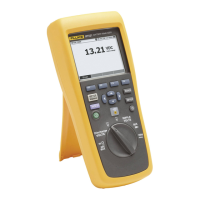
PCA Trigger Output
The PCA Trigger Output jacks (one for each channel)
provide floating relay contacts. Normally open contacts
are available between ring and shield. Normally closed
contacts are available between tip and shield. (Refer to
the pump manufacturer’s service manual when
preparing a PCA trigger cable).
from interface box
1/4” phono
shield
PCA trigger output configuration
normally
open
contacts
normally
closed
contacts
to PCA pump
tip
ring
gnd



 To Next Page