Home
Fluke
Test Equipment
CertiFiber Pro
Page 32
Fluke CertiFiber Pro - Page 32
150 pages
Manual
Save Page as PDF
To Next Page
To Next Page
To Previous Page
To Previous Page
Loading...
CertiFiber Pro Fiber
Optical Loss
T
est Set
Users Manual
22
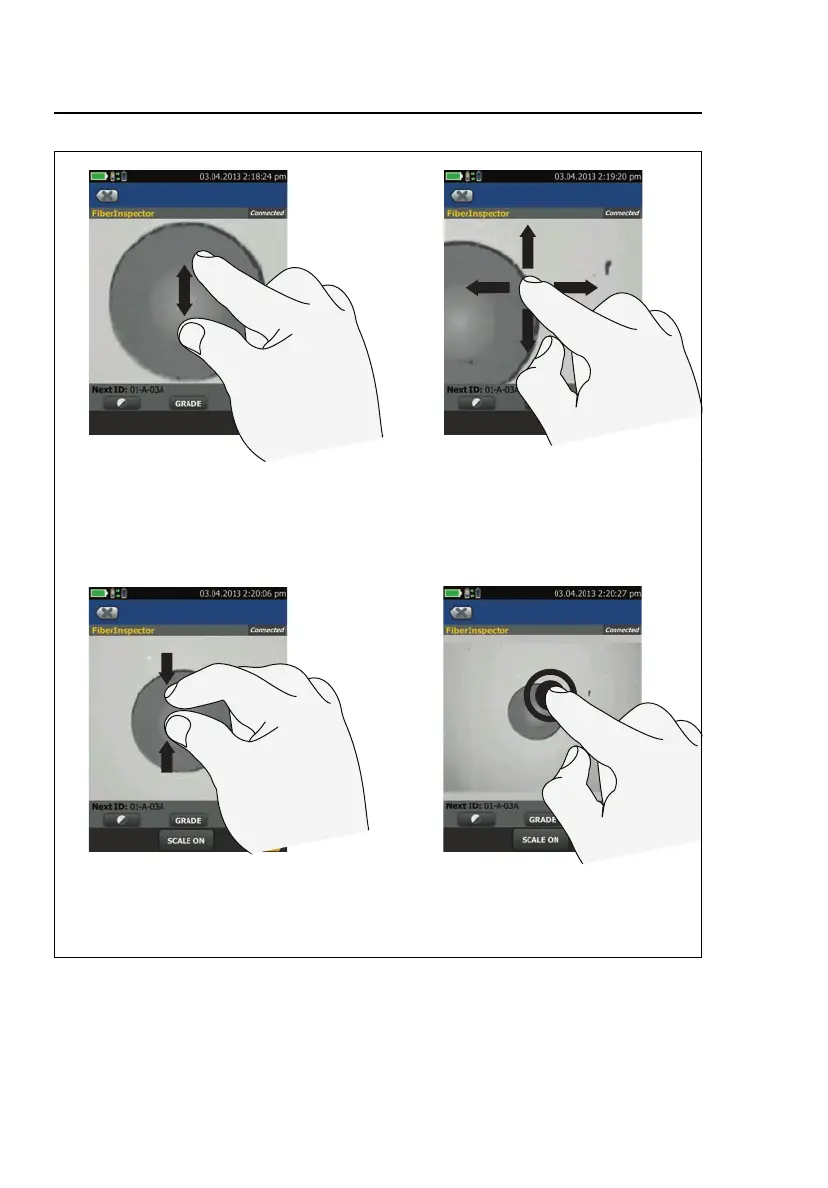
HGD45.EPS
Figur
e 6. How to Zoom the Scr
een
To quickly go back to 1:1
magnification, double-tap the
screen.
To zoom in, use t
he reverse-
pinch gesture
To zoom out, use the pinch
gesture
To move the image, drag it in
any direction.
31
33
Table of Contents
Main Page
Default Chapter
3
Table of Contents
3
Chapter 1 Get Acquainted
11
Overview of the Certifiber Pro Optical Loss Test Set Modules
11
Contact Fluke Networks
12
Register Your Product
12
Technical Reference Handbook
13
Additional Resources
13
Supplements and Updated Manuals
13
Kit Contents
13
CFP-100-M Kit
14
CFP-100-S Kit
14
CFP-100-Q Kit
15
CFP-Q-ADD Kit
16
Safety Information
17
Connectors, Keys, and Leds
20
The Home Screen for Certifiber Pro Modules
25
AC Adapter and Battery
28
Charge the Battery
28
Check the Battery Status
28
How to Use the Touchscreen
31
Verify Operation
33
Change the Language
33
Buttons to Do Tests and Save Results
33
Overview of Memory Functions
35
Options for Cable Ids
36
How to Remove and Install the Connector Adapters
37
How to Install a Strap
39
How to Remove or Install a Module
39
About Linkware and Linkware Stats Software
41
Chapter 2 How to Clean Fiber Endfaces
43
How to Use a Fluke Networks IBC Oneclick Cleaner
46
How to Use Wipes, Swabs, and Solvent
48
To Clean Bulkhead Connectors
48
To Clean the Optical Connectors on the Modules
49
To Clean Fiber Adapters
49
To Clean Connector Ends
49
Chapter 3 How to Certify Fiber Cabling
51
Requirements for Reliable Fiber Test Results
51
About the Reference for Fiber Tests
52
When to Set the Reference
52
Good Reference Values
53
How to See the Reference Values
54
About Test Reference Cords and Mandrels
54
About the EF-TRC (Encircled-Flux Test Reference Cords)
54
About APC Connectors
56
About Standard Mandrels
57
Settings for Fiber Tests
58
About 1 Jumper Reference Connections
65
Autotest in Smart Remote Mode
65
Step 1: Set the Reference in Smart Remote Mode
67
Step 2: Measure the Loss of the Test Reference Cords You will Add
69
Step 3: Do an Autotest in Smart Remote Mode
70
Autotest Results for Smart Remote Mode
71
Fiber Ids for Saved Results in Smart Remote Mode
71
Autotest in Loopback Mode
74
Step 1: Set the Reference in Loopback Mode
76
Step 2: Measure the Loss of the Test Reference Cord You will Add
78
Step 3: Do an Autotest in Loopback Mode
79
Autotest Results for Loopback Mode
80
Autotest in Far End Source Mode
82
Auto Wavelength Modes
82
Step 1: Set the Reference in Far End Source Mode
84
Step 2: Measure the Loss of the Test Reference Cord You will Add
87
Step 3: Do an Autotest in Far End Source Mode
87
Autotest Results for Far End Source Mode
88
Bi-Directional Tests
90
Chapter 4 The Fiberinspector Test
93
How to Do the Fiberinspector Test
93
Chapter 5 The Visual Fault Locator
99
Visual Fault Locator Applications
99
How to Use the VFL
100
Chapter 6 The Power Meter and Light Source
103
How to Monitor Power and Loss
103
How to Control the Light Source
107
Use the Display to Control the Main Tester's Light Source
108
Use the Module's Button to Control the Light Source
108
Chapter 7 Test Results
111
View Saved Results
111
How to Add a Result to a Saved Result
114
How to Replace a Saved Result that Failed
115
Delete, Rename, and Move Results
116
Manage Results on a Flash Drive
117
Upload Results to a PC
118
View the Memory Status
120
Chapter 8 Projects
121
Why Use Projects
121
Set up a Project
122
The PROJECT Screen
122
The CABLE ID SETUP Screen
125
About Next ID Sets
125
Manage Projects on a Flash Drive
128
Copy Project Settings to Other Testers
129
Chapter 9 Maintenance
131
Maintenance
131
Verify Operation
132
Clean the Tester
132
Clean the DI-1000 Video Probe
132
Traceable Calibration Period
133
See Information about the Tester
133
Update the Software
133
Extend the Life of the Battery
138
Store the Tester
138
Remove the Battery
138
Calibration
139
If the Tester Does Not Operate as Usual
139
Options and Accessories
140
Certifications and Compliance
141
Regulatory Information
141
Appendix A: Reference Method Names
143
Appendix B: Modified 1 Jumper Reference Method
145
Other manuals for Fluke CertiFiber Pro
Getting Started Guide
10 pages
Related product manuals
Fluke CertiFiber
57 pages
Fluke CableIQ
92 pages
Fluke CableIQ CIQ-100
16 pages
Fluke CombiScope PM3380B
297 pages
Fluke CombiScope PM3394B
297 pages
Fluke CombiScope PM3370B
297 pages
Fluke Oscilloscope Calibration
60 pages
Fluke 725
72 pages
Fluke 6200
39 pages
Fluke 5500A
296 pages
Fluke 5320A
196 pages
Fluke ScopeMeter 123
170 pages










 To Next Page