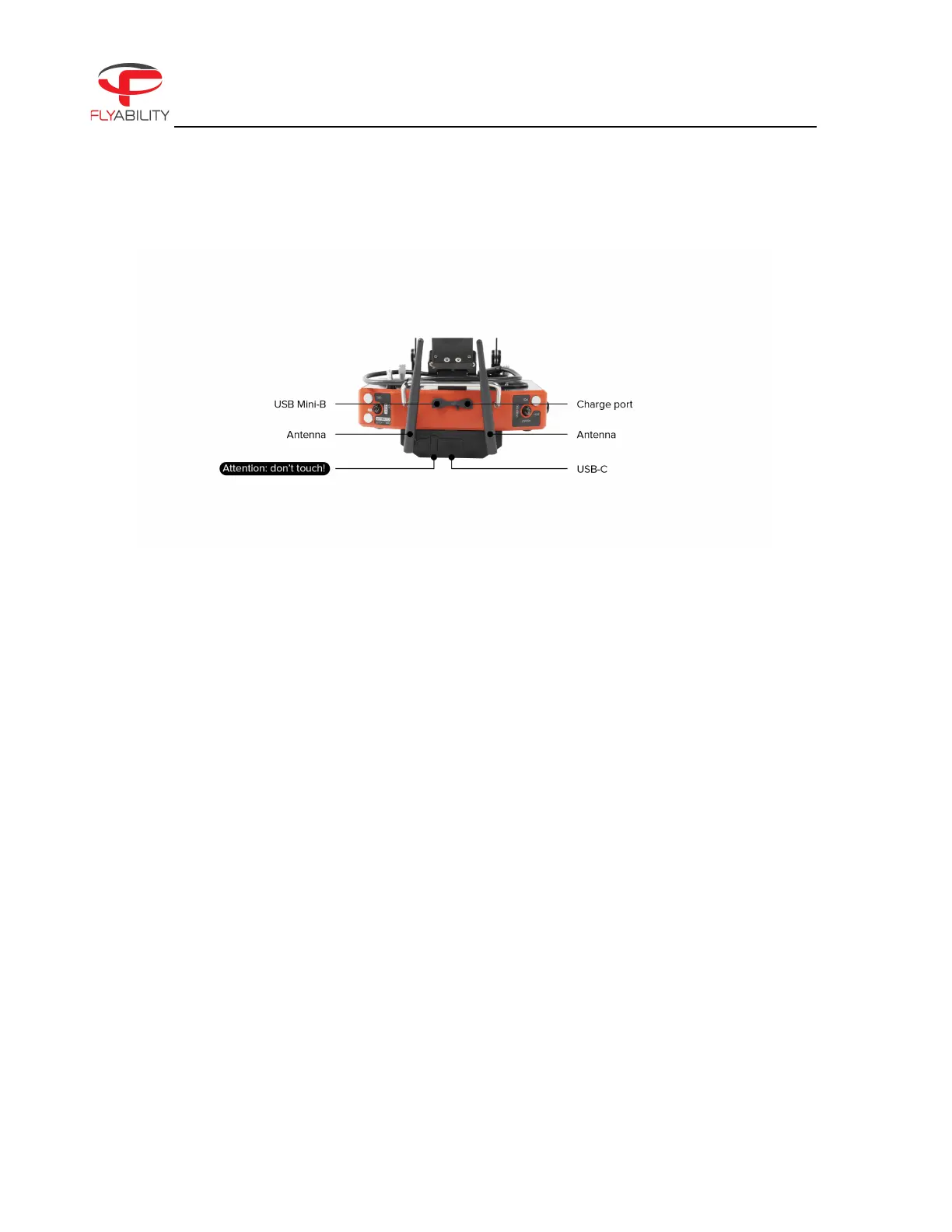
Figure 2.11: Remote Control Overview
USB-C PORT
Use this port to connect the RC to the tablet.
ANTENNA
We recommend attaching the antennas before powering on the unit. Operating the system without the
antennas attached will significantly reduce range and might damage the controller.
CHARGE PORT
This port connects the controller to the controller charger to charge the internal battery of the
controller.
USB MINI-B
This USB connection can be used to connect the controller to a PC for firmware updates.
2.4. LiDAR payload
ELIOS 3 can carry an optional LiDAR payload. The LiDAR data is used in real time by the drone to generate a 3D
Live Map of the surrounding environment. The 3D Live Map is streamed directly to the pilot on the tablet for
improved situational awareness. The user can see both the live visual feed and the 3D Live Map on the tablet,
and can choose which of the two to make the primary image. LiDAR data is saved on ELIOS 3’s on board SSD
and can be post-processed to generate high accuracy point cloud models of the flight environment through
an external software (GeoSLAM).



 To Next Page