4544
Allow your FLYER specialist retailer to
adjustthesettingsofthehandlebarsand
the stem. This can be done in various
waysdependingonthemodel.
Adjustingthestem
For all stems, please read the instruc-
tionssuppliedbythemanufacturer.Only
allow your FLYER specialist retailer to
workonthehandlebarsandstem.
Changing the position of the stem also
changesthepositionofthehandlebars.
You should always be able to safely
reachandusegripsandcontrols.Han-
dles with a pronounced wing shape may
needtoberepositioned.
Makesurethatallcablesandleadshave
asufcientlengthtoallowforallpossible
steering movements when changing the
handlebarandstemposition.
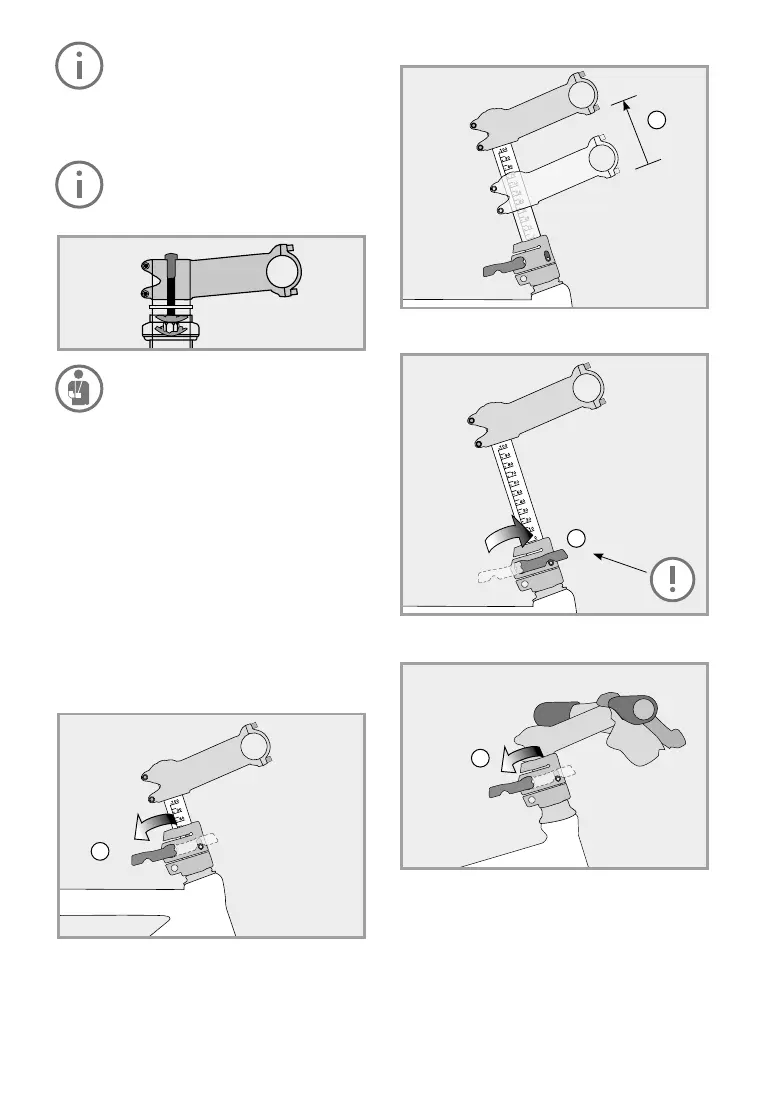
SpeedlifterTwist
The Speedlifter allows you to adjust the height
ofthehandlebarsinonlyafewmovements.The
Twistsystemmakesitpossibletoturnthehandle-
bars 90 degrees to save space while transporting
andstoringyourFLYER.
Open the quick-release lever of the Speedlifter
(1).
1
Movethehandlebarstothedesiredposition(2).
Closethequick-releaselevercompletelytofasten
thehandlebars(3).
Openthequick-releaseleverinordertoturnthe
handlebarssideways(1).
2
3
1


 To Next Page