36
lected on the contacts and this will lead
to a short circuit. Do not connect the bat
-
tery to the charger immediately after a
sudden temperature change from cold to
warm. Wait until both devices have
reached room temperature before con
-
necting the charger or the battery.
Only charge and store the battery and
charger in a dry indoor space and keep
themawayfromhotandammableob
-
jects.
Donotexposethechargertorainorwet
environments. If water enters the char
-
ger, there is a risk of electric shock.
The battery can at any time be charged outside
or installed in the bicycle without reducing its life
span. Interrupting the charging process does not
damage the battery.
The battery is equipped with a temperature mon
-
itor that permits charging only within a tempera-
ture range of 0 °C to 40 °C.
In this case, separate the battery from the charger
and wait until it has reached operating tempera
-
ture. Only reconnect the charger when it has
reached the permitted operating temperature.
The charger itself can also indicate problems via
theredLEDashing.
Chargerstatusdisplay(LED):
The LED on the charger indicates the following
states:
-ashinggreen-->standby(nobatteryconnec
-
ted)
- continuous red --> battery charging
- continuous green --> battery fully charged
-ashingred-->chargererror
Blinking
patternof
charger LED
Description Action
Blinking red
Charging er
-
ror
An error has
occurred in
the battery
or charger.
Charging
cannot be
continued.
Remove any
dirt from the
terminals and
plugs. If the
problem per
-
sists, contact
your FLYER
specialist
retailer.
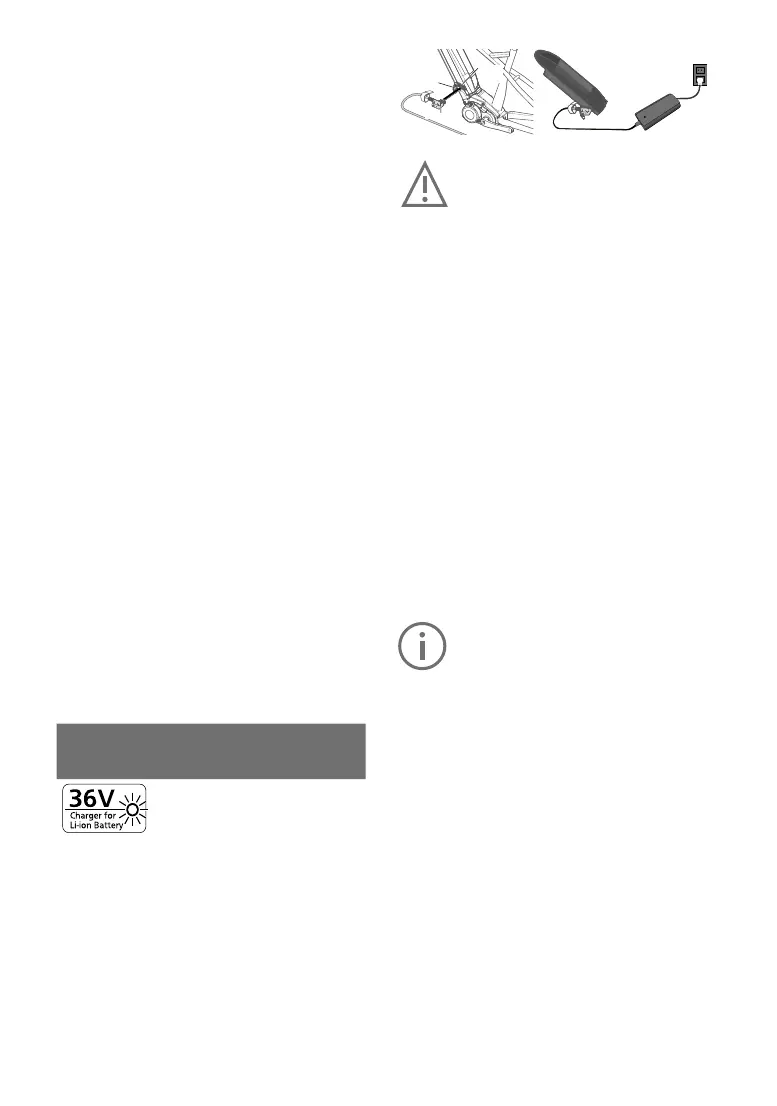
1 Remove the rubber cap
Open the rubber cap on the battery. Connect the
mains plug to a mains socket (220 V – 240 V AC) and
connect the charger to the battery.
Rubber cap
Charger plug
charger
connector
Do not connect the charger to the mains
socket immediately after a sudden tem
-
perature change from cold to warm. It is
possible that condensed water has col
-
lected on the contacts and this will lead
to a short circuit.
Do not connect the battery to the charg
-
er immediately after a sudden tempera-
ture change from cold to warm. Wait until
both devices have reached room tem
-
perature before connecting the charger
or the battery. Always charge and store
the battery and charger in a dry, covered
environment and only under supervision.
2 Check the LED charge status indicator
Check whether the charge status LED is lit up.
The LED lights up according to the charge status.
ThechargestatusLEDgoesowhenthecharg
-
ing process has been completed. The charging
time takes longer if the battery temperature is too
low or too high. A fully charged battery cannot be
charged any further.
During charging, the following messages may be
displayed by the battery and charger via LEDs:
The battery may not be recharged when
it indicates a fault. The battery might be
damaged after being dropped or due to
mechanical impact, even when there is
novisibleexternaldamage.
Such batteries must therefore be in
-
spected by a FLYER specialist retailer.
Never try to open a battery or to repair it.
Damaged batteries must not be posted.
3Pulloutthepowerplugfromtheplugsocket
After disconnecting the battery from the charger,
disconnect the power supply plug from the wall
socket.
Beforeusingthebattery,besuretormlytighten
the rubber cap.
Insertingthebattery
First, place the battery into the lower holder of the
e-bike and move its upper part towards the ve
-
hicle until the lock audibly latches into the upper
holder.
Ensure that the battery is correctly positioned in
the holder.



 To Next Page