34
Installation and Operation Manual
SystemsSystems
2001 and 2002
These FoamPro systems are designed to be easy to diagnose and service. There are several
major components. Servicing the system involves isolation of the failed component and replacing
it. There are no user serviceable internal components. Due to the reliable nature of modern
electronics, most failures are traced to faulty cables or wiring problems. A diagnostic mode is built
into the system to help isolate problems.
TROUBLESHOOTING
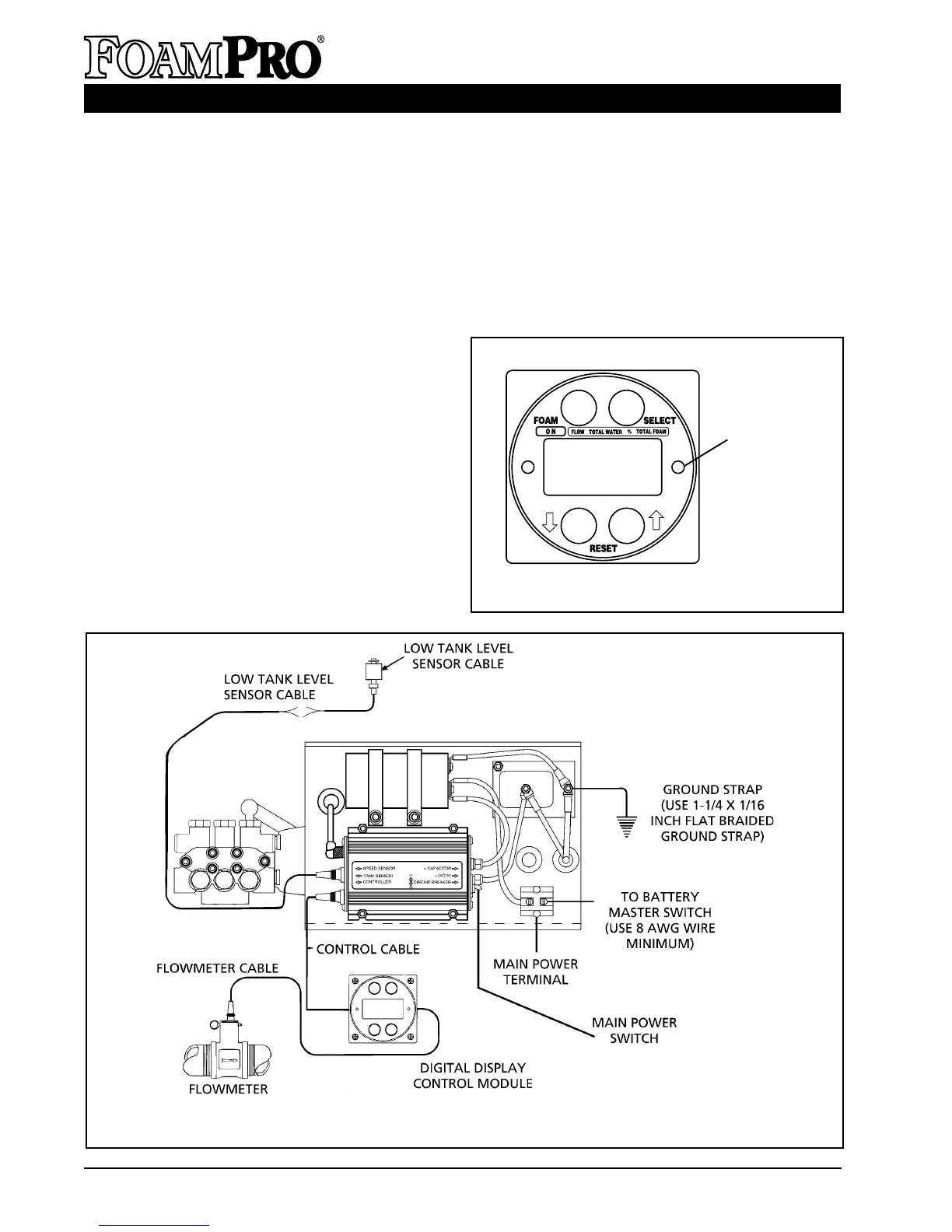
Figure 29. FoamPro 2002 Electrical Wiring Diagram
ENTERING DIAGNOSTIC MODE
Diagnostic mode is entered by removing the
center screw and o-ring on the right hand side
of the Digital Display Control Module (see
Figure 28) using a
3
/32 inch Allen wrench. Once
the screw is removed, press and release the
switch located under the screw.
To exit the diagnostic mode, press and release
the switch again. The word "HYPRO” will
appear on the display followed by a zero after
several seconds. REPLACE THE COVER
SCREW AND O-RING WHEN DONE.
COVER SCREW
TO BE
REMOVED
Figure 28. Diagnostic Switch Location
12
HELLO
HYPRO



 To Next Page