PBX configuration FortiGate Voice web-based manager configuration reference
FortiGate Voice Version 4.0 Administration Guide
30 01-400-112851-20100127
http://docs.fortinet.com/ • Feedback
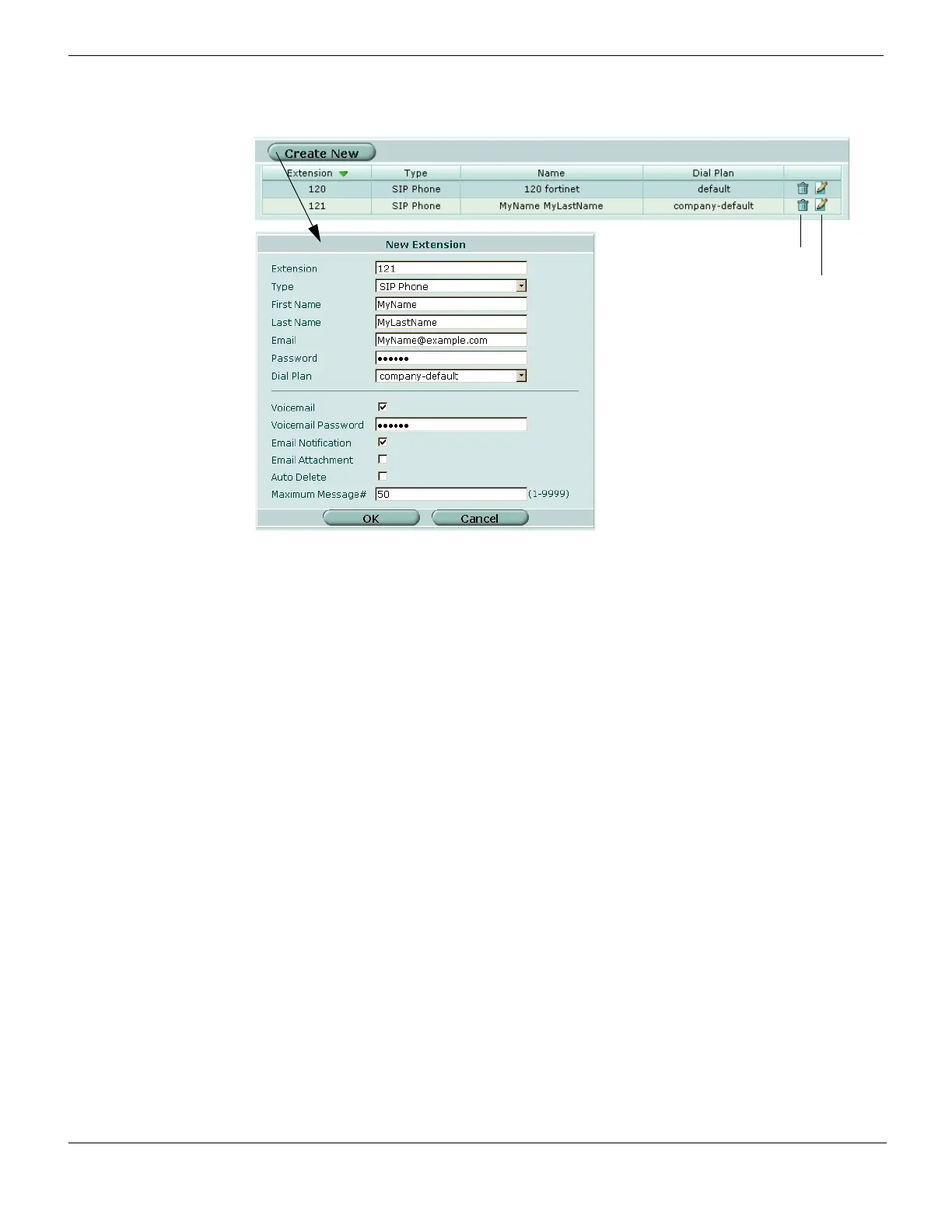
Figure 6: Configuring extensions
General extension settings
Create New Select to create an extension.
Extension The extension number.
Type The type of extension the number is, for example, SIP Phone.
Name The name of the extension.
Dial Plan The dial plan that will be used for that extension.
Delete icon Select to delete an extension.
Edit icon Select to change the extension’s settings.
Extension configuration settings
Extension Enter the extension number.
Type Select the type of extension. You can choose from SIP Phone, IVR, or
Conference.
First Name Enter the first name of the person that will be using this extension.
Last Name Enter the surname of the person that will be using this extension.
Email Enter the email address of the person that will be using this extension.
Password Enter the password of that accesses the email address.
Dial Plan Select the dial plan that will be used with this extension from the drop-
down list.
Voicemail Select if you want to have voicemail available for this extension.
Voicemail Password Enter a voicemail password for accessing the voicemail.
Email Notification Select to have an email sent to the email address given in the Email field
so that the person is notified when a voicemail message is in their
voicemail message inbox.
Email Attachment Select to attach the actual voicemail message to the notification email.



 To Next Page