EasyManua.ls Logo

Fostex FD-8 - Page 16

Fostex FD-8
28 pages
Print Icon
To Next Page IconTo Next Page
To Previous Page IconTo Previous Page
Loading...
FDSteX
Rerecording
part
of
a
song
(Punch
In/Out)
You
can
rerecord
only
part
of
a
song
with
which
you
are
not
satisfied
or
in
which
you
have
found
a
mistake.
This
operation
is
called
“Punch
In/Out
Recording.”
“Punch
In”
means
switching
from
playback
to
recording
and
“Punch
Out”
means
switching
from
recording
to
playback.
Punch
In/Out
recording
can
be
done
auto¬
matically
(Auto
Punch
In/Out)
or
manually
using
a
foot
switch
(Manual
Punch
In/Out).
This
section
explains
Auto
Punch
In/Out
recording.
To
perform
this
operation,
you
need
to
set
the
punch-in
time
and
punch-out
time.
The
FD-8
features
rehearsal
mode,
in
which
you
can
first
practice
your
punch
in/out
until
you
are
satisfied.
As
an
example,
we
rerecord
part
of
the
guitar
performance
we
have
recorded
on
track
1
in
the
previous
section.
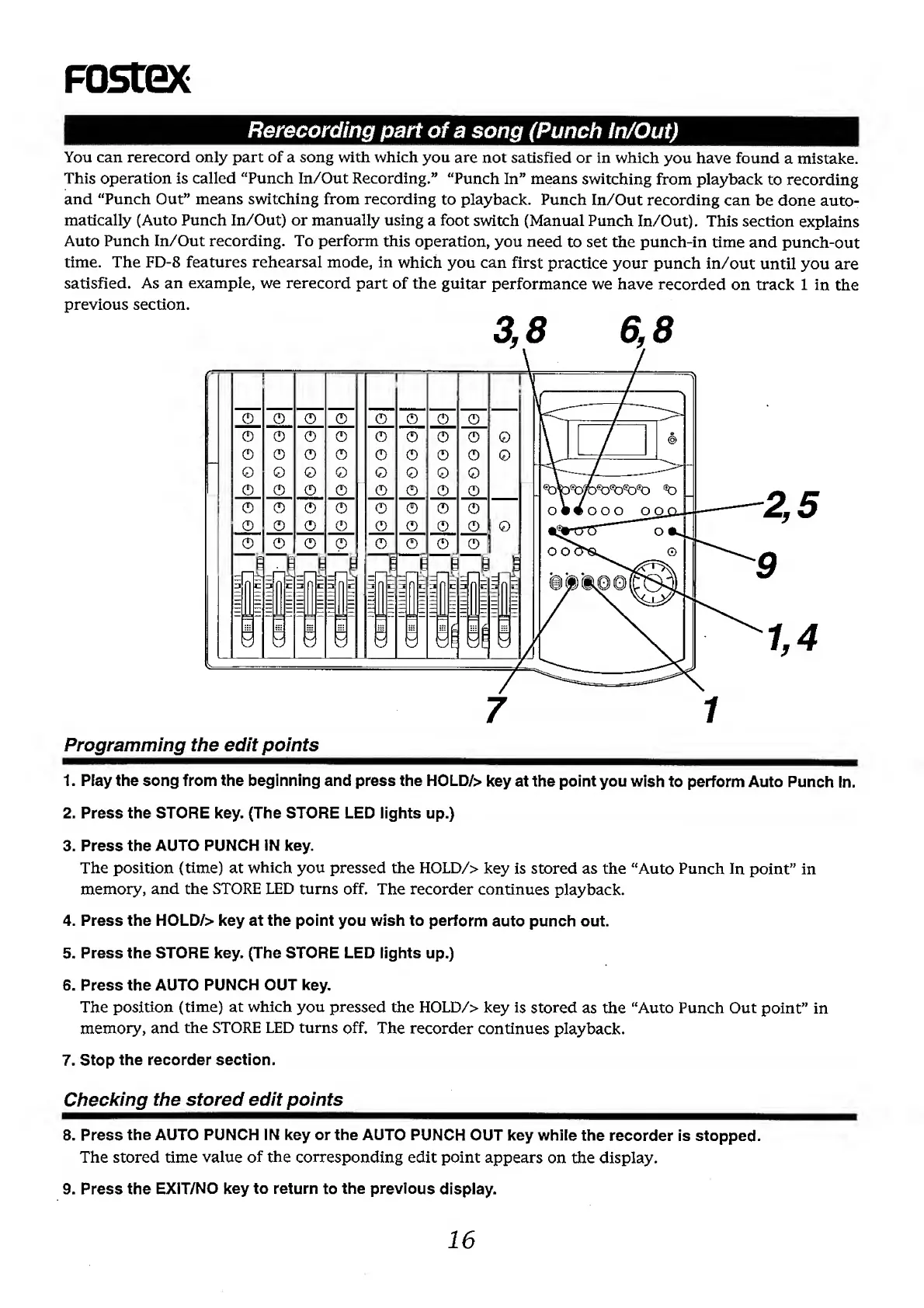
Programming
the
edit
points
1.
Play
the
song
from
the
beginning
and
press
the
HOLD/>
key
at
the
point
you
wish
to
perform
Auto
Punch
in.
2.
Press
the
STORE
key.
(The
STORE
LED
lights
up.)
3.
Press
the
AUTO
PUNCH
IN
key.
The
position
(time)
at
which
you
pressed
the
HOLD/>
key
is
stored
as
the
“Auto
Punch
In
point”
in
memory,
and
the
STORE
LED
turns
off.
The
recorder
continues
playback.
4.
Press
the
HOLD/>
key
at
the
point
you
wish
to
perform
auto
punch
out.
5.
Press
the
STORE
key.
(The
STORE
LED
iights
up.)
6.
Press
the
AUTO
PUNCH
OUT
key.
The
position
(time)
at
which
you
pressed
the
HOLD/>
key
is
stored
as
the
“Auto
Punch
Out
point”
in
memory,
and
the
STORE
LED
turns
off.
The
recorder
continues
playback.
7.
Stop
the
recorder
section.
Checking
the
stored
edit
points
8.
Press
the
AUTO
PUNCH
iN
key
or
the
AUTO
PUNCH
OUT
key
while
the
recorder
is
stopped.
The
stored
time
value
of
the
corresponding
edit
point
appears
on
the
display.
9.
Press
the
EXIT/NO
key
to
return
to
the
previous
display.
16

Other manuals for Fostex FD-8

Related product manuals