EasyManua.ls Logo

Fostex FD-8 - Display Section

Fostex FD-8
28 pages
Print Icon
To Next Page IconTo Next Page
To Previous Page IconTo Previous Page
Loading...
FOStQX
Auto
Punch
In/Out
rehearsal
In
the
rehearsal
mode,
the
part
between
the
auto
punch
in
point
and
the
auto
punch
out
point
enters
input
monitoring
mode
and
is
not
recorded.
In
this
way,
you
can
repeatedly
practice
your
performance
technique
and
adjust
the
recording
level
until
you
are
satisfied.
Practice
in
rehearsal
mode
until
you
are
ready,
then
proceed
to
Take
mode.
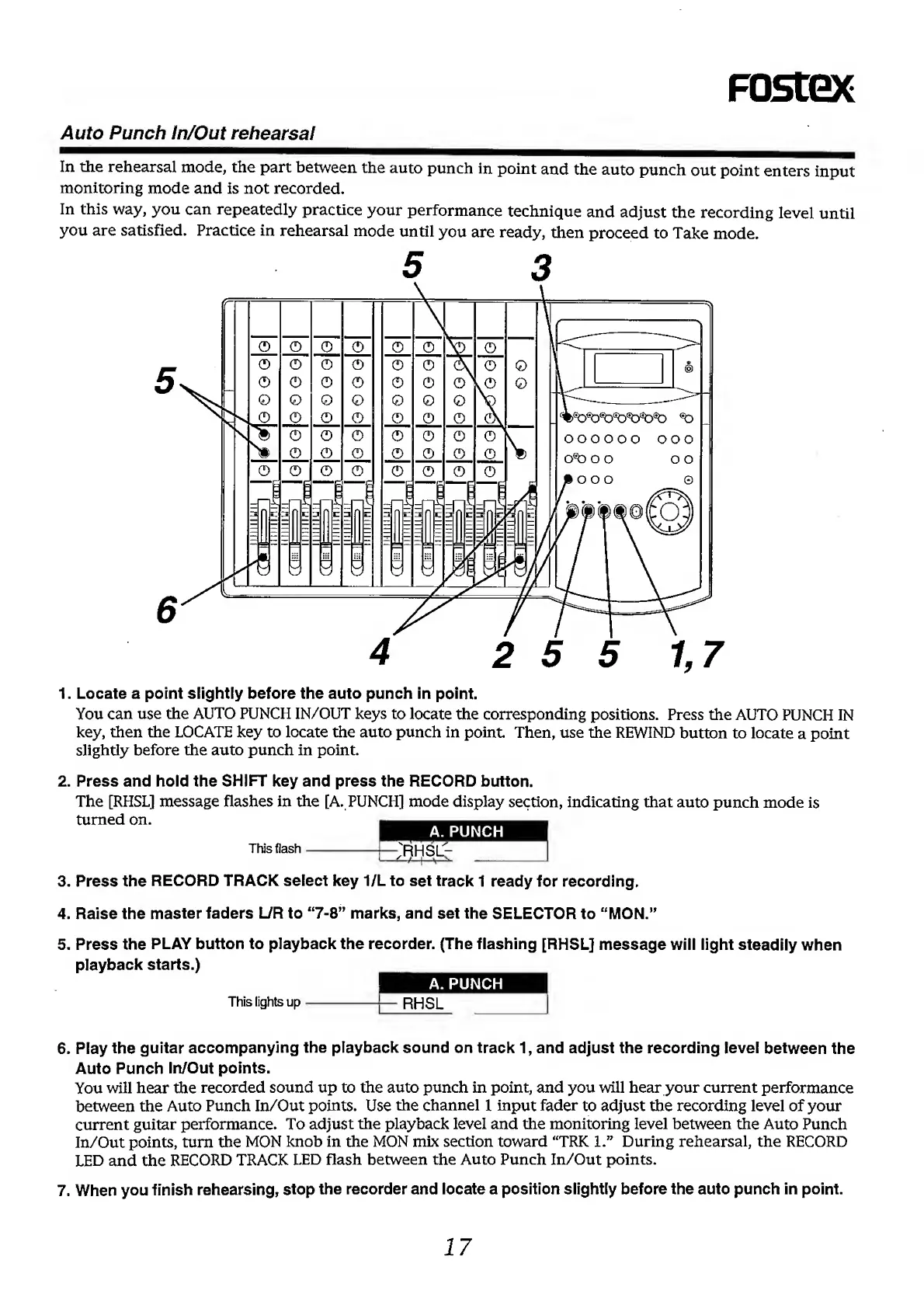
1.
Locate
a
point
slightly
before
the
auto
punch
in
point.
You
can
use
the
AUTO
PUNCH
IN/OUT
keys
to
locate
the
corresponding
positions.
Press
the
AUTO
PUNCH
IN
key,
then
the
LOCATE
key
to
locate
the
auto
punch
in
point.
Then,
use
the
REWIND
button
to
locate
a
point
slightly
before
the
auto
punch
in
point.
2.
Press
and
hold
the
SHIFT
key
and
press
the
RECORD
button.
The
[RHSL]
message
flashes
in
the
[A.
PUNCH]
mode
display
section,
indicating
that
auto
punch
mode
is
turned
on.
A.
PUNCH
This
flash->"RHSL^
-
^
/'
I
s
s
—-
3.
Press
the
RECORD
TRACK
select
key
1/L
to
set
track
1
ready
for
recording.
4.
Raise
the
master
faders
L/R
to
“7-8”
marks,
and
set
the
SELECTOR
to
“MON.”
5.
Press
the
PLAY
button
to
playback
the
recorder.
(The
flashing
[RHSL]
message
will
light
steadily
when
playback
starts.)
A.
PUNCH
This
lights
up-—
RHSL
6.
Play
the
guitar
accompanying
the
playback
sound
on
track
1,
and
adjust
the
recording
level
between
the
Auto
Punch
In/Out
points.
You
will
hear
the
recorded
sound
up
to
the
auto
punch
in
point,
and
you
will
hear
your
current
performance
between
the
Auto
Punch
In/Out
points.
Use
the
channel
1
input
fader
to
adjust
the
recording
level
of
your
current
guitar
performance.
To
adjust
the
playback
level
and
the
monitoring
level
between
the
Auto
Punch
In/Out
points,
turn
the
MON
knob
in
the
MON
mix
section
toward
“TRK
1.”
During
rehearsal,
the
RECORD
LED
and
the
RECORD
TRACK
LED
flash
between
the
Auto
Punch
In/Out
points.
7.
When
you
finish
rehearsing,
stop
the
recorder
and
locate
a
position
slightly
before
the
auto
punch
in
point.
17

Other manuals for Fostex FD-8

Related product manuals