17
T1000 TPMS Service Tool Manual_English_V1.01
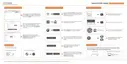
Figure 4-8 Sample One Wheel Test Data Screen
[Pos] – Indicates the wheel sensor position.
[ID-H/D] – Shows sensor ID data.
[KPa/Psi/Bar] – Indicates wheel pressure.
[℃/℉] – Indicates wheel temperature.
[BAT] – Indicates battery condition.
[Fre.] – Indicates the frequency of the sensor.
NOTE
Different ID format, pressure and temperature units will display at the title bar according to the
device’s system setting, please refer to 7 System Setup for detailed guidance.
4.2 Sensor Learning Process
This operation will provide detailed operations when doing TPMS relearn.
To check Sensor Learning Process:
1. Scroll with the UP/DOWN arrow keys to highlight TPMS from the Main Menu and
press the YES key to start.
2. On each screen that appears, select the correct option and then press the YES key. Do this
until the complete vehicle information is entered.
3. Scroll with the UP/DOWN arrow keys to highlight Sensor Learning Process and press the
YES key to confirm.



 To Next Page
 Loading...