27
T1000 TPMS Service Tool Manual_English_V1.01
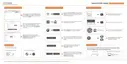
Figure 7-6 Sample Auto Power-off Setup Screen
2. Use the UP/DOWN key to increase or decrease time, and press the YES key to save and return.
Figure 7-7 Sample Auto Power-off Interval Screen
7.5 ID Format
Selecting ID format opens a dialog box that allows you to set ID data to be displayed in
hexadecimal or decimal format.
To change the ID display format
1. Scroll with the arrow key to highlight ID Format from Setup menu and press the YES key.
Figure 7-8 Sample ID Format Setup Screen
2. Press the UP/DOWN arrow key select a format and press the YES key to save and return.



 To Next Page
 Loading...