29
T1000 TPMS Service Tool Manual_English_V1.01
7.7 Temperature Unit
Selecting Temperature Unit opens a screen that allows you to set the temperature unit Celsius or
Fahrenheit degrees.
To configure temperature unit
1.Scroll with the UP/DOWN arrow keys to highlight Temperature Unit from Setup menu and
press the YES key.
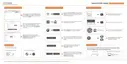
Figure 7-12 Sample Temperature Unit Setup Screen
2.Press the UP/DOWN arrow key select an item and press the YES key to save and return.
Figure 7-13 Sample Temperature Unit Selection Screen
7.8 Tire Test
Selecting Wheels to Test option opens a screen that allows you to select one wheel or all wheels
to test.
To configure wheels to test
1. Scroll with the UP/DOWN arrow keys to highlight Tire Test from Setup menu and press
the YES key.



 To Next Page
 Loading...