33
T1000 TPMS Service Tool Manual_English_V1.01
review the registered products, register new products, modify personal information or reset the
password.
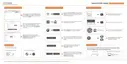
Figure 9-5 Sample Member Center Screen
6. If you forget your password, just click Sign in at the top right of the website, then click Forget
password, You are required to input your registered email address, verification code, new
password and confirmed password, click Reset password.
Figure 9-6 Sample User ID and/or Password Retrieve Screen
IMPORTANT
Before enter new password or confirm password, please enter the correct Verification Code in your
registered email.
7. A Password reset succeeded message will appear if you rest password successfully.
Now you are able to log in with your ID and the new password. If you want to change the
password, please sign in with your user name and password, then select My Profile/Reset
Password.
Figure 9-7 Sample Password Reset Succeeded Screen
8. If you forget your email or Foxwell ID, just click Sign in at the top right of the website, then click
Forgot password, and click Forget Email or Foxwell ID. You are required to input your
registered serial number.


 To Next Page
 Loading...