Part number 550-142-850/0716
63
FreeStyle
®
WALL MOUNT GAS-FIRED WATER BOILER — Boiler Manual
24 Controls and operation (continued)
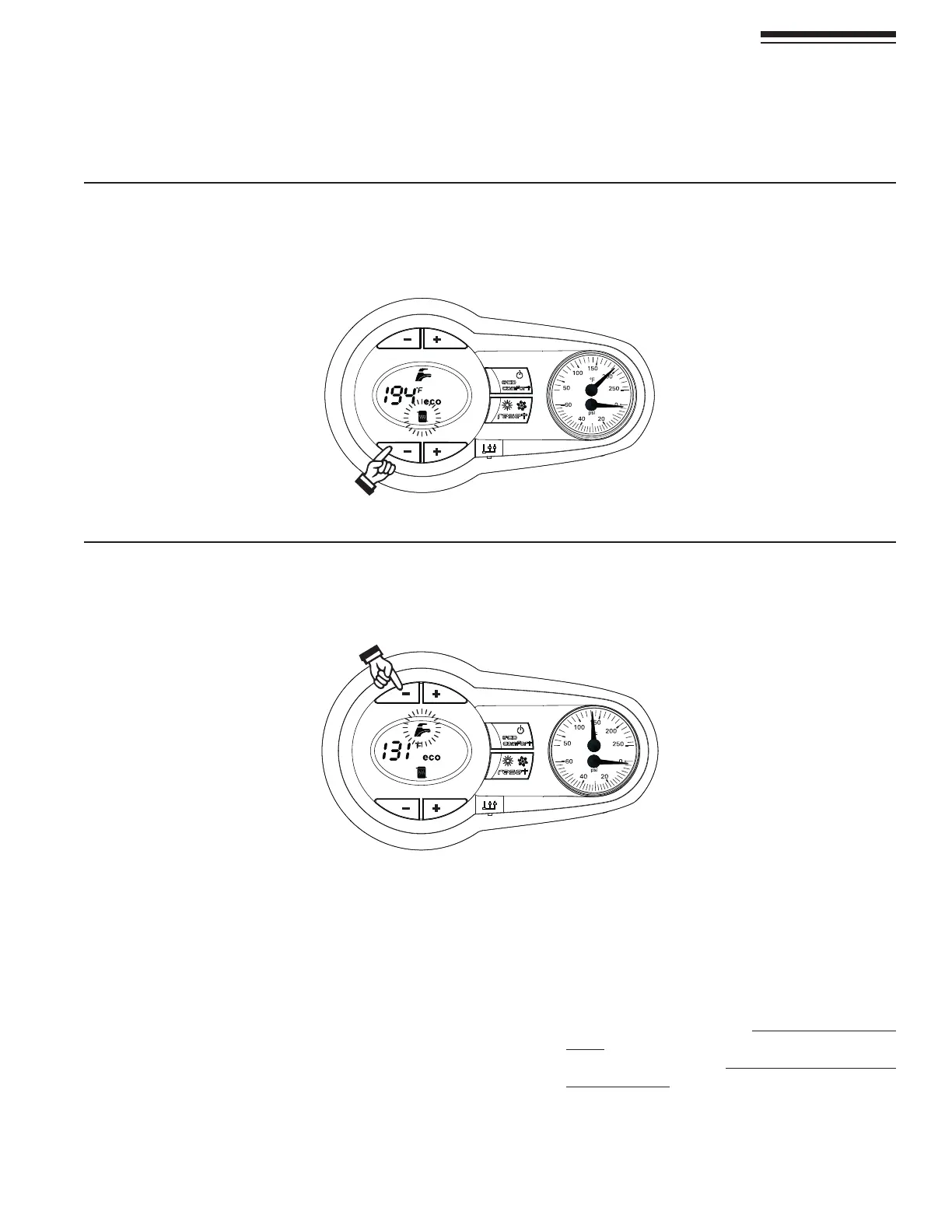
Figure 80 (EATINGTEMPERATURESETTINGS
To set the system Heating temperature, use the CH buttons, “-” to reduce water setpoint “+” to increase water setpoint (Items 3
and 4 - Figure 74, page 60)TCANBESETFROMAMINIMUMOF&TOAMAXIMUMOF&
Adjustments
Room temperature adjustment (using a
room thermostat
1. Using the room thermostat, set the temperature desired.
Controlled by the room thermostat, the boiler heats the system
water to the system delivery setpoint temperature. The boiler
shuts down when the desired temperature in the room is reached.
Economy/Comfort selection
1. The unit is equipped with a special internal device that ensures a
HIGHHOTWATERDELIVERYSPEEDANDEXCELLENTUSERCOMFORT7HEN
COMFORTMODEISACTIVETHEWATERINTHEBOILERISMAINTAINEDAT
a pre-determined temperature, which means that hot water is
available at the boiler outlet as soon as a tap is opened, i.e. with
no waiting.
2. 4HEUSERCANTURNTHEDEVICEOFFhECOvMODEISAhCOLD
STARTv BOILER BYPRESSING ECONOMYCOMFORT BUTTON
(Item 7 - Figure 74, page 60).
3. In “eco” mode the display shows the relevant symbol
(Item 12 - Figure 74, page 60). TOTURNON#/-&/24
modePRESSECONOMYCOMFORTBUTTON )TEM
Figure 74, page 60), again, the “eco” symbol will vanish
from the display.
Heating Only boiler must use Comfort mode.
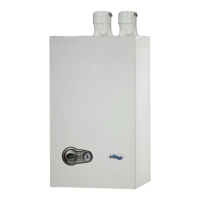
Figure 81 $OMESTICHOTWATERTEMPERATURESETTINGS
To set the Domestic hot water temperature, use the DHW buttons, “-” to reduce water setpoint “+” to increase water setpoint
(Items 1 and 2 - Figure 74, page 60)TCANBESETFROMAMINIMUMOF&TOAMAXIMUMOF&


 To Next Page