Display, Side Guard Assist, and Side Guard Trailer
on or off.
ICUC Quick Access Systems Screens
Quick Access Screens are activated by a button on
the right hand steering wheel pod. There are up to
six top-level menu options:
•
Hysteresis
•
Cruise Control
•
Transmission
•
Engine Idle Adjust
•
Power Take Off
•
Optimized Idle
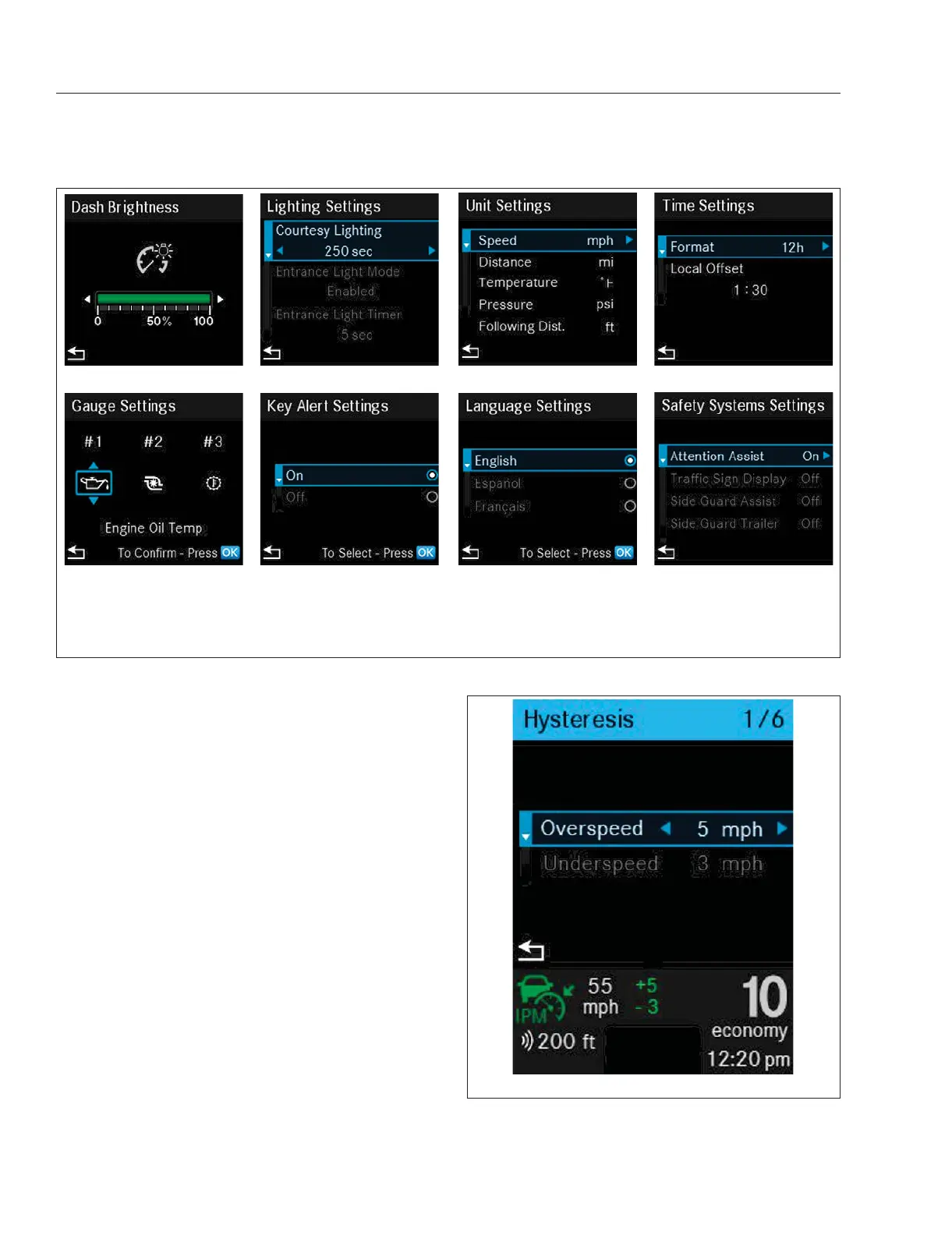
Hysteresis allows the driver to set the overspeed and
underspeed in mph (km/h). See
Fig. 3.16.
Cruise Control allows the driver to control such
features as active lane assist, lane position, and
following distance. See
Fig. 3.17. For more
information see "Instruments and Systems: ICUC" in
this chapter.
f61163504/25/2019
1 2 3 4
5 6 7 8
1. Dash Brightness
2. Courtesy and Entrance Light
Timing
3. Unit Settings
4. Time
5. Gauge Positioning
6. Key Alert
7. Language
8. Safety Systems
Fig. 3.15, ICUC User Settings Screens
f61163704/29/2019
Fig. 3.16, Quick Access Screen: Hysteresis
Instruments
3.9














 To Next Page