S90-010 CS (APR 08) FRICK
QUANTUM™ COMPRESSOR CONTROL PANEL
Page 42 COMMUNICATIONS SETUP
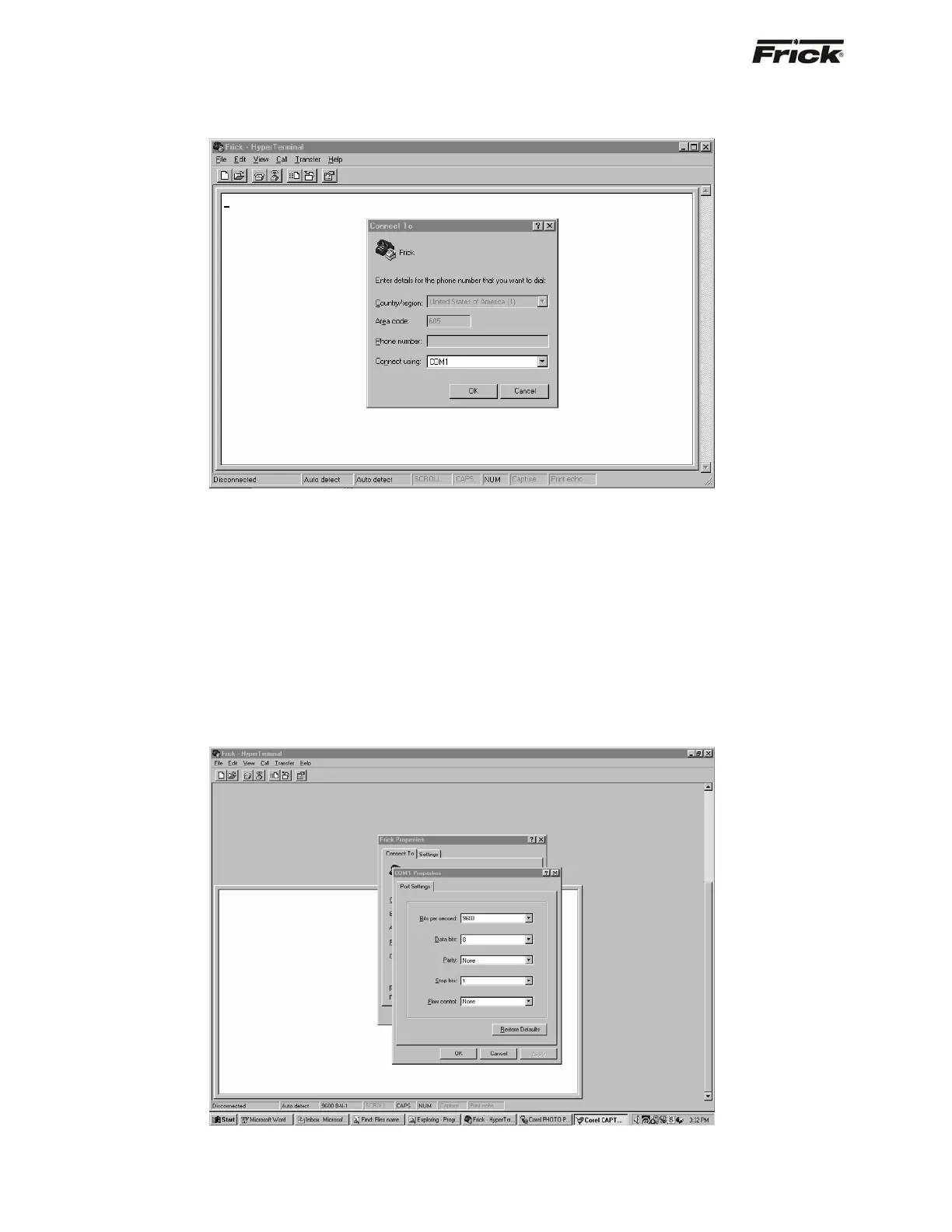
A new dialog box will be shown asking to select a Com
port (choose the Com port that your communications cable
is attached to, this will normally be Com-1). The phone
number box should be blank. Click on [OK].
The Com-1 properties dialog box will now appear. The
parameters in this box must match the requirements of the
protocol that you are wishing to use. The one box that
normally would need to be changed from one protocol to
the next is the Data Bits box. For Modbus, you would want
to use 7 data bits, for Frick
®
and Quantum™ protocols, use
8 data bits.
NOTE: Allen-Bradley protocol cannot be tested using
Hyperterminal.
For the purpose of this document, Frick
®
# protocol will be
used. Refer to the Modbus section of this manual for
information on Modbus.
Set the five boxes as follows, then click [OK].
• Bits per second: 9600 (must match the
Quantum™)
• Data bits: 8
• Parity: None
• Stop Bits: 1
• Flow Control: None



 To Next Page