S90-010 CS (APR 08) FRICK
QUANTUM™ COMPRESSOR CONTROL PANEL
Page 8 COMMUNICATIONS SETUP
Software Setup For The Communications Loopback Test
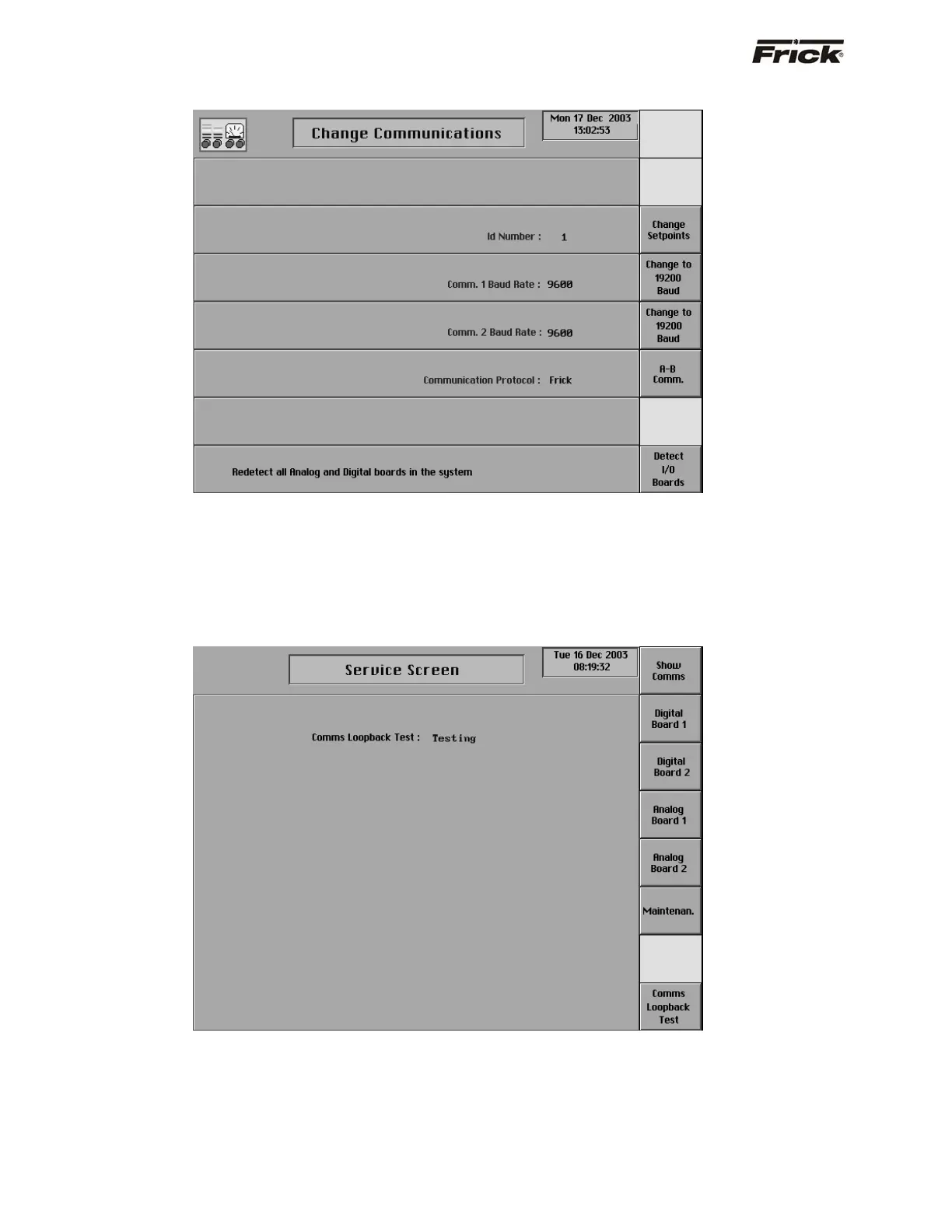
On the Change Communications screen (shown above),
ensure that the settings are as follows:
• ID Number: 0 - 99 (does not matter)
• Comm 1 Baud Rate: (does not matter, but it must
be set the same as Comm 2 Baud Rate)
• Comm 2 Baud Rate: (does not matter, but it must
be set the same as Comm 1 Baud Rate)
Communication Protocol: Frick
®
(must be Frick
®
)
Performing the Communications Loopback test
Upon properly setting up the Change Communications
screen, access the Service Screen. The center of the
screen will initially appear blank. The bottom key on the
right side of this screen is the Comms Loopback Test key.
Pressing the key will initiate the test. The blank center of
the screen will be replaced by one of three word lines:
• Testing - This will appear as the test is running.
NOTE: The test occurs so quickly that It may be
possible that the word Testing will not appear if
the test passes.
• Passed - If the test passes, the word Passed will
appear.
• Failed - If the test does not pass, this will appear.



 To Next Page