EN
FRIGOMAT KREAM 2.5 E M04.37389 R.2022.03.30 12
VI APPENDICE / APPENDIX / SUPPLEMENT / 6tttttttt / ssikisis / sisisisi / ssjjsjsjsj V PROGRAMMING
for the technician
These operations must be carried out only by qualified
personnel authorised by the manufacturer.
1 USER MENU
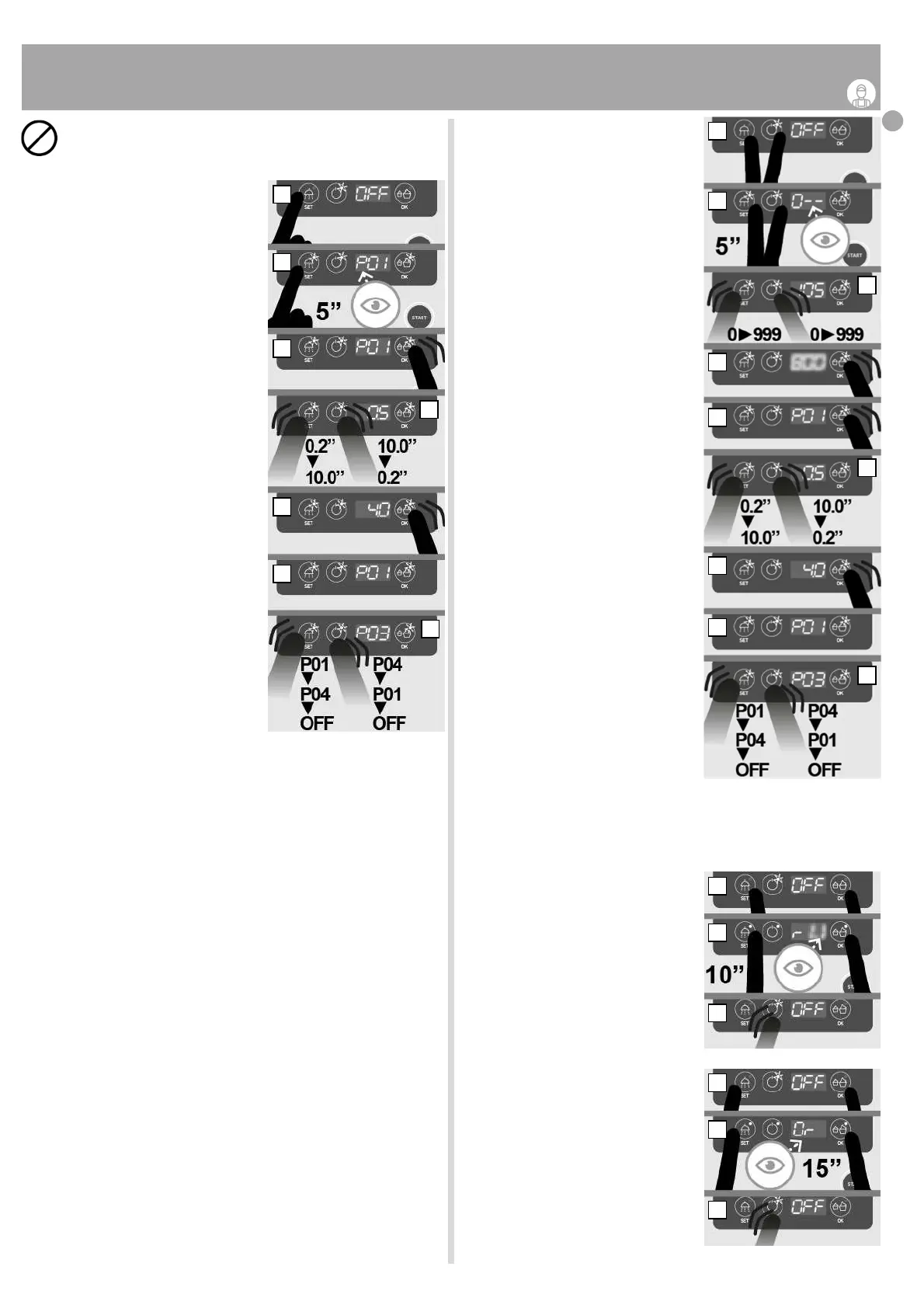
● Check that the machine is OFF. If not, switch
off the machine as indicated in chapter III/3.7.
● Press and hold the WASH/SET button
(fig.V/01-A).
● After 5 ”the display shows the parameter
“P01”, the LEDs of the buttons flash (fig.V/01
-B).
● Release the button (fig.V/01-C).
● If you want to modify the selected parame-
ter, press the DOSE/OK button to enable the
modification (fig.V/01-C).
● press the WASH/SET button to decrease
the set value or the ON-OFF button to in-
crease it (fig.V/01-D). Note: keeping a button
pressed, the displayed value scrolls quickly.
● Press the DOSE/OK button to confirm the
selected value (fig.V/01-E), the display will
return to showing the parameter (fig.V/01-F).
● If you do not want to make any changes to
the displayed parameter, press and release
the ON-OFF button to display the next para-
meter or the WASH/SET button to view the
previous parameter . Note: by pressing the
WASH/SET button with P01 displayed or the
ON-OFF button with P04 displayed, the
machine returns to the initial condition
(display is “OFF”) and saves the changes
made (fig.V/01-G).
Parameter list:
P01: t.1 small dose timed dispensing
(0.2” > 10”). Default = 1”. Step = 0.1”
P02: t.2 large dose timed dispensing
(0.2” > 10”). Default = 2.5”. Step = 0.1”
P03: tank temperature
(0,0 °C > 5°C). Default = 4.0°C. Step = 0.1°C
P04: Disabled
2 SETTINGS MENU
● Check that the machine is OFF. If not, switch
off the machine as indicated in chapter III/3.7.
● Press and hold down the WASH/SET and
ON-OFF buttons at the same time (fig.V/02-A).
● After 5” the display shows“ 0 - - ”request
for password entry (fig.V/02-B).
● Release the buttons (fig.V/02-B).
● Enter the password by pressing the WA-
SH/SET and ON-OFF buttons (fig.V/02-C).
● Confirm by pressing the DOSE / OK button
(fig.V/02-D). Note: If you do not know the password,
contact the Frigomat assistance service.
● The display shows the parameter “P01” (fig.V/02-E).
● If you want to modify the selected para-
meter, press the DOSE/OK button to enable
the modification (fig.V/02-E).
● press the WASH/SET button to decrease
the set value or the ON-OFF button to increa-
se it (fig.V/01-F). Note: keeping a button pres-
sed, the displayed value scrolls quickly.
● Press the DOSE/OK button to confirm the
selected value(fig.V/02-G), the display will
return to showing the parameter (fig.V/02-H).
● If you do not want to make any changes to
the displayed parameter, press and release
the ON-OFF button to display the next para-
meter or the WASH/SET button to view the
previous parameter . Note: by pressing the
WASH/SET button with P01 displayed or
the ON-OFF button with P08 displayed, the
machine returns to the initial condition
(display is “OFF”) and saves the changes
made (fig.V/01-I).
Elenco parametri:
P01: temperature scale
(0 = °F, 1 = °C). Default = 1. Step = 1 °C.
P02: Disabled
P03: Disabled
P04: Disabled
P05: Disabled
P06: Disabled
P07: Disabled
P08: Disabled
3 VISUALIZZAZIONE VERSIONE SOFTWARE
● Check that the machine is OFF. If not, switch
off the machine as indicated in chapter III/3.7.
● Press and hold down the WASH/SET and
DOSE/OK buttons at the same time (fig.V/03-A).
● after 10” the display will show the software
version (fig.V/03-B).
● Release the buttons (fig.V/03-C).
● To return to the "OFF" display, press the
ON-OFF button or wait 10 " (fig.V/03-C).
4 RESTORE DEFAULT SETTINGS
● Check that the machine is OFF. If not, switch
off the machine as indicated in chapter III/3.7.
● Press and hold down the WASH/SET and
DOSE/OK buttons at the same time (fig.V/04-A).
● after 10” the display will show the software
version (fig.V/03-B).
● after another 5” the display shows “Or”,
the machine is reset to the factory parame-
ters (fig.V/03-C).
● Release the buttons (fig.V/04-C).
● To return to the "OFF" display, press the
ON-OFF button or wait 5" (fig.V/03-C).
fig.V/01
A
B
C
D
E
F
G
fig.V/02
A
B
C
D
E
F
G
H
I
fig.V/03
A
B
C
fig.V/04
A
B
C










 To Next Page