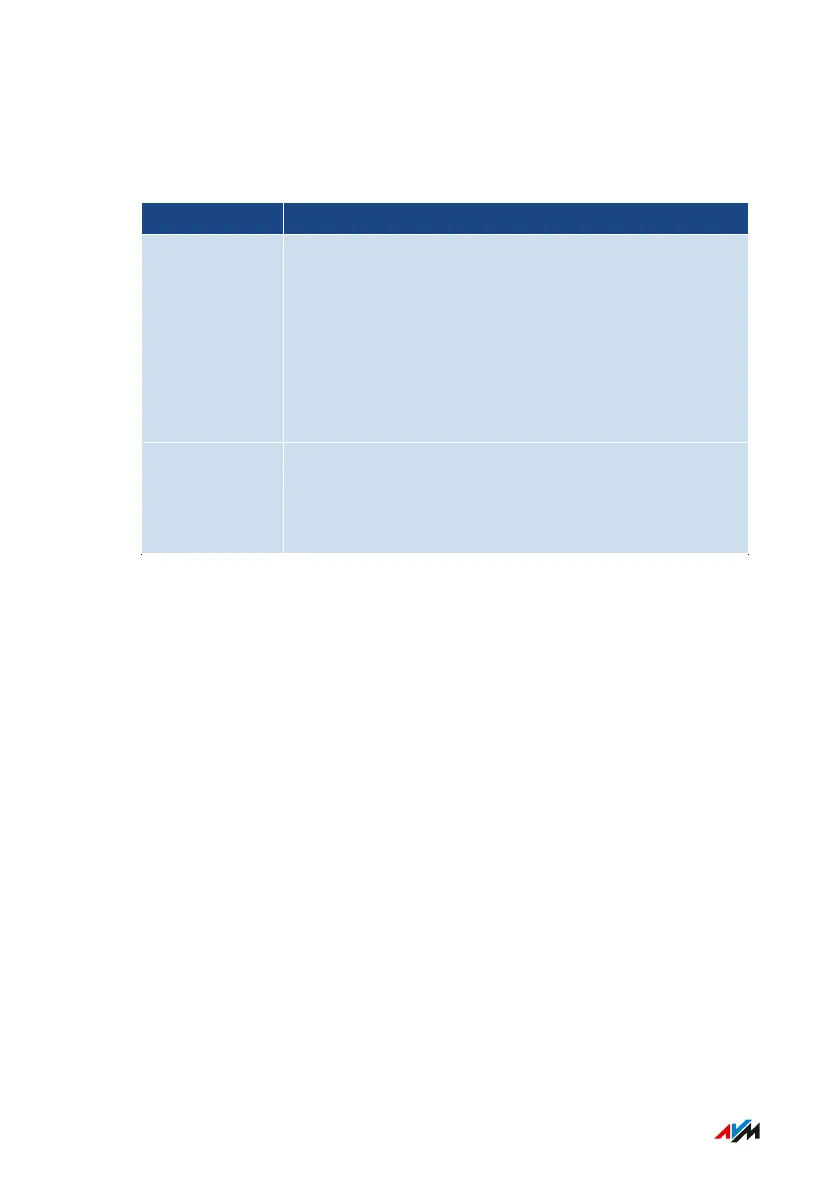
Configuring USB3.0 or 2.0 Mode
In the FRITZ!Box user interface, the following settings for the rear USB
port are located under “Home Network / USB/Storage / USB Settings”:
Setting Function
Power Mode
(USB3.0)
Full transmission capacity
During operation of USB devices, slow data trans-
mission in the 2.4-GHz Wi-Fi network and poor voice
quality on calls with DECT telephones can occur. This
depends on the quality of the USB cable used. To cor-
rect such deficiencies, switch to the 5-GHz Wi-Fi net-
work or set “Green Mode”.
Green Mode
(USB2.0)
During operation of devices with USB3.0
• Reduced power consumption
• Reduced transmission capacity
FRITZ!Box4040 122
User Interface: Home Network Menu
• • • • • • • • • • • • • • • • • • • • • • • • • • • • • • • • • • • • • • • • • • • • • • • • • • • • • • • • • • • • • • • • • • • • • • • • • • • • • • • • • • • • • • • • • • • • • • • • • • • • • • • •
• • • • • • • • • • • • • • • • • • • • • • • • • • • • • • • • • • • • • • • • • • • • • • • • • • • • • • • • • • • • • • • • • • • • • • • • • • • • • • • • • • • • • • • • • • • • • • • • • • • • • • • •



 To Next Page