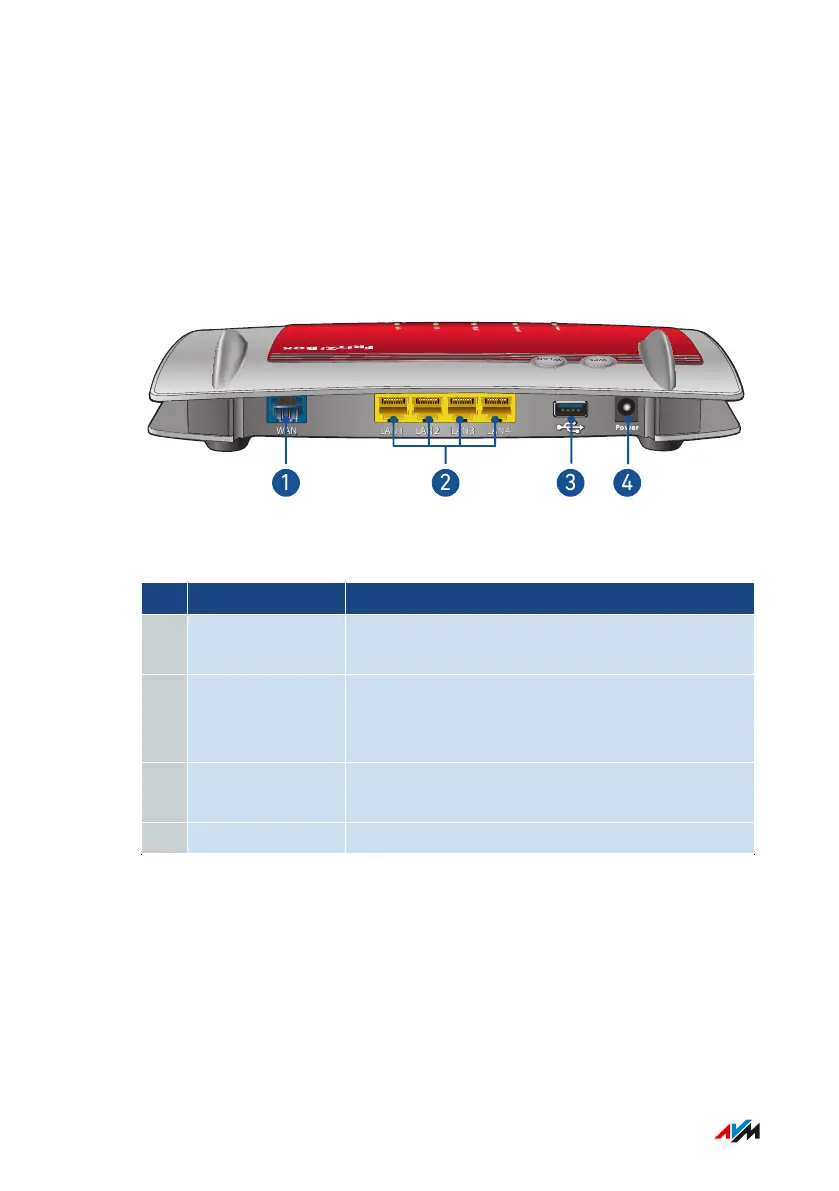
Connection Sockets
Connector Panel
WAN
LAN
1 LAN
2 LAN
3 LAN
4
WLA N
WPS
No. Name Function
1 WAN RJ45 socket for connecting to a modem or a
router for internet access.
2 LAN1 to LAN4 Sockets for connecting computers and oth-
er network-compatible devices like hubs and
game consoles.
3 USB USB3.0 socket for connecting USB devices
like printers or storage media.
4 Power Socket for plugging in the power supply.
FRITZ!Box4040 18
Functions and Structure
• • • • • • • • • • • • • • • • • • • • • • • • • • • • • • • • • • • • • • • • • • • • • • • • • • • • • • • • • • • • • • • • • • • • • • • • • • • • • • • • • • • • • • • • • • • • • • • • • • • • • • • •
• • • • • • • • • • • • • • • • • • • • • • • • • • • • • • • • • • • • • • • • • • • • • • • • • • • • • • • • • • • • • • • • • • • • • • • • • • • • • • • • • • • • • • • • • • • • • • • • • • • • • • • •



 To Next Page