Saving Power with the FRITZ!Box
Overview
The FRITZ!Box offers various settings for energy-saving operation. The
following section describes how you can configure these settings and
what potential energy savings can be expected.
Viewing Information on Energy Consumption
The current power consumption of the total FRITZ!Box system is dis-
played on the “Overview” page of the user interface.
Information on the power consumption of the individual areas, and on
the average power consumption over the last 24hours, is presented in
the FRITZ!Box user interface under “System / Energy Monitor / Power
Consumption”.
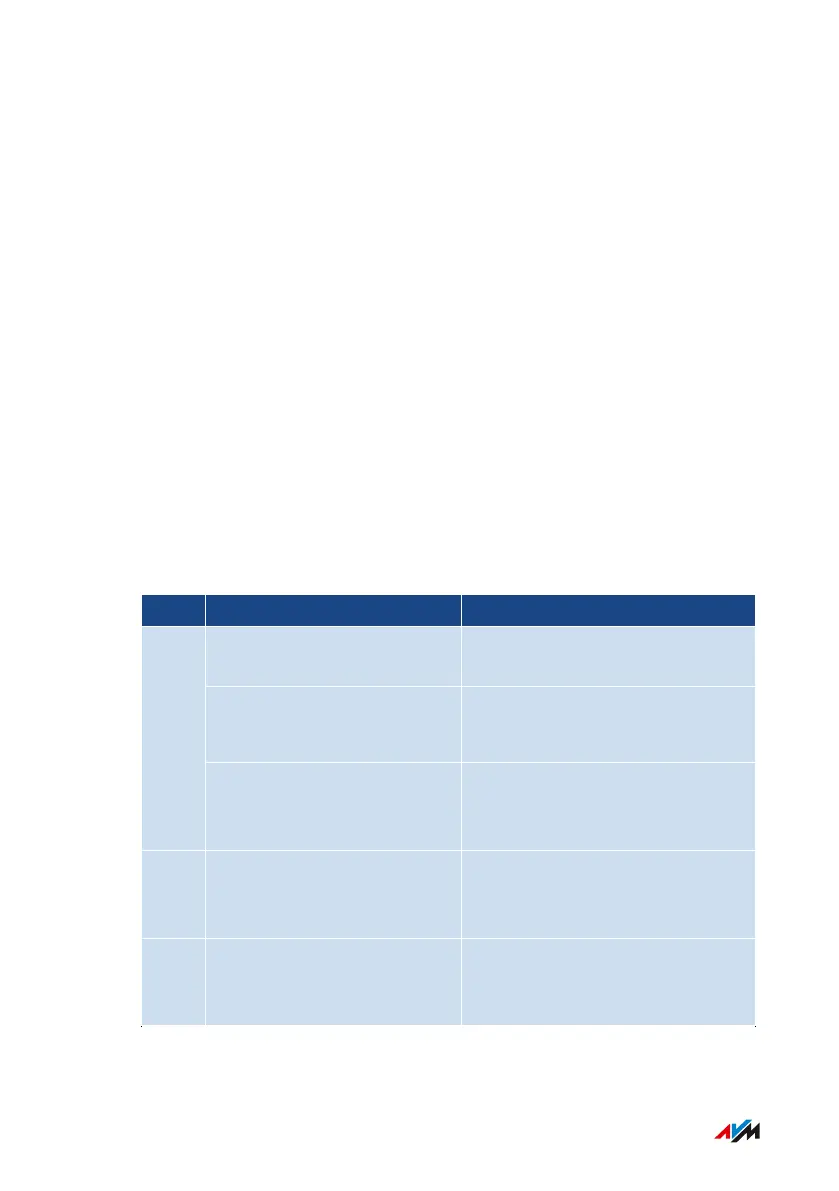
Using Savings Potential
What How to Where
Configure a schedule; see
page127
“Wi-Fi / Schedule” menu
Switch off Wi-Fi; see
page127
• “WLAN” button
• “Wi-Fi / Wi-Fi Network” menu
Wi-Fi
Reduce the maximum trans-
mitter power
“Wi-Fi / Wi-Fi Channel / Wi-Fi
Channel Settings / Additional
settings” menu
LAN Use the LAN port in ener-
gy-saving (green) mode
“Home Network / Network / Net-
work Settings / LAN Settings”
menu
USB Use the USB port in ener-
gy-saving (Green) mode; see
page122
“Home Network / USB/Storage /
USB Settings” menu
FRITZ!Box4040 64
Configuring
• • • • • • • • • • • • • • • • • • • • • • • • • • • • • • • • • • • • • • • • • • • • • • • • • • • • • • • • • • • • • • • • • • • • • • • • • • • • • • • • • • • • • • • • • • • • • • • • • • • • • • • •
• • • • • • • • • • • • • • • • • • • • • • • • • • • • • • • • • • • • • • • • • • • • • • • • • • • • • • • • • • • • • • • • • • • • • • • • • • • • • • • • • • • • • • • • • • • • • • • • • • • • • • • •



 To Next Page