Connecting with the Internet: Via Modem or Router
Overview
The FRITZ!Box is connected with the internet access via the “WAN”
socket. For this you need a network cable and an access device appro-
priate for the connection type.
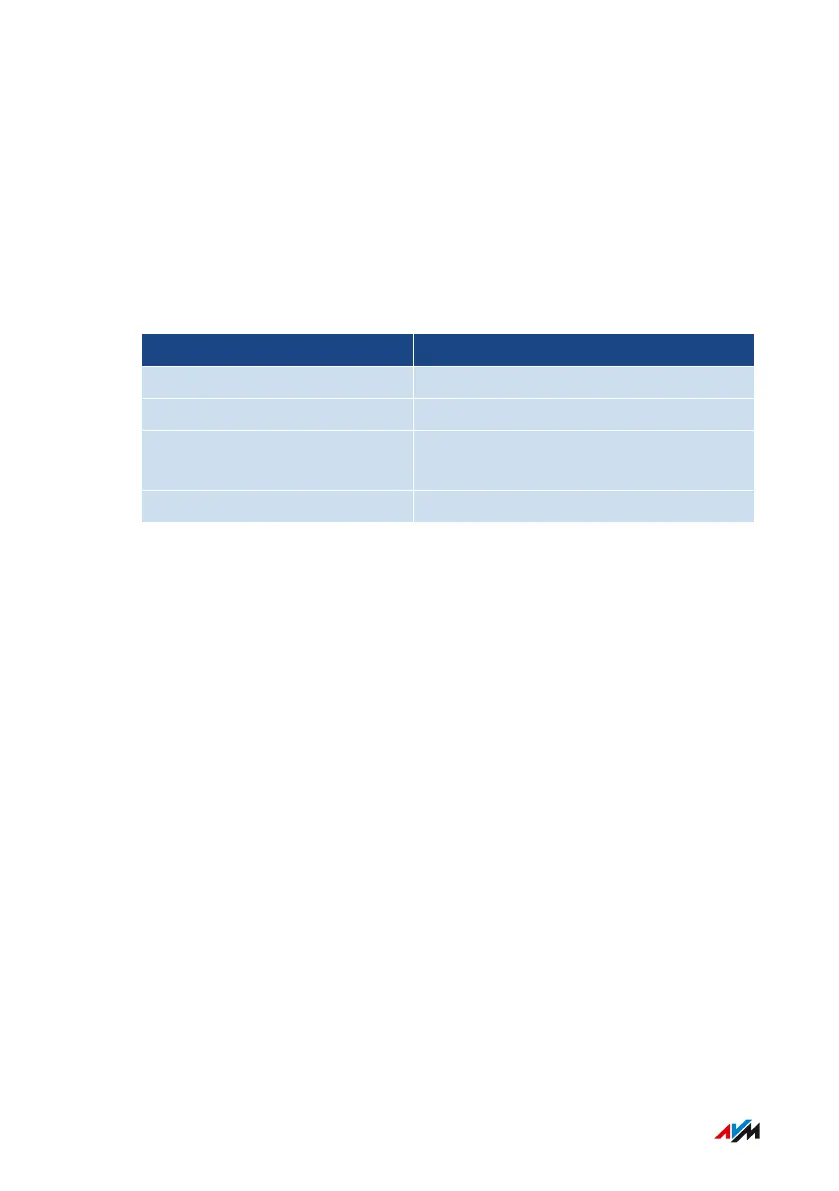
The following connection types are possible:
Type of connection Access Device for the Connection Type
DSL or VDSL line DSL or VDSL modem
Cable connection Cable modem
Fiber optic connection Fiber optic modem (FTTH ONT/media
converter)
Any internet connection Internet router
FRITZ!Box4040 30
Connecting
• • • • • • • • • • • • • • • • • • • • • • • • • • • • • • • • • • • • • • • • • • • • • • • • • • • • • • • • • • • • • • • • • • • • • • • • • • • • • • • • • • • • • • • • • • • • • • • • • • • • • • • •
• • • • • • • • • • • • • • • • • • • • • • • • • • • • • • • • • • • • • • • • • • • • • • • • • • • • • • • • • • • • • • • • • • • • • • • • • • • • • • • • • • • • • • • • • • • • • • • • • • • • • • • •



 To Next Page