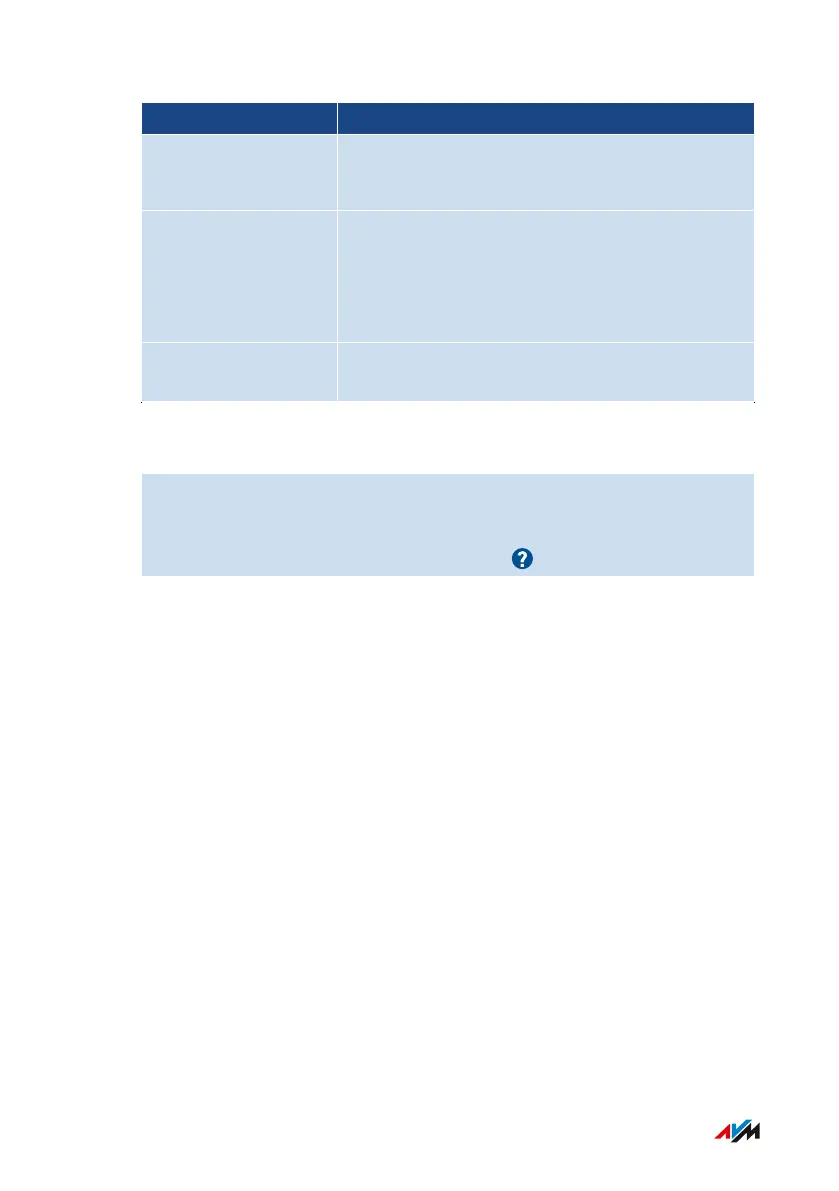
Area Checkpoint/Status
MyFRITZ! • status of MyFRITZ! activation
• MyFRITZ! account email address
Home network • number of network devices connected with
the FRITZ!Box at present or at an earlier
point in time
• number of network devices online
Wi-Fi environment Wi-Fi frequency band with number of Wi-Fi
networks on the same or an adjacent channel
Instructions: Starting Function Diagnostics
1. Open the user interface; see page46.
2. Select “Diagnostics / Function”.
3. For instructions, open the online help .
FRITZ!Box4040 136
User Interface: Diagnostics Menu
• • • • • • • • • • • • • • • • • • • • • • • • • • • • • • • • • • • • • • • • • • • • • • • • • • • • • • • • • • • • • • • • • • • • • • • • • • • • • • • • • • • • • • • • • • • • • • • • • • • • • • • •
• • • • • • • • • • • • • • • • • • • • • • • • • • • • • • • • • • • • • • • • • • • • • • • • • • • • • • • • • • • • • • • • • • • • • • • • • • • • • • • • • • • • • • • • • • • • • • • • • • • • • • • •



 To Next Page