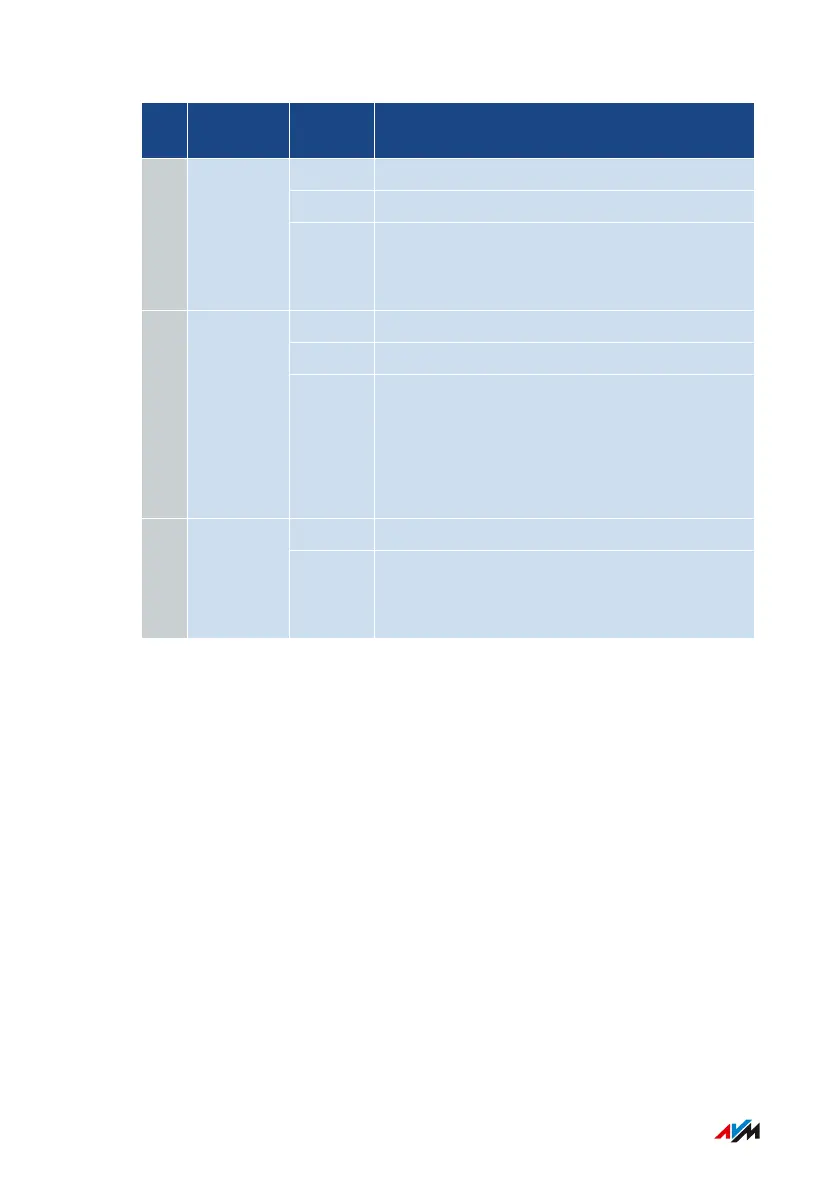
No. LED Condi-
tion
Meaning
off Not connected to the internet.
on An internet connection is active.
2 Internet
flashing There is an active connection to a modem
or router, but the internet connection is not
enabled or is being established now.
off Wi-Fi is disabled.
on Wi-Fi is enabled.
3 WLAN
flashing • Switching Wi-Fi function on or off.
• Applying changes to the Wi-Fi settings.
• WPS in progress: Registration of a wire-
less device in progress.
off There is no connection via LAN.4 LAN
on Network connection is active to at least
one connected device (network adapter or
hub/switch).
FRITZ!Box4040 22
Functions and Structure
• • • • • • • • • • • • • • • • • • • • • • • • • • • • • • • • • • • • • • • • • • • • • • • • • • • • • • • • • • • • • • • • • • • • • • • • • • • • • • • • • • • • • • • • • • • • • • • • • • • • • • • •
• • • • • • • • • • • • • • • • • • • • • • • • • • • • • • • • • • • • • • • • • • • • • • • • • • • • • • • • • • • • • • • • • • • • • • • • • • • • • • • • • • • • • • • • • • • • • • • • • • • • • • • •



 To Next Page