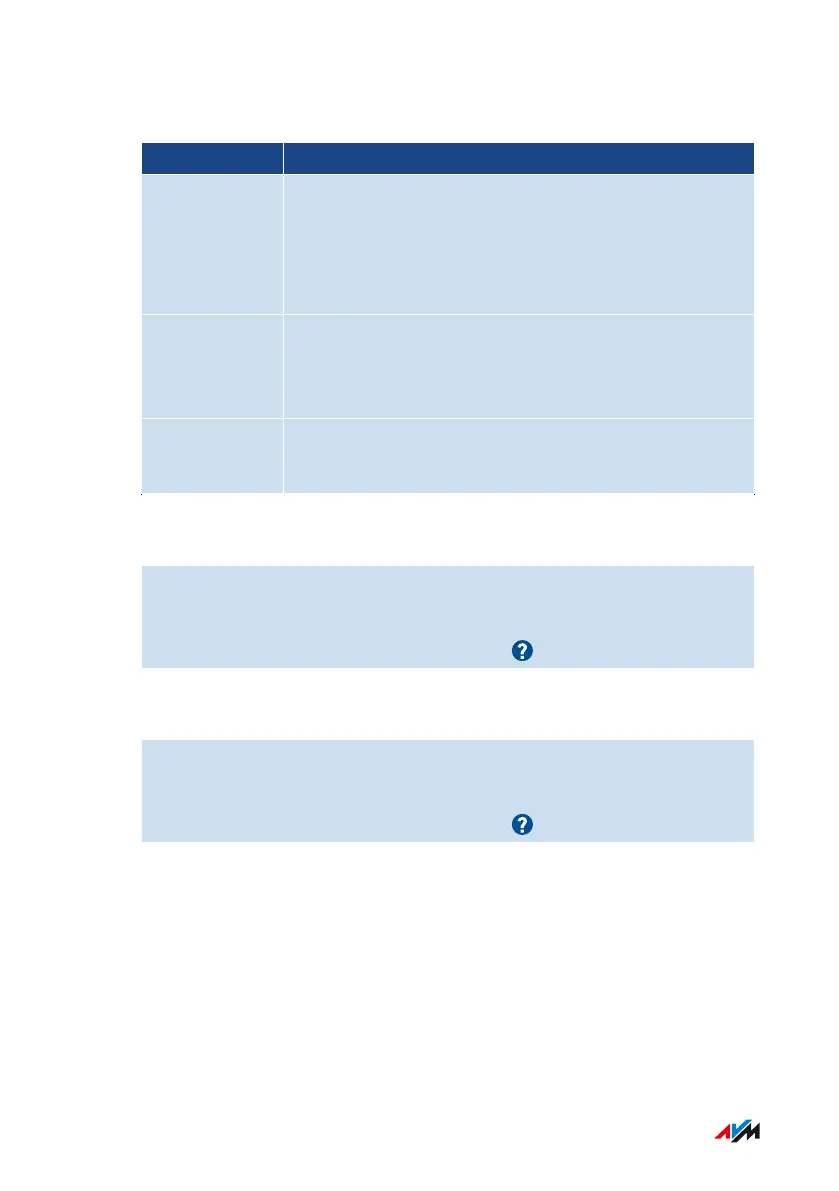
Preconfigured Access Profiles
Name Properties
Standard • Set by default to unrestricted use
• Automatic access profile for network devices reg-
istering with the home network for the first time
• Can be changed
Guest • Automatic, exclusive access profile for network
devices registering with the guest network
• Can be changed
Unrestricted • Unrestricted internet use
• Cannot be changed
Instructions: Creating an Access Profile
1. Open the user interface; see page46.
2. Select “Internet / Filters / Access Profiles”.
3. For instructions, open the online help .
Instructions: Assigning an Access Profile
1. Open the user interface; see page46.
2. Select “Internet / Filters / Parental Controls”.
3. For instructions, open the online help .
FRITZ!Box4040 78
User Interface: Internet Menu
• • • • • • • • • • • • • • • • • • • • • • • • • • • • • • • • • • • • • • • • • • • • • • • • • • • • • • • • • • • • • • • • • • • • • • • • • • • • • • • • • • • • • • • • • • • • • • • • • • • • • • • •
• • • • • • • • • • • • • • • • • • • • • • • • • • • • • • • • • • • • • • • • • • • • • • • • • • • • • • • • • • • • • • • • • • • • • • • • • • • • • • • • • • • • • • • • • • • • • • • • • • • • • • • •



 To Next Page