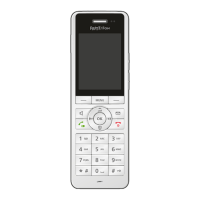
FRITZ!Fon C5 17
Opening New Messages
FRITZ!Fon MT-D 17
Opening the Menu
Press the Menu key .
The main menu appears on the display.
Selecting a Menu Item
A menu item performs an action or opens a sub-menu.
1. Press the up and down navigation keys to navigate up and
down in the menu.
2. Press the OK key to select a menu item.
You can return to the previous menu by pressing the left Select
key .
3.3 Opening New Messages
If new messages are available, an audio signal sounds, the notifica-
tion key flashes, and the “New Messages” icon appears
in the display. Messages are:
• Missed calls
• Notifications about firmware updates
• Messages on the answering machine
• e-mail, podcasts and RSS feeds
Here is how to open new messages:
1. Press the message key .
2. If different messages are available, select the kind of message
(for instance calls, e-mail). Press the OK key .



 To Next Page
 Loading...