Real-Ear Measurements 161
4. Press [LEVEL] to level the sound field speaker.
5. Use [F2] to select REUG 1. (Press [F2] to open the pop-up selection menu.
Use [∨, ∧] to select REUG 1. Press [>] to complete the selection and close
the menu.)
6. Use [F5] to set the source type to DIG SPEECH.
7. Use [∨, ∧] to set the source amplitude to 50 dB SPL.
8. Press [START] to start the frequency response measurement. When the mea
-
surement has stabilized, press [STOP]. This is the “reverse” measurement
curve.
9 Use [F2] to select REAG 2.
10. Use [F5] to set the source type to DIG SPEECH.
11. Use [∨, ∧] to set the source amplitude to 50 dB SPL.
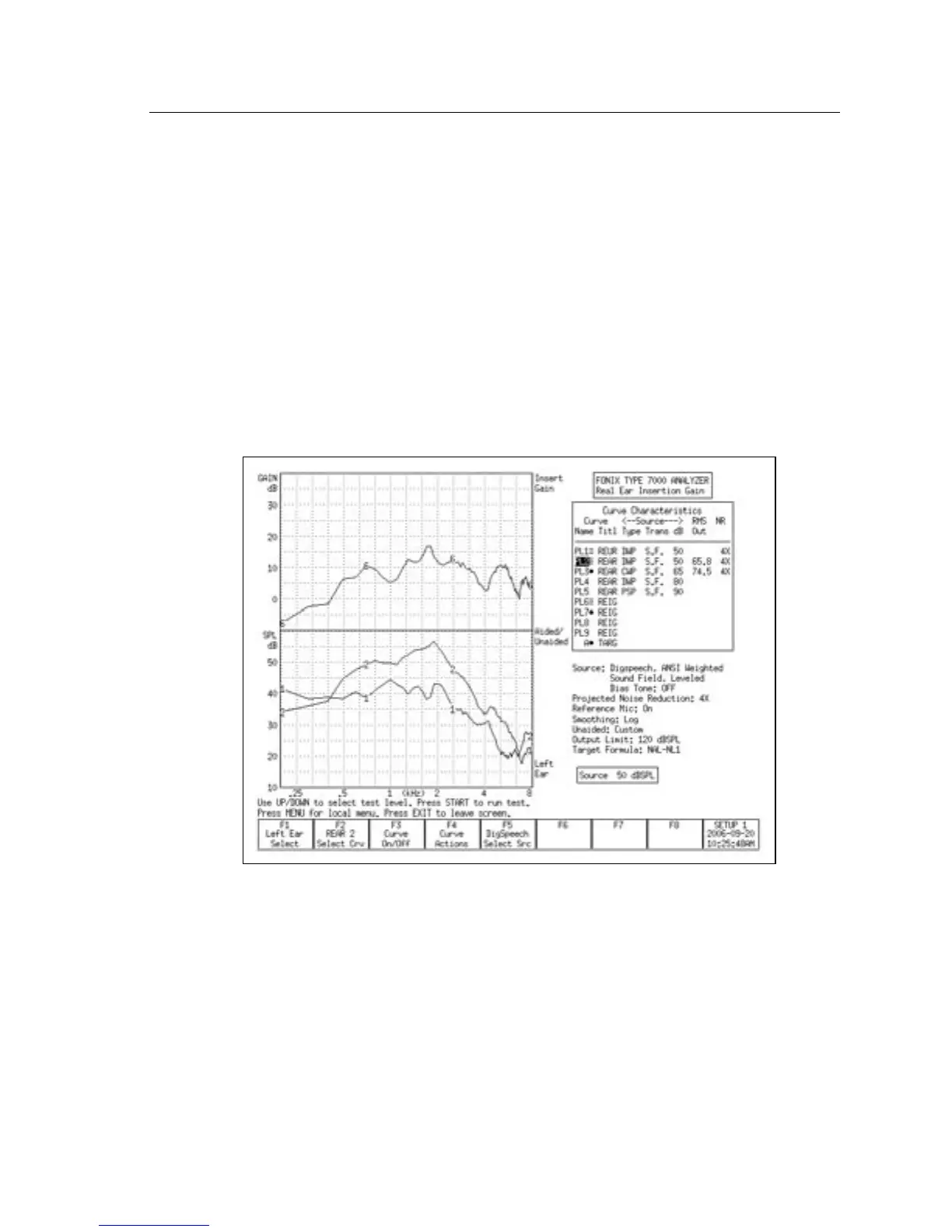
Figure 6.6.1—Testing directionality. REUR 1 was tested with the source at 135° azimuth. REAR
2 was tested with the source at 45° azimuth. Curve 6 illustrates the directional advantage of the
hearing aid.
12. Reposition the patient so that the sound field speaker is placed at 0° or 45°
azimuth. The reference microphone should be repositioned so that it is fac
-
ing towards the sound field speaker.
13 Press [LEVEL] to re-level the sound field speaker. This will temporarily clear
(but not erase) the reverse measurement.



 To Next Page