1-1
CHAPTER 1: FILTERQUICK™ CONTROLLER INSTRUCTIONS
1.1 Using the FilterQuick
™
Controller
ON/OFF
Press ON/OFF button. Fryer begins melt cycle to slowly heat solid shortening to programmed temperature before switching to full
temperature and heating to setpoint or idle temperature and displays: READY.
Exit melt cycle, when using liquid oil, by pressing and releasing the Exit Cool button or any programmed product button. Displays Exit
Melt? on left and YES NO on the right. Press (YES) arrow to exit.
Cooking
COOL displayed: Press product button or Exit Cool; fryer heats to setpoint and displays READY.
READY displayed: Press product button and drop product.
----- displayed: The vat temperature is out of the Ready zone.
DONE displayed: Press blinking product button to cancel alarm and end a cook.
HOLD displayed: Press blinking product button to cancel hold alarm.
Cancel a Cook: Press and hold blinking product button to cancel cook cycle.
Change Cook Temperature: Press and hold a product button with the desired different cooking temperature for 3 seconds. An audible will
confirm that the temperature has changed. Press the product button again to start a cook at the new temperature.
NOTE: When a product button with a setpoint different than a currently cooking product is pressed, a low tone is heard indicating the new
cook won’t start until the cook is finished and the cook temperature is changed.
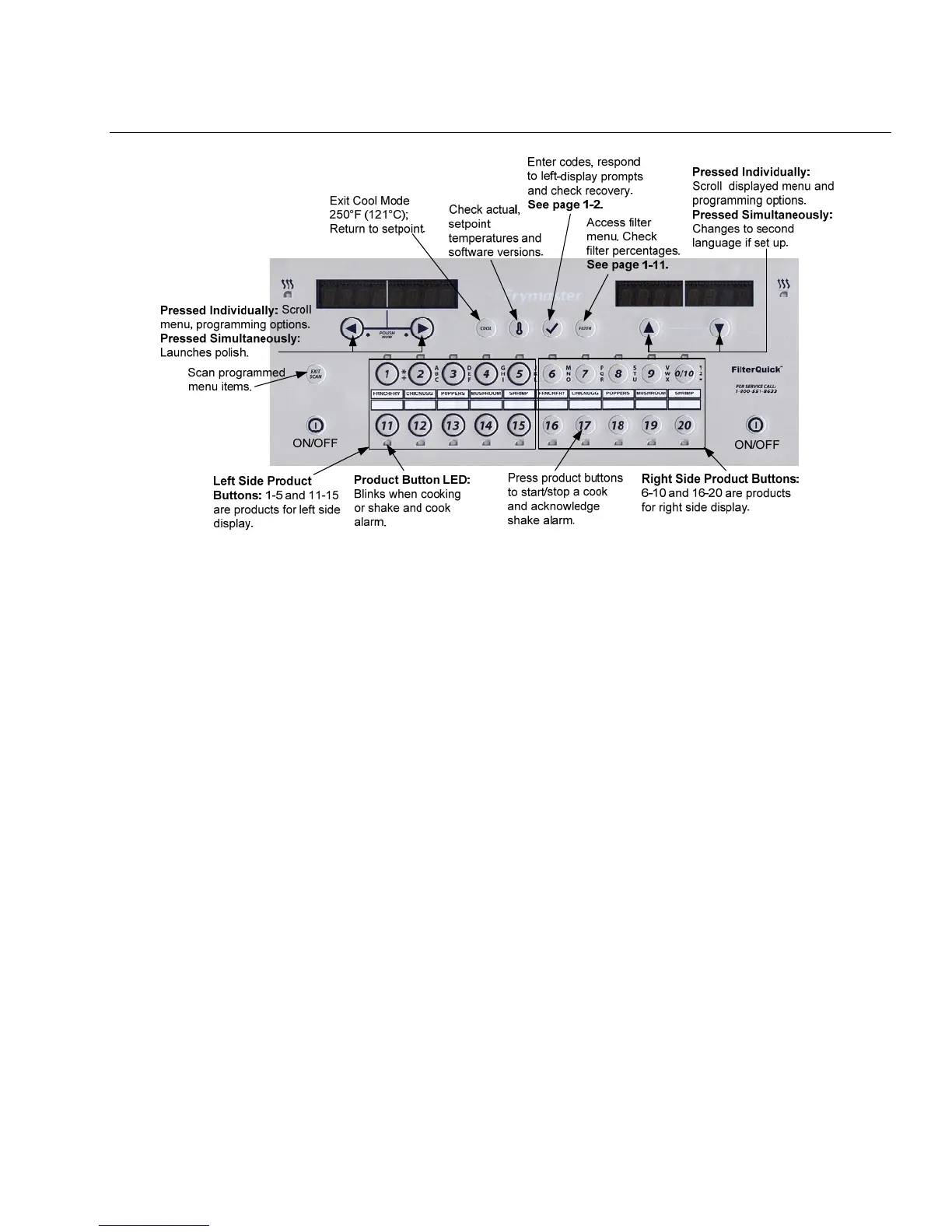
Controller Button Navigation
Product: Press to start a cook cycle. Active when adjacent LED is lit. LED flashes during a cook cycle. Press and hold to cancel a
cook cycle. Press at end of cook cycle to cancel an alarm. Press and hold a product with different setpoint to change setpoint
temperature.
Exit/ Scan: Press once; all product buttons are lit. Select Product displayed. Press product button to view product name. Press to
advance through all product parameters. Press Exit Scan again to repeat. Press Exit Scan twice to escape.
Left/Right Arrows: Navigate options in left display. Press both simultaneously to start a polish cycle.
Up/Down Arrows: Navigate options in right display. Press both simultaneously to change to a second language if one is selected in
setup.
Exit Cool: Exits cool mode, returns fryer to setpoint temperature.
Thermometer: Fryer ON: Press and release for setpoint in left display and vat temperature in right display.
Thermometer: Fryer OFF: Press to display temperature, time, date, system version, controller and circuit board software versions.
Thermometer: Fryer OFF: Press and hold. Will display AIF/ATO Temp
Checkmark: Fryer OFF: Press to check recovery; Press and hold 3 seconds: Scroll filter usage; Press and hold 10 seconds: Product
setup.
Checkmark: Fryer ON: Press to check recovery; Enter Codes and Respond to left display prompts.
Filter: Press and release: Displays total percentage of products cooked and cooks remaining to filter cycle. Press and hold: Filter
options: Filter, Clean and Filter, OQS, Dispose, Drain to Pan, Fill from Pan, Hot or Cold Clean, Fill Vat from Bulk (Bulk only) and Pan
to Waste
Bulk onl
.



 To Next Page